60-second home Wi-Fi check
Ryan’s Favorite Wi-Fi Checker
Before school starts, run the same speed test in three places around your house. Don’t worry too much about the exact number — pay attention to how much the result changes from one place to another.
1. Near your router.
2. Where the kids do homework.
3. In the room or area where your Wi-Fi usually gives you trouble.
When you’re done, text Ryan the three results and where you took them at (973) 945-5275. He’ll tell you what he would look at first.
The immediate answer
Summer Did Not Fix Your Wi-Fi. It Just Made the Problem Easier to Ignore.
When school and normal work schedules return, your home network has to support more simultaneous activity in more rooms. If your Wi-Fi already has weak coverage, poorly placed equipment, wireless-only mesh links or an inadequate network backbone, back-to-school use can make those weaknesses obvious. The real fix is not automatically a faster internet plan. It is a Wi-Fi system designed around your house, your wiring and the way your family actually uses technology.
Why it suddenly feels worse
Everybody Needs the Network at the Same Time Again
During summer, schedules are loose. Kids are outside, families travel, and a bad connection can feel like a small annoyance. Back to school changes the stakes because the network becomes part of homework, work and everyday family life.
The common mistake
“I’ll Just Pay for Faster Internet or Add Another Extender.”
Internet speed and Wi-Fi coverage are related, but they are not the same thing. Your provider can deliver plenty of speed to the modem while certain rooms still have weak or unreliable wireless coverage.
What often happens
Modem / router → walls → distance → weak room
Adding speed at the modem does not move the wireless signal closer to the bedroom, office, family room or other problem area.
What a proper design does
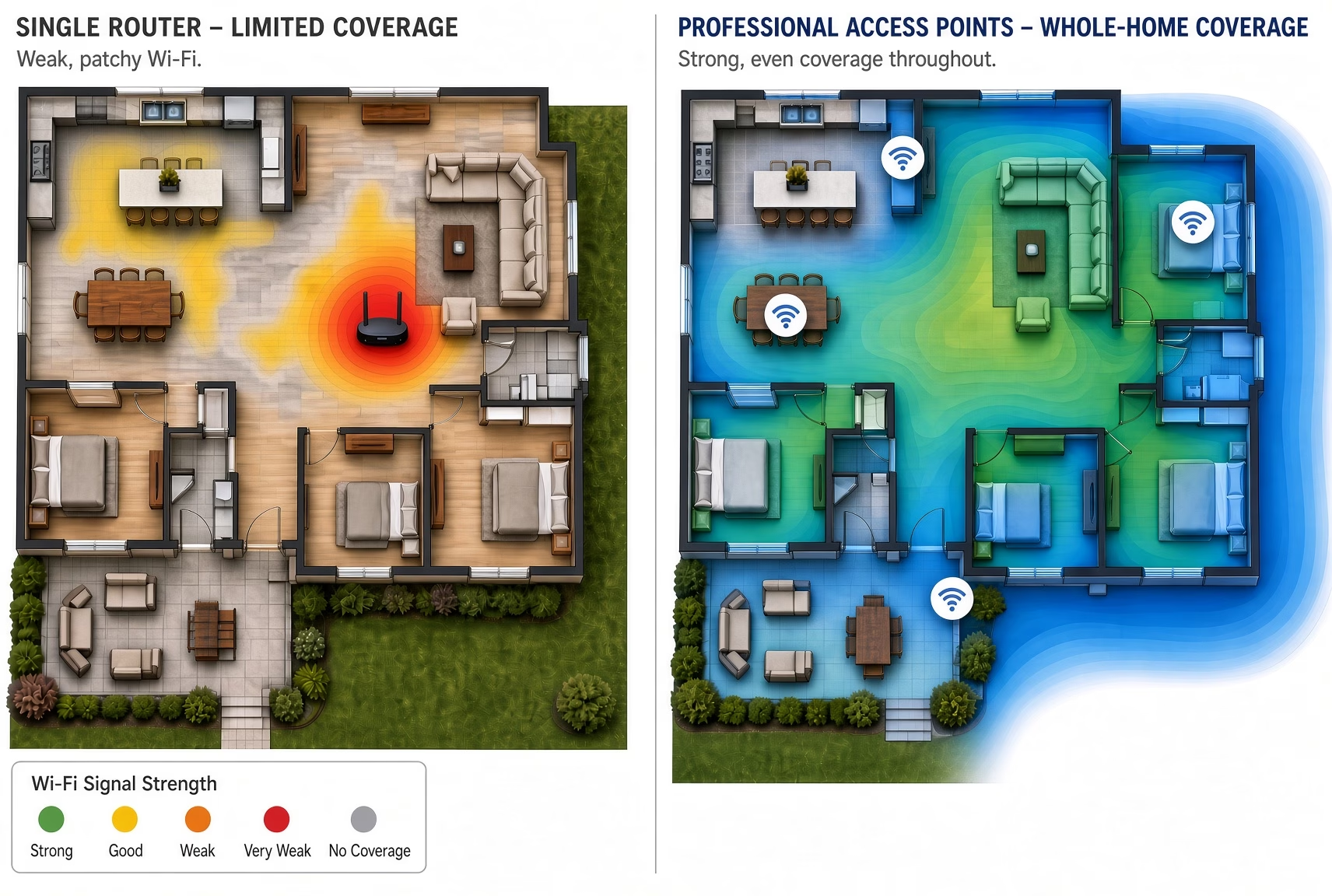
Home network → wired backbone → properly placed access point → strong coverage
Instead of asking one box to do everything, Wi-Fi is placed where your family actually needs it and tied into a stable network.
Ryan’s recommendation
Design the Wi-Fi Around the House — Not Around the Router
The right solution depends on the size and construction of the home, the location of the modem and router, existing wiring, where the dead zones are, and what your family is trying to do in those rooms.
In many larger single-family homes, a professionally designed network uses hardwired access points placed throughout the house so each important area gets dependable coverage instead of relying on one router or a chain of wireless repeaters.
One home at a time
What Ryan Looks at Before Recommending Anything
Find the network
Locate the modem, router, switches, existing access points and available wiring.
Understand the house
Review home size, layout, age, construction materials and the rooms where coverage struggles.
Understand the family
Identify where school, work, streaming, gaming, cameras, Sonos and smart-home devices are actually used.
Design the fix
Recommend the right wiring, access-point locations, network equipment and configuration for the home.
The real goal
Wi-Fi Should Be Something Your Family Stops Thinking About
School just works
Homework, research, school portals and video sessions do not become another source of family frustration.
Work stays stable
Calls, VPN connections and cloud applications stay dependable even when the rest of the house is online.
Entertainment keeps moving
Streaming, gaming and connected AV work in the rooms where your family actually wants to use them.
Sonos stays connected
Music control is easier when phones, controllers and network-connected audio stay on a dependable network.
Connected devices stay online
Cameras, doorbells and smart-home equipment depend on a stable network foundation.
Less family chaos
The technology fades into the background so the family can focus on school, work and enjoying the home.
Meet the person behind the recommendation

Ryan Herd — Making Home Technology Feel Simple for More Than 30 Years
Ryan is the founder of One Sound Choice and has spent more than three decades helping New Jersey homeowners understand what their homes actually need instead of simply selling them another box.
He is a former Mayor of Pequannock Township, a TEDx speaker and an author. His experience includes thousands of home-technology installations throughout New Jersey.
With Wi-Fi, that means looking at the whole house, explaining why the current network falls short, and recommending the right solution for the home and family.
What homeowners say
Clear Recommendations. Clean Work. Technology That Works.
These are general One Sound Choice client experiences and are not presented as back-to-school Wi-Fi testimonials.
Local home Wi-Fi expertise
Serving Single-Family Homeowners Throughout Northern New Jersey
One Sound Choice evaluates and designs home networks for established single-family homes where size, construction, finished spaces and family usage make Wi-Fi design more important than simply buying another router.
Morris County
Pequannock, Kinnelon, Mountain Lakes, Chatham, Madison, Mendham, Harding, Florham Park and nearby communities.
Bergen County
Franklin Lakes, Ridgewood, Saddle River, Upper Saddle River, Ho-Ho-Kus, Tenafly, Alpine and surrounding towns.
Essex & Passaic
Montclair, Livingston, Short Hills, Wayne, Pompton Plains and select surrounding communities.
Somerset & Hunterdon
Professional Wi-Fi design for larger homes and properties where layout, construction and distance make coverage more challenging.
Straight answers from Ryan
Back-to-School Wi-Fi — Common Homeowner Questions
Why does my Wi-Fi seem worse when everyone is home?
When the household returns to a normal school and work schedule, more devices are being used at the same time and weak areas become harder to ignore. Dead zones, poor access-point placement, older equipment and weak network design can show up as buffering, dropped calls and unreliable connections.
Will paying for faster internet fix bad Wi-Fi in my house?
Not necessarily. Internet speed is the service delivered to your home. Wi-Fi coverage is how that connection reaches devices throughout the house. A faster plan does not automatically fix dead zones or poor wireless coverage.
Will a Wi-Fi extender fix dead zones?
Sometimes, but an extender can only work with the signal it receives. If it is repeating a weak or unstable connection, the result may still be inconsistent. Larger homes often benefit from properly located access points connected back to the home network.
My house already has mesh Wi-Fi. Why do I still have dead zones?
Mesh Wi-Fi can work well, but performance depends on where the nodes are placed, the quality of the connection between them, the construction of the house and the overall network configuration. A wired connection to strategically placed access points can provide more consistent performance in many larger homes.
What does One Sound Choice look at during a Wi-Fi evaluation?
Ryan looks at the modem and router location, existing networking equipment, house size and construction, wiring options, problem rooms, access-point placement and how the family uses Wi-Fi for school, work, streaming, gaming, cameras and smart-home devices.
Can you improve Wi-Fi in an existing finished home?
Yes. One Sound Choice works in existing Northern New Jersey homes and evaluates practical retrofit options for wiring, equipment placement and access points while minimizing disruption to finished spaces.
How do we get started?
Call or text Ryan at (973) 945-5275 and tell him which room or area is giving you trouble. He will explain where he would start and whether an in-home Wi-Fi evaluation makes sense.
The next step
Fix the Wi-Fi Before the Back-to-School Chaos Starts
Tell Ryan where the Wi-Fi struggles, what your family is trying to do there, and what equipment you already have. You will get a clear explanation of the problem and the right next step — not another random box.
(973) 945-5275Email: Ryan@onesoundchoice.com
Learn more about home networking and Wi-Fi or visit One Sound Choice.