
Smart home technology can simplify family life, but choosing the right systems is key. From improving home security to ensuring smooth internet for work, school, and entertainment, the focus should be on solving real problems without adding complexity. Here’s what matters most:
- Reliable Networks: With 20-30 devices connected in most homes, professional-grade networks ensure stable connections and security. Features like VLANs isolate risky devices and protect sensitive data.
- Integrated Security: Systems combining cameras, locks, and lighting in one interface offer convenience and peace of mind. Costs range from $3,000 to $7,000 for mid-level setups.
- Simplified Control: Platforms like Control4 or Savant unify devices, letting you manage your home with a single app or voice command. Scene-based automation, like “Goodnight,” saves time and frustration.
- Family Entertainment: Multi-room audio and home theaters transform entertainment spaces. Professional setups ensure high-quality sound, seamless control, and long-lasting hardware.
- Parental Controls: Network-level tools make it easy to manage kids’ internet access and screen time without separate apps.
Professional installation eliminates DIY headaches, offering reliable systems tailored to your home’s design and needs. Focus on technology that fits your daily routines and delivers long-term value.
Security and Network Infrastructure: The Foundation
Professional-Grade Home Networks
Your home network is the lifeline for all connected devices, from video calls and online learning to gaming and security systems. The typical smart home today includes 20 to 30 connected devices, all vying for bandwidth at the same time [9]. With so many devices running simultaneously, consumer-grade routers often fall short.
Professional-grade networks break down the system into separate components – routers, switches, and wireless access points – designed to work together. This setup eliminates dead zones and ensures a stable connection throughout your home, even in larger, multi-story properties often found in Northern New Jersey. Switching from a standard ISP-provided router to a prosumer-grade system can boost Wi-Fi speeds by as much as 724% in areas that previously had weak signals [8]. For instance, in August 2024, Tom Welsh of The AIAA Consultants Ltd upgraded to a Synology RT6600ax system with network segmentation across five zones. This upgrade removed the need for powerline adapters and blocked suspicious port scans [8].
"The enterprise-grade network in your home should be virtually invisible. That is, you should be able to turn on any device, at any time, and simply have it work." – Nathan Holmes, Director of Operations, WhyReboot [7]
One key feature of professional networks is segmentation through VLANs. This isolates potentially risky IoT devices, such as budget-friendly cameras or smart refrigerators, from sensitive devices like work computers. This added layer of security ensures that while all devices remain functional, your private data stays protected. Additionally, enterprise-grade hardware is built to last between 10 and 30 years without failure [7], making it a solid investment for families planning to stay in their homes for the long term. Beyond day-to-day convenience, a strong home network also ensures that your security systems function reliably when you need them most.
Home Security Systems with Camera Integration
A stable network lays the groundwork for an integrated home security system, which combines cameras, doorbells, locks, and smart lighting into a single, user-friendly interface. These systems allow you to monitor your home effortlessly, offering real-time alerts for door activity or arrivals.
Professional installation ensures that your security cameras stay online, even during high-bandwidth activities. Using enterprise-grade networking alongside tools like WattBox for remote power management, these setups defend against Wi-Fi jammers and maintain consistent operation. Automated scenes such as "Goodnight" or "Away" can lock all doors, adjust lighting to mimic occupancy, lower shades, and activate exterior cameras with just one tap [4]. These features are designed to integrate seamlessly into everyday family routines.
"A well-designed smart home security system should feel simple. We use clear scenes like ‘Goodnight,’ ‘Away,’ or ‘Welcome Home’ so your family can lock doors, adjust lights, and arm security with a single tap." – Ryan Herd, Owner, One Sound Choice [4]
The cost of a mid-level smart home setup, including security, lighting zones, and HVAC control, typically ranges from $3,000 to $7,000 [6]. Monthly fees for monitoring or cloud storage add another $10 to $50 [6]. Professional installation ensures that everything is code-compliant and reliable, especially for complex integrations involving your electrical panel or HVAC system [6]. These solutions meet the demands of modern homes in Northern New Jersey, offering protection without making your house feel like a fortress. Equipment remains discreetly stored in secure racks, while the interface stays simple and intuitive for everyday use.
sbb-itb-c5b321b
Making Automation Simple and Practical
Single-Interface Control Systems
One of the biggest hurdles in smart home adoption is managing the sheer number of devices. Many families find themselves switching between multiple remotes or apps just to control basic functions like lights, locks, or music. This "remote control chaos" can make automation feel more like a hassle than a convenience, often leaving expensive systems underutilized.
Platforms like Control4, Crestron, and Savant tackle this issue by bringing everything together under a single interface. Whether it’s a touch panel, smartphone, or voice command, these systems allow you to control all your devices seamlessly. The standout feature is scene-based automation, which enables users to execute multiple actions with a single command. For instance, tapping "Goodnight" could lock all doors, dim the lights, lower the shades, adjust the thermostat, and activate exterior cameras – all at once [3][5].
"A smart home system is easiest to use when it is designed around real routines." – Ryan Herd, CEO, One Sound Choice [3]
Consider the story of a healthcare executive in Bergen County who revamped their basement theater in September 2025. The family had stopped using the space because the setup was too complicated. After installing a unified Control4 system with Triad speakers, their 8-year-old daughter could initiate "Movie Time" with a simple voice command. This single action dimmed the lights, loaded Disney+, and activated calibrated audio. What was once an unused space became a weekend favorite, freeing the parents from acting as tech support [11].
While professional systems like these require a larger upfront investment compared to consumer gadgets, they simplify life in the long run. By consolidating control, families can avoid paying for multiple app subscriptions and reduce daily frustrations. Choosing open platforms is crucial, as they allow for easy integration of new devices as technology advances, without needing a full system overhaul [10].
Beyond simplifying device management, professional systems also enhance online safety for families.
Network-Level Parental Controls
Automation doesn’t just streamline daily routines – it can also make managing your children’s online safety more straightforward. Instead of installing separate software on each device or constantly monitoring browser histories, professional home automation systems offer network-level controls that simplify the process.
These controls operate through your home’s network infrastructure, enabling you to manage internet access and content filtering from a central interface. You can set schedules, filter specific content categories, and determine which devices can connect – all without needing advanced technical skills. Protections are applied across all devices, whether your child is using a laptop, tablet, or gaming console. Customizable profiles allow parents to tailor restrictions based on each child’s age and maturity.
Additionally, professional-grade networks provide an extra layer of security by isolating children’s devices from sensitive ones, such as work computers or financial systems. This keeps your home network functional and secure. Adjustments can be made in real time, such as extending internet access for homework or temporarily blocking social media during dinner, all without the need for outside help.
These parental controls are often seamlessly integrated into platforms like Control4, alongside lighting and security management [1]. This integration eliminates the need for separate systems or subscriptions, offering a more effective and convenient solution than app-based alternatives that tech-savvy kids can sometimes bypass.
Family Entertainment Systems
Multi-Room Audio and Home Theater
Many families struggle with mismatched speakers, tangled wires, and an overwhelming number of remotes. Multi-room audio systems simplify this chaos by offering a single interface that lets everyone enjoy their preferred entertainment in different spaces simultaneously.
These systems feature multisource-multizone technology, so your teenager can stream music in their room, you can catch up on a podcast in the kitchen, and someone else can enjoy a movie in the basement – all without interfering with one another [12][13]. Instead of juggling multiple apps, platforms like Control4 unify everything. With it, you can adjust volume, choose sources, and control playback across the entire house using your phone or voice commands [14][11].
The hardware is designed to blend seamlessly into your home. Professional installers use in-wall or in-ceiling speakers and house the equipment in centralized racks, eliminating the visual clutter of wires and bulky devices [12][15]. Brands like Triad and McIntosh provide amplifiers and components that deliver richer, more detailed audio than standard consumer-grade speakers [13][11].
"Your home deserves better [than consumer-grade electronics]. Professional whole-home entertainment uses dedicated audio zones, commercial-grade components, and unified control systems."
- Ryan Herd, CEO, One Sound Choice
These systems are built to last for decades – often 20 years or more – unlike consumer electronics, which tend to require replacement every few years [11]. Whether you’re streaming music or diving into a movie, professional systems take family entertainment to the next level. And for gamers, specialized setups ensure a lag-free, immersive experience.
Dedicated Gaming Spaces
Modern gaming demands more than just a console and a screen – it requires a powerful, reliable network. Enterprise-grade networking solutions, like those from Araknis, minimize lag and provide the low-latency performance essential for smooth gameplay [1][2].
To further optimize performance, professional setups often use network segmentation (VLANs) to separate gaming traffic from other devices in the home. This means your smart fridge or security cameras won’t cause interruptions during a crucial gaming session [3][2]. Add to that reference-grade speakers and large displays – such as 4K laser projectors or massive screens up to 160 inches – and you’ve got a gaming environment that fully immerses you in the action [3][5].
These setups can also integrate with your home’s control system. For example, you can create a "Game Day" mode that powers up your console, adjusts lighting to reduce glare, lowers motorized shades, and activates the sound system – all with a single command [3][2]. In one project in Alpine, New Jersey, One Sound Choice installed a 160-inch projection screen and professionally calibrated audio in a basement gaming space. The client shared that the setup transformed their gaming experience, offering unparalleled visuals and sound [2].
Basements and bonus rooms are ideal for gaming spaces, as they can accommodate larger screens and sound systems without disrupting the rest of the household. Additionally, network-level parental controls make it easy to manage screen time and device access without needing separate software [1][4].
Professional smart home installers share their tips
Professional Installation vs. DIY Approaches
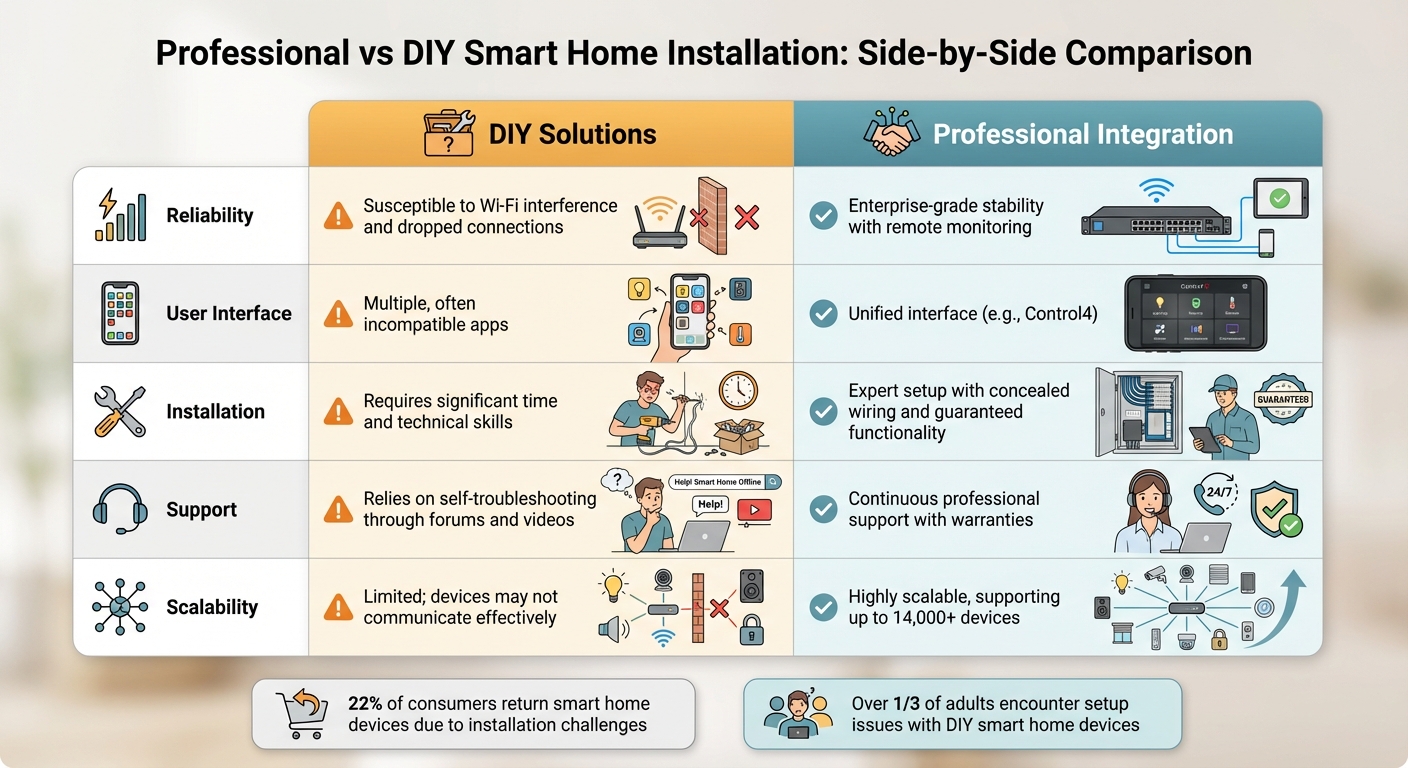
Professional vs DIY Smart Home Installation Comparison
Professional vs. DIY: Side-by-Side Comparison
For families in Northern New Jersey juggling busy schedules, professional smart home installation offers a dependable and hassle-free solution. The decision between hiring professionals or going the DIY route often boils down to reliability, ongoing support, and the time you’re willing to spend troubleshooting. While DIY might seem like a cost-effective option at first glance, hidden expenses and frustrations can quickly add up.
Statistics show that over one-third of adults encounter setup issues when installing smart home devices. In fact, around 22% of consumers end up returning these products due to installation challenges [17]. A common example is smart thermostats, which often require navigating complex HVAC wiring – a task many homeowners find daunting [17].
Take the case of Brandon Doyle in November 2020. He worked with professional integrator LelchAV to consolidate 48 devices across 12 apps into a single Control4 interface in just two hours. This streamlined setup resolved frequent update issues and allowed for remote support. For instance, when Doyle requested a custom Disney+ shortcut late at night, his integrator delivered it within seven minutes [17].
The following table highlights the key differences between DIY and professional installation, showcasing how professional services cater to the needs of busy families:
| Feature | DIY Solutions | Professional Integration |
|---|---|---|
| Reliability | Susceptible to Wi-Fi interference and dropped connections [16] | Enterprise-grade stability with remote monitoring [1] |
| User Interface | Multiple, often incompatible apps [17] | Unified interface (e.g., Control4) [2] |
| Installation | Requires significant time and technical skills [17] | Expert setup with concealed wiring and guaranteed functionality [2][1] |
| Support | Relies on self-troubleshooting through forums and videos [16] | Continuous professional support with warranties [16] |
| Scalability | Limited; devices may not communicate effectively [16] | Highly scalable, supporting up to 14,000+ devices [17] |
Professional systems also benefit from enterprise-grade networking, which uses VLAN separation to ensure that security devices and entertainment systems operate without interference [2][4].
"I chose Control4… interface [is] bulletproof… I have not spent $1 in four years to have my installer (One Sound Choice) come in to fix anything" [4].
Conclusion: Matching Technology to Your Family
What to Remember
Choose technology that supports your family’s routines and enhances everyday life. Begin with essentials like a resilient smart home systems and security, and automation that simplifies daily tasks.
Opt for integrated systems that can be managed through one interface. This avoids the hassle of juggling multiple apps and creates a smoother experience. When considering new devices, apply the "three-year rule" – a product should recover its cost in savings within three years to make it a worthwhile investment [18]. This method ensures that your choices align with the priorities of families in Northern New Jersey.
In the local market, professional installation can make all the difference. It ensures that your technology blends seamlessly into your home’s design and fits naturally into your family’s lifestyle. As Ryan Herd, CEO of One Sound Choice, explains: "Smart home design… is about making family life smoother – not more complicated" [3]. Professional services help create systems that operate in the background, offering reliable and unobtrusive performance.
When planning your system investments, consider the total cost over five years, including subscriptions and potential upgrades. Make sure your network is segmented and has local control options, so your home remains functional even if a manufacturer’s cloud service is temporarily unavailable [18]. By choosing professionally tailored solutions, you can ensure your technology meets your family’s unique needs.
What One Sound Choice clients say
We were surprised with what (Ryan) took away from the conversation – even reading between the lines to put everything we wanted and needed right into his designs for us. At first, we really didn’t know who to go with; we hadn’t had any renovations to our home before. We set up a consultation and liked (Ryan) because he was personable, a good listener and knowledgeable. He asked about our wish list and gave us some ideas…which were great.
– Mr. & Mrs. Caywood (1 Sound Choice client testimonials)
Ryan listened to us – he understood what we wanted to accomplish. (The 1 Sound Choice team’s) commitment to post-installation support and service has been unbelievable. They are professionals in every aspect and have gained our trust throughout the completion of our project.
– Mr. & Mrs. Maytin (1 Sound Choice client testimonials)
Very efficient and professional. Knowledgeable of equipment and products suited for your space/home. Perfectionists at their job and get the task done in promised time.
– dmhajjar (Houzz review)
FAQs
What should we automate first?
To build a reliable smart home setup, begin with the essentials: smart hubs or speakers, networking equipment, and smart lighting. These foundational elements create a stable base for adding more devices later. A smart hub or display serves as the command center, allowing you to control and manage your devices from one place. Meanwhile, a strong and dependable network ensures all connected gadgets operate without hiccups.
Once you’ve established this core system, you can move on to features that enhance comfort and safety. Consider adding devices like smart thermostats, sensors, and security systems to make your home both more convenient and secure.
Do we really need a professional network?
A professional network plays a key role in delivering dependable connectivity, correct installation, and consistent performance – particularly in integrated smart home systems. It ensures the stability and efficiency required to handle advanced technology, sidestepping many of the pitfalls often seen with DIY setups or consumer-grade options.
How can we keep it simple for everyone?
To make home technology more approachable, begin with a system that focuses on the basics. Start by incorporating key devices such as a smart hub, dependable networking gear, and simple smart lighting to lay the groundwork for an easy-to-use setup.
Combine features like security, lighting, and climate control into a single interface to avoid juggling multiple apps. Opting for professional installation can ensure everything is set up correctly, offering a reliable and straightforward experience that works well for everyone in the household.
Related Blog Posts
- Smart Home Questions Answered: 15 Common Concerns for Families
- Whole-Home Automation: Family Benefits Explained
- Smart Home Personalization: What Families Need
- “How Do I Avoid Spending Money on Home Technology I’ll Regret in a Few Years?”
More questions
Do we need every new gadget?
No. Pick tech that fixes a real problem in your home. A strong network and simple controls matter more than the newest device.
One Sound Choice, 8 Tilley Ave, Pompton Plains, NJ 07444. Call or text (973) 945-5275. We work in homes across Morris, Passaic, Bergen, Essex, Somerset, and Hunterdon counties. Written by Ryan Herd, founder of One Sound Choice.