
Avoiding regrets with home technology comes down to three key steps: build a strong network, choose compatible systems, and consider professional home automation systems.
Many homeowners waste money on gadgets that fail to work together, become obsolete quickly, or don’t meet their needs. Common pitfalls include weak Wi-Fi setups, devices that don’t communicate, and DIY installations that lead to performance or safety issues.
Here’s how to make smarter choices:
- Invest in your network: Use enterprise-grade routers and structured wiring to avoid dropped connections and support future devices.
- Focus on compatibility: Choose systems that work together under a single interface to simplify use and avoid juggling multiple apps.
- Consider professional help: Experts ensure reliable setups, compliance with safety standards, and long-term support, saving you time and frustration.
Top 10 Smart Home Pre-Wire Secrets the Pros Use 2025!
sbb-itb-c5b321b
Common Mistakes When Buying Home Technology
Purchasing smart home systems can be tricky, and many homeowners make errors that lead to expensive frustrations.
Overlooking Network Infrastructure
Your home network is the backbone of your smart devices, yet it’s often neglected. Many rely on the basic router provided by their internet service provider, which can’t handle the demands of a modern smart home. This leads to dropped connections and sluggish performance.
Most consumer-grade routers struggle with more than 50 connected devices, and once you exceed that limit, problems arise. Devices may disconnect, voice commands might lag, and automation routines could fail altogether [4]. This is especially true in areas like Northern New Jersey, where multiple family members often stream video, work remotely, and use smart gadgets simultaneously.
Wi‑Fi coverage issues are another common problem. Thick walls, electronic interference, and distance from the router can create dead zones where devices lose connection. These gaps can cause your smart doorbell to miss visitors, security cameras to buffer at critical moments, or lighting controls to fail [3].
"Flakey wifi is the number one cause of smart home headaches."
- Echelon Services [3]
Wireless-only security devices like Wi‑Fi doorbells and cameras also introduce vulnerabilities. Unlike hardwired systems, they’re more susceptible to interference or hacking [5][2].
The Home Technology Association emphasizes the importance of investing in a robust network:
"Our home’s network is the foundation of much of your activity. We recommend strongly that you invest in an enterprise-grade network for your home." [1]
Enterprise-grade options from brands like Cisco, Araknis, or Ruckus can support hundreds of devices, providing the security and reliability your home needs [5][1]. Without this solid foundation, even the best smart devices may underperform or fail to integrate properly.
Choosing Systems That Don’t Communicate
Buying smart home products individually might seem convenient, but it often leads to frustration when they don’t work together. You could end up juggling multiple apps: one for lighting, another for your thermostat, and yet another for security cameras. This can confuse family members, guests, and older relatives [5].
Disconnected systems also limit functionality. For example, creating a scene where lighting, shades, and temperature adjust with a single action becomes difficult. Additionally, devices that rely on internet connectivity for core functions can become useless if the manufacturer stops supporting them or goes out of business [4][2].
Ryan Herd, Owner of One Sound Choice, highlights the benefits of professional integration:
"A smart home system is easiest to use when it is designed around real routines. Scenes like ‘Movie Night,’ ‘After School,’ and ‘Goodnight’ make lighting, sound, and shades adjust together with one tap." [5]
While the Matter standard aims to improve compatibility across devices, many existing products still don’t support it [4]. As these compatibility issues pile up, some homeowners attempt DIY solutions, which often exacerbate the problems.
DIY Installation Pitfalls
DIY installations, while tempting, often lead to more headaches than solutions. Without proper planning, self-installed systems frequently suffer from poor performance and reliability issues, which can end up costing more to fix than hiring a professional would have.
Electrical requirements are a common stumbling block. Most smart switches need a neutral wire to remain connected to your network, but homes built before the mid-1980s often lack neutral wiring in switch boxes [4]. Attempting to install these switches without the right wiring can lead to safety hazards and code violations.
"Home electrical systems really aren’t something to try DIY hacks on."
- James Bruce, BGR [4]
DIY setups also lack the reliability and support of professionally installed systems. When something breaks – and it will – you’re left troubleshooting on your own, often spending hours searching online for answers. In contrast, professional installations come with ongoing support and monitoring, resolving issues before you even notice them.
Here’s a quick comparison of DIY versus professional installations:
| Feature | DIY Installation | Professional Installation |
|---|---|---|
| Cost | Lower upfront | Higher initial investment |
| Reliability | Prone to Wi‑Fi gaps and lag | Stable with enterprise‑grade mesh or hardwired systems |
| Support | Limited to online forums | Includes remote monitoring and local support |
| Safety | Risk of code violations | Ensures compliance and safety |
While professional installation requires a higher upfront investment, it delivers reliable systems that comply with safety standards and offer long-term support. In regions like Morris, Bergen, and Essex counties, where technology budgets often range from 4% to 8% of a home’s value [1], this investment not only enhances functionality but also protects your property value and peace of mind.
How to Choose Technology That Lasts
Creating a smart home that stands the test of time depends on solid infrastructure, compatible systems, and dependable partnerships. These foundations ensure your setup can grow and adapt as technology changes.
Invest in Structured Wiring and Expandable Networks
Structured wiring, such as Cat6 or better, provides the backbone for reliable performance across both wired and wireless systems [6][7]. Using a "home-run" design – where all cables converge at a central hub – makes it easy to upgrade or add devices without tearing into walls [6][11]. This setup also reduces strain on your wireless network by hardwiring stationary devices like TVs, gaming consoles, and streaming boxes, leaving wireless bandwidth for mobile devices [7][9].
"Technology evolves quickly, but cabling infrastructure lasts decades." – Remee [6]
Power over Ethernet (PoE) is another smart choice, combining power and data in a single cable. This setup enhances reliability for devices like cameras, sensors, and control panels while reducing the need for additional power outlets [9][10]. For homeowners in Northern New Jersey, where technology budgets often range from 4% to 8% of the home’s value [1], investing in structured wiring can save money in the long run. Retrofitting after construction can cost two to three times more than prewiring [10].
Another tip: install empty conduits during construction or renovations. These allow you to pull new cables later without damaging walls [9][10]. Adding dual Ethernet connections in key areas like offices and media centers provides a backup if one cable fails [9].
Select Systems That Work Together
Choose systems that support protocols like Matter, Zigbee, or Z-Wave to avoid juggling multiple apps and to prepare for future upgrades [7][8][9]. Integrated systems simplify daily life by automating routines. For example, a "Goodnight" scene could lock doors, adjust the thermostat, close shades, and turn off lights – all with one command.
Devices using Zigbee, Z-Wave, or Matter are especially useful because they reduce Wi-Fi congestion and continue working locally even if your internet goes down [9].
Choose Partners Who Provide Ongoing Support
Technology doesn’t just need to work today – it needs to evolve with your family and home. Professional integrators offer valuable support through software updates, security patches, and system expansions [8]. Remote monitoring can even resolve issues before you notice them, often eliminating the need for a service visit.
These experts also help future-proof your investment by using scalable infrastructure. As your needs change, they can expand your system without starting from scratch. High-quality networking hardware from brands like Cisco, Ruckus, or Araknis ensures your system can handle hundreds of devices and grow with you [1][8].
"If you are going to splurge anywhere, splurge on the home network. Your family will thank you." – Home Technology Association [1]
Beyond technical support, professional integrators work with architects and builders during construction to plan wiring paths, equipment locations, and power needs before walls are closed [7][10]. This forward-thinking approach avoids costly DIY mistakes and ensures your technology blends seamlessly into your home’s design. Combining strong infrastructure with expert support keeps your smart home functional and future-ready for years to come.
Why Professional Installation Delivers Better Results
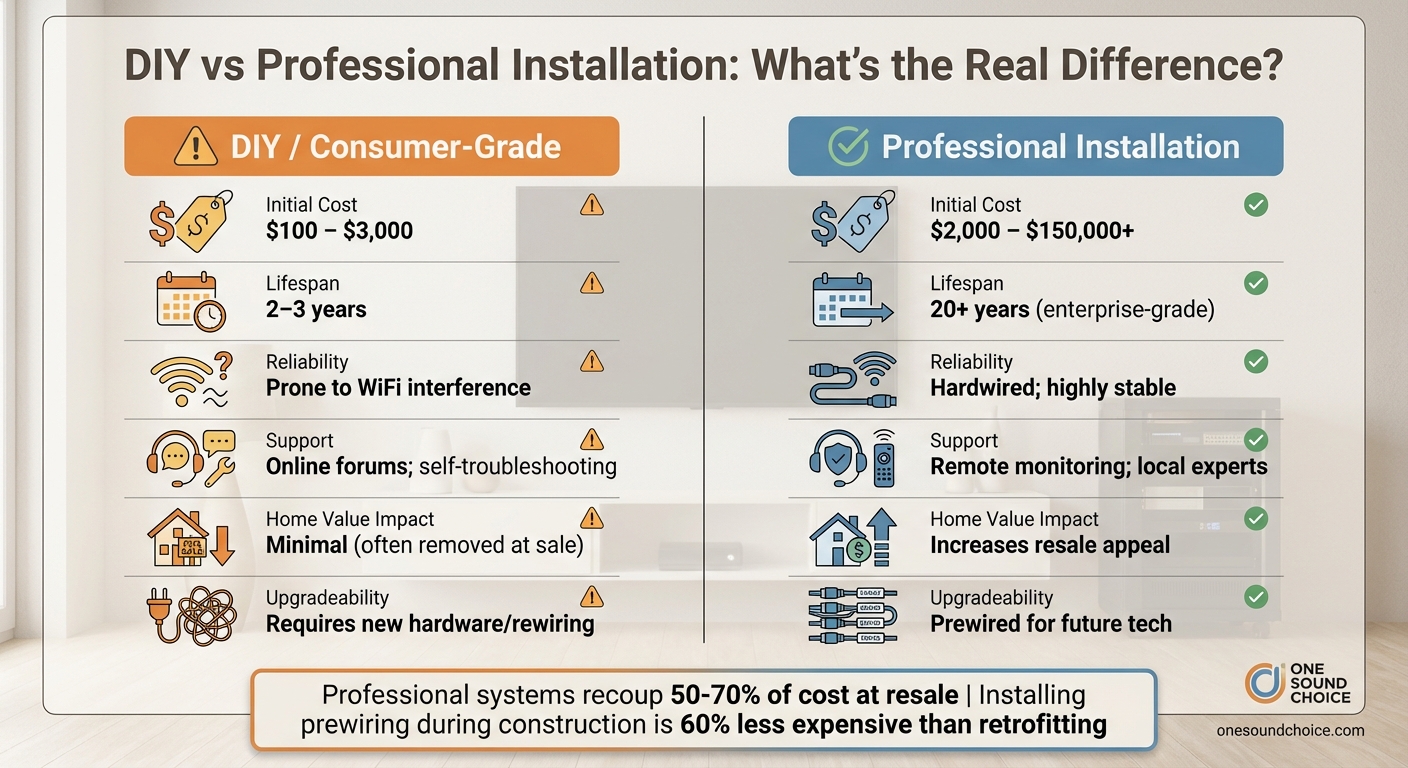
DIY vs Professional Smart Home Installation: Cost, Reliability and Long-Term Value Comparison
Professional Networks vs. Consumer WiFi Systems
Enterprise-grade networks from brands like Cisco, Ruckus, and Araknis outperform standard consumer routers in both reliability and capacity [1]. These systems are designed to handle hundreds of devices simultaneously, eliminating buffering and dead zones. This makes them ideal for homes where multiple users stream 4K videos, work remotely, and connect a variety of smart devices.
Another key advantage is the inclusion of VLAN separation, which isolates smart home devices from personal computers and sensitive data [8]. This added security layer surpasses what most consumer routers can offer. Additionally, tools like WattBox allow professional integrators to monitor and troubleshoot network issues remotely – often resolving problems before you even notice them [8]. These features create a secure and seamless foundation that only a professionally installed system can provide.
Professionally Installed Security and Family Features
Many people struggle with DIY smart home setups, with over one-third of adults facing challenges and 22% returning products due to installation issues [13]. Professional installation eliminates these frustrations, ensuring everything works as intended from the start. For instance, PoE cameras, which record continuously, provide a more reliable solution than battery-powered wireless models [10].
Take the example of Brandon Doyle, a real estate professional with RE/MAX Results, who managed 48 connected devices across six systems and 12 separate apps. After investing nearly $5,000 in equipment, he enlisted Alex Lelchuk of LelchAV to integrate everything – including Ring, Ecobee, Lutron, and Sonos – into a single Control4 interface in just two hours. Later, when Doyle needed a Disney+ shortcut added, the integrator resolved it remotely at 10 p.m. in just seven minutes, saving him the cost and inconvenience of a service call [13].
This level of reliability and convenience highlights why professional installation is worth considering, especially when factoring in the long-term financial benefits.
Comparing Costs and Long-Term Value
| Feature | DIY / Consumer-Grade | Professional Installation |
|---|---|---|
| Initial Cost | $100 – $3,000 | $2,000 – $150,000+ |
| Lifespan | 2–3 years | 20+ years (enterprise-grade) |
| Reliability | Prone to WiFi interference | Hardwired; highly stable |
| Support | Online forums; self-troubleshooting | Remote monitoring; local experts |
| Home Value | Minimal (often removed at sale) | Increases resale appeal |
| Upgradeability | Requires new hardware/rewiring | Prewired for future tech |
Consumer electronics typically follow a 2–3 year replacement cycle, while professional-grade systems are built to last for decades [12]. Installing prewiring during construction also prevents costly retrofits later – adding security cameras after walls are closed can be two to three times more expensive than doing it upfront [10]. Furthermore, professional systems often receive software updates, extending their usefulness and protecting your investment over time.
"Consumer electronics companies design their products to be replaced every 2-3 years. That ‘smart’ TV you bought? It’ll be slow and unsupported long before it breaks." – Ryan Herd, CEO, One Sound Choice [12]
Conclusion
Making smart choices about home technology comes down to three key principles: lay a solid foundation, choose systems that integrate seamlessly, and work with professionals who offer lasting support. By prioritizing structured wiring and enterprise-grade networking, you set up an infrastructure that can grow with evolving technology, avoiding costly upgrades later on. For example, installing Cat6a Ethernet during construction or renovation is about 60% less expensive than retrofitting it later [1][14]. This ensures your home stays ready for the demands of future devices.
Compatibility is just as important as quality. Systems that connect through a single interface – rather than requiring multiple apps – make technology easier and more enjoyable to use [7]. Professional installation further ensures everything works smoothly, avoiding the common pitfalls of DIY setups. The result? A home where technology enhances your daily life rather than causing frustration.
"When implemented correctly, there is no aspect of our home that will impact our enjoyment of where we live more than its technology systems. The reverse is also true. A home that has a poor technology implementation is a source of constant frustration." – Home Technology Association [1]
Smart home systems can also safeguard your home’s value. Studies show that professional installations can recoup 50% to 70% of their cost when you sell your home [14]. Additionally, features like water sensors and automated shut-off valves are becoming more appealing to insurance providers, which could lead to savings on premiums [7]. By treating technology as a long-term investment rather than short-lived gadgets, you can improve your quality of life, enhance security, and maintain your home’s value. For families in Northern New Jersey, following these steps ensures a smart home that’s dependable, secure, and ready for the future.
What One Sound Choice clients say
I’d (tell others) that Ryan’s very professional and very easy to work with, in terms of budgeting and listening to what you want to have done. He never pushed us toward anything we couldn’t afford or didn’t want and he got the job done on time.
– Mr. & Mrs. DeSantis (1 Sound Choice client testimonials)
Ryan listened to us – he understood what we wanted to accomplish. (The 1 Sound Choice team’s) commitment to post-installation support and service has been unbelievable. They are professionals in every aspect and have gained our trust throughout the completion of our project.
– Mr. & Mrs. Maytin (1 Sound Choice client testimonials)
I have hired 1 Sound Choice on several occasions over the past 10 years for several projects (from minor implementations to a whole house system). Ryan and the team at 1 Sound Choice are consummate professionals – extremely knowledgeable and up to date with technology, focused on delivering the best solution to fit your need, and highly customer service oriented. This combination plus the quality of finished product (every time) have made me a loyal customer… I highly recommend 1 Sound Choice.
– Terry Maytin (Houzz review)
FAQs
How do I know if my home network is strong enough for a smart home?
To determine if your home network is ready to support a smart home, start by evaluating its stability, speed, and capacity to manage multiple connected devices. A tri-band mesh router is a great option for efficiently handling network traffic. Conduct speed tests on devices connected via Ethernet to confirm your internet plan meets your needs. If your Wi-Fi seems sluggish but wired speeds are satisfactory, it might be time to upgrade your router or fine-tune your Wi-Fi setup for improved performance.
Which smart home standards should I prioritize to avoid compatibility issues?
Standards such as Matter and Thread play an important role in ensuring smart home devices work seamlessly together. By prioritizing these protocols, you can set up a system that remains compatible with future advancements, making it simpler to incorporate new technologies as they become available.
When is it worth hiring a professional instead of doing it myself?
Hiring a professional can make all the difference when setting up reliable, scalable, and fully integrated smart home systems. This is particularly important for more intricate setups, such as home automation, security systems, or energy management solutions. Professionals bring the expertise needed to handle tasks like proper wiring, ensuring robust network coverage, and achieving smooth integration – all of which are essential for the system’s long-term efficiency and security. For advanced systems like Control4 or Crestron, professional installation not only ensures everything works seamlessly but also maximizes compatibility and prepares your setup for future upgrades.
Related Blog Posts
- Enterprise-Grade Networking for Smart Homes
- Why Wired Networks Matter for Smart Homes
- Smart Home Investment: Quality vs. Cost
- How to Coordinate Smart Home Installs with Builders
Want help planning it right the first time? See our smart home page.
More questions
Should I run wires even if I use Wi-Fi?
Yes. Wires in the walls cost less while walls are open. They help your Wi-Fi and are ready for gear you add later.
One Sound Choice, 8 Tilley Ave, Pompton Plains, NJ 07444. Call or text (973) 945-5275. We work in homes across Morris, Passaic, Bergen, Essex, Somerset, and Hunterdon counties. Written by Ryan Herd, founder of One Sound Choice.