
Creating a high-quality home theater involves more than just picking a screen and speakers. It’s about combining the right room setup, technology, and design for an immersive experience. Here’s a quick rundown of the 12 key features every professional-grade home theater should have:
- Room Selection: Choose a rectangular room with proportions based on the golden ratio to optimize sound and visuals.
- Screen and Seating Layout: Position your screen and seating for ideal viewing angles and distances, ensuring clear sightlines for all rows.
- Display Choices: Opt for 4K or 8K screens, with projectors for larger setups or MicroLED TVs for brighter spaces.
- Audio Systems: Use Dolby Atmos configurations (e.g., 5.1.4 or 7.1.4) for immersive sound, with precise speaker placement and subwoofer calibration.
- Acoustic Treatments: Install acoustic panels, bass traps, and soundproofing to reduce echoes and external noise.
- Smart Lighting: Integrate dimmable LEDs, bias lighting, and motorized blackout curtains for optimal viewing conditions.
- Seating Arrangements: Use recliners with features like lumbar support and risers for multi-row setups.
- Networking: Ensure a stable network with wired Ethernet and enterprise-grade routers for seamless 4K/8K streaming.
- AV Distribution: Centralize your AV system to manage content across devices and rooms effortlessly.
- Smart Home Controls: Use platforms like Control4 or Crestron for one-touch automation of lighting, audio, and video.
- Power Management: Install dedicated circuits, surge protectors, and ventilated equipment racks to protect your devices.
- Professional Expertise: Work with certified professionals to ensure every detail is tailored to your space.
These features work together to transform a simple room into a cinema-like experience. Whether you’re designing from scratch or upgrading, focusing on these elements ensures a high-quality setup that’s built to last.
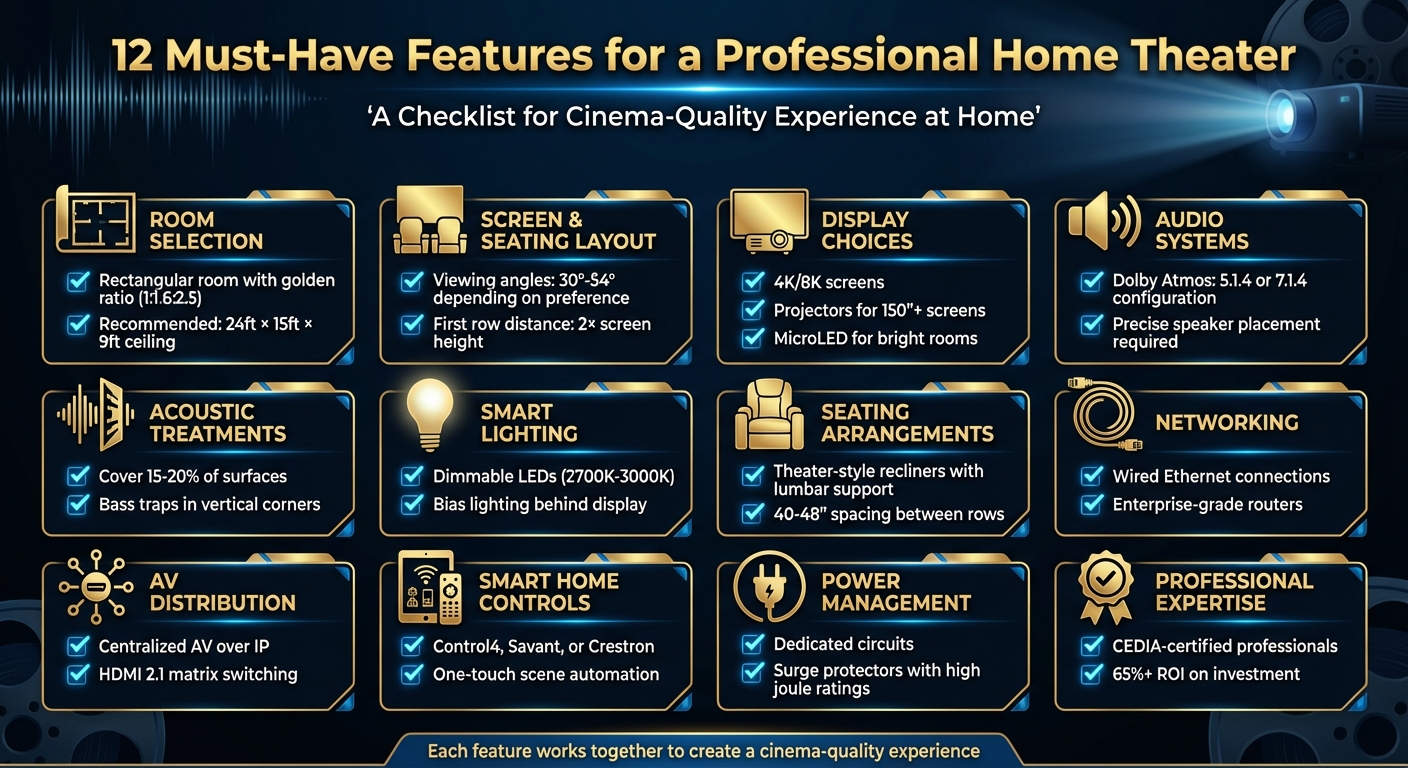
12 Essential Home Theater Features Checklist
Home Theater Design Best Practices
Room Selection and Layout
Carefully choosing your room and planning its layout is key to achieving the best audio and video experience. The positioning of your screen, seating, and speakers plays a huge role in creating an immersive environment for both sound and visuals [3].
Room Dimensions and Shape
The size and shape of your room can make or break your home theater’s performance. Rectangular rooms are ideal for acoustics [6]. According to the Home Theater Academy, a recommended room size is 24 ft x 15 ft with a 9 ft ceiling [6]. That said, the proportions of the room are often more important than the exact dimensions.
Square or cube-shaped rooms tend to create standing waves, which interfere with bass frequencies up to 300 Hz [7]. To combat this, aim for dimensions that follow the golden ratio (roughly 1:1.6:2.5 for height, width, and length). This ratio helps minimize sound distortions caused by standing waves [3][7].
If you’re working with a square room, you can reduce sound issues by using acoustic panels and bass traps. Rooms with non-parallel walls – where the walls are closer together at the front and gradually widen toward the back – are particularly effective at dispersing sound waves [6].
Screen and Seating Layout
After optimizing the room’s dimensions for sound, the next step is to arrange the screen and seating for the best viewing experience. Start by choosing the screen wall and marking seating positions with painter’s tape to visualize the layout [5].
Viewing angles are crucial for immersion [3]. Traditional cinemas aim for a 30° angle, while THX recommends 36-40°, and IMAX setups go up to 54° [3]. For a 120-inch 4K screen, the ideal seating distance is about 7.8 ft, with the screen center positioned 37 inches from the floor. To find the best distance for your setup, use these guidelines based on screen resolution: multiply the diagonal by 1.5–2.0 for 4K, 2.0–2.5 for 1080p, and 1.0–1.5 for 8K [3].
If you’re planning multiple rows of seating, ensure everyone has a clear view by calculating the riser height. Use this formula: (eye height of a seated person ÷ distance to the screen) × distance between rows. This will help you avoid obstructed views, no matter where someone is sitting [3].
Screen Size and Display Selection
Once you’ve planned your room layout and seating, the next step is picking the right screen size and display. This decision is the backbone of your home theater experience, as it ties together your room dimensions, viewing distance, and display type.
Screen Size Based on Viewing Distance
How far you sit from the screen makes a big difference. For 4K displays, aim to sit about 1.5 to 2 times the screen’s diagonal measurement away. With 1080p screens, the recommended distance increases to 1.5 to 2.5 times the diagonal. For 8K displays, you can sit closer – just 1 to 1.5 times the screen size – allowing for a highly immersive experience without visible pixelation [3][9]. For example, a 70-inch HDTV works best when viewed from 8.5 to 14.5 feet away [9].
Thanks to 4K and 8K technology, you can sit closer to larger screens without losing image clarity. This closer seating enhances immersion, making it feel like you’re right in the middle of the action. However, keep in mind that 8K setups are still a premium choice [3].
Choosing Between Projector and TV
After settling on screen size, the next decision is whether to go with a projector or a high-end TV. This choice largely depends on your room’s lighting and the size of the screen you want.
Projectors shine – literally – when you’re looking for screens larger than 150 inches, particularly in dark, dedicated spaces. Laser projectors, for instance, can deliver massive screens over 200 inches with brightness levels ranging from 2,000 to 5,000 lumens. However, they perform best in low-light environments [3].
For brighter rooms or spaces with ambient light, MicroLED displays are a solid option. These screens offer exceptional brightness (4,000 to 8,000 nits), deep black levels, and a lifespan exceeding 100,000 hours [3]. Samsung’s "The Wall" is a standout example, offering modular MicroLED technology that scales from 110 to 220 inches while maintaining stunning image quality [3]. Keep in mind, though, that MicroLED displays come with a hefty price tag, whereas projectors are often more affordable, especially for setups under $5,000 [3].
Ultra-Short Throw (UST) projectors are another great choice for multi-purpose rooms. They can create 120 to 150-inch screens from just inches away, making them perfect for smaller spaces. Models like Samsung The Premiere and LG HU915QE deliver brightness levels of 2,500 to 3,500 lumens with impressive contrast ratios [3]. If your room has some ambient light, pairing a projector with an Ambient Light Rejecting (ALR) screen can help maintain sharp, vibrant images [3].
Audio System Design
Once you’ve chosen the perfect screen and display, it’s time to turn your attention to sound – the element that truly brings your home theater to life. A great visual experience deserves an audio system that delivers clear dialogue, deep bass, and immersive sound effects.
5.1 vs. 7.1 Dolby Atmos Configurations

The backbone of any home theater audio system is its speaker configuration. Dolby Atmos systems use a numbering format like 5.1.2 or 7.1.4, where each number represents a specific set of speakers. The first number refers to ear-level speakers, the second to subwoofers, and the third (if included) to height speakers, which can be ceiling-mounted or upward-firing[10][12].
- 5.1 Configuration: This setup includes five main speakers – left, center, right, and two surrounds – along with one subwoofer. It’s ideal for smaller spaces, offering an excellent surround sound experience without taking up too much room or stretching your budget.
- 7.1 Configuration: Adding two more ear-level speakers (usually front and rear surrounds) brings the total to seven main speakers and one subwoofer. This arrangement is better suited for larger rooms, as it provides more precise sound placement and a heightened sense of immersion.
For Dolby Atmos, height speakers are the key to creating a three-dimensional sound experience. Dolby recommends a 5.1.4 setup (five ear-level speakers, one subwoofer, and four height speakers) for optimal immersion. However, a 5.1.2 configuration can still deliver excellent results in many cases[10]. According to Focal, a 7.1.4 layout is the minimum standard for those aiming for a high-end home theater experience[11]. To maximize Atmos performance, ensure your ceiling is flat and falls between 7.5 and 14 feet in height[10].
| Configuration | Ear-Level Speakers | Subwoofer | Height Speakers | Best For |
|---|---|---|---|---|
| 5.1.2 | 5 (Left, Center, Right, 2 Surround) | 1 | 2 | Smaller rooms, budget-friendly setups |
| 5.1.4 | 5 (Left, Center, Right, 2 Surround) | 1 | 4 | Balanced immersion for most home theaters |
| 7.1.4 | 7 (Left, Center, Right, 2 Front, 2 Rear) | 1 | 4 | Larger spaces, premium audio experiences |
Speaker Placement and Subwoofer Integration
Proper speaker placement is essential for creating a balanced and immersive soundstage.
- Front Speakers: Place the left and right front speakers about 30° to the left and right of your main seating position. Keep their tweeters at ear level and experiment with angling them slightly toward the listener ("toe-in") to fine-tune the soundstage[8].
- Center Channel: This speaker, responsible for most dialogue, should be positioned directly above or below the screen and angled slightly toward the listening area for clarity[8].
- Surround Speakers: For a natural surround effect, position these speakers approximately 120° from the center line and slightly behind the seating area. In a 7.1 setup, place the front surrounds closer to the sides and the rear surrounds behind the listener[3].
- Dolby Atmos Height Speakers: Install these at a 45° elevation angle from the primary listening position. For the best three-dimensional sound, four ceiling-mounted speakers are recommended[3].
Finding the right spot for your subwoofer often requires trial and error. Start by playing bass-heavy content while seated in your primary listening position. Then, perform a "subwoofer crawl" by moving around the room to find the spot where the bass sounds cleanest, and place the subwoofer there. For larger rooms or setups with multiple rows of seating, using two to four subwoofers can help ensure even bass distribution[3][13].
Finally, use the calibration tools built into most modern AV receivers to fine-tune your audio system. Features like Audyssey MultEQ XT32 and Dirac Live use microphones to measure and adjust for phase alignment, frequency response, and subwoofer integration. For the best results, consider hiring a professional installer who can tailor these settings to your room’s unique acoustics. This step sets the stage for advanced acoustic treatments, which will be covered in the next section.
Acoustic Treatments and Soundproofing
Even with a finely tuned audio system, your home theater can’t deliver its best performance without addressing the room’s acoustics. Hard surfaces like drywall, glass, and tile bounce sound waves around, leading to echoes, frequency issues, and audio distortion. These problems can make dialogue harder to understand and flatten the overall sound experience[3]. By combining the right acoustic treatments with soundproofing techniques, you can create a balanced and immersive audio environment.
Acoustic Panels and Bass Traps
To manage sound reflections, place 2–4 inch thick fiberglass or acoustic foam panels on key surfaces like side walls, the ceiling, and the rear wall. Covering about 15–20% of these surfaces can significantly improve sound clarity[3]. Products like GIK Acoustics 244 Bass Traps and ATS Acoustic Panels are great options, as they use acoustically transparent fabric that blends into your décor.
For bass issues, thicker traps – usually 4 to 6 inches of mineral wool – are essential. Position these bass traps in all vertical corners where walls meet the ceiling and floor to even out low-frequency sound waves. On the rear wall opposite your main speakers, consider adding quadratic residue diffusers like Vicoustic Wavewood or RPG Skyline. These diffusers scatter sound waves evenly, maintaining a spacious feel while reducing direct echoes[3].
Pair these acoustic treatments with structural soundproofing to fully isolate your home theater.
Soundproofing for Noise Isolation
Soundproofing serves two purposes: it keeps your theater’s sound from bothering other rooms and blocks outside noise from disrupting your experience. For walls, use a layered approach. Start with a 1/8-inch layer of Mass-Loaded Vinyl (MLV) under your drywall, then add a second drywall layer with Green Glue sandwiched in between. This setup can cut sound transmission by 6 to 10 decibels. To further reduce vibrations, install resilient channels between the studs and drywall.
Swap out hollow-core doors for solid-core ones, and add perimeter gaskets and automatic door bottoms to seal any gaps. Replace hardwood flooring with thick carpeting for added sound absorption. If your room has windows, heavy velvet curtains can help dampen sound while also blocking light. For HVAC systems, use acoustic duct liners and flexible connectors to stop sound from traveling through the vents[3][5].
When combined, these soundproofing and acoustic treatments create a quiet, isolated space where your audio system can perform at its best, giving you an unparalleled home theater experience.
Smart Lighting and Light Control
Smart lighting can turn a simple room into an immersive home theater experience. Even the best display can’t fully shine if ambient light or reflections interfere with the picture quality. With smart lighting systems, you can fine-tune brightness, color temperature, and timing to create the perfect viewing environment – all while reducing eye strain[14].
"Lighting is one of the most overlooked elements of a great home theater, yet it is the single biggest factor in setting the mood and eliminating distractions." – Home Theatres Hyderabad[15]
To maximize your setup, divide your theater into specific lighting zones. Use recessed ceiling lights for overall illumination, wall sconces for pathways, LED strips for accent lighting around the screen, and step lights for safe movement. Each zone can be managed individually or grouped into preset scenes for ultimate convenience.
Dimmable LED Lighting
Recessed LED lights are a smart choice to avoid screen reflections. Opt for warm white bulbs (around 2700K–3000K) to create a welcoming atmosphere for pre-movie gatherings, while also allowing for very low light levels during viewing. Add low-intensity LED step lights along risers or baseboards to softly illuminate pathways without disrupting the screen’s visibility.
For bias lighting, place a soft LED strip behind your display. RGB LED strips under seating or along architectural features can enhance ambiance – use warm tones for movies, cool shades for sports, or dynamic effects for gaming sessions.
Pair your lighting system with a professional control platform like Control4 or Lutron. These systems enable you to create custom scenes, such as dimming all lights for movie time while maintaining subtle pathway lighting, or brightening the room for casual viewing.
External light can also be managed seamlessly by integrating blackout solutions, ensuring your screen remains distraction-free.
Blackout Curtains and Light Blocking
External light is the enemy of contrast and clarity, especially in dark scenes. Motorized blackout curtains or cellular shades can block out all light, and mounting them with side channels eliminates any gaps.
For the ultimate convenience, connect these shades to your smart home system so they close automatically when a movie starts and open gradually during intermissions or after the credits roll. If your windows face direct sunlight, consider combining blackout shades with heavy curtains to ensure complete darkness.
A professional installation ensures that your lighting and shading systems work seamlessly together. Motion sensors can even trigger subtle pathway lighting when someone moves, enhancing safety and maintaining the immersive vibe.
sbb-itb-c5b321b
Seating Arrangements
The right seating setup isn’t just about comfort – it’s about ensuring everyone has a great view. Spacing and sightlines are just as crucial as picking the ideal screen, especially when you’re creating a professional-grade home theater for your family.
Start by measuring your room accurately and working with a specialist to figure out the best seating capacity. For a truly immersive experience, place the first row at a distance equal to twice the screen’s height. Between rows, leave 40–48 inches of space to allow for fully reclined seating positions.[3]
Just like audio and lighting, a well-thought-out seating arrangement ties the entire home theater experience together.
Theater-Style Recliners
High-end recliners elevate movie nights into something extraordinary. Features like motorized recline, lumbar support, and adjustable headrests make long viewing sessions comfortable.[3] While standard seats are typically 22–24 inches wide, premium options provide 28–30 inches of space for added comfort.[3]
For families, microfiber upholstery is a smart choice. It’s resistant to spills and stains, easy to clean, and offers the durability of leather.[3] If convenience is a priority, look for seats with built-in USB-C charging ports and cup holders.[3]
For an extra layer of immersion, consider haptic transducers like ButtKicker LFE or Clark Synthesis models. These devices sync vibrations with low-frequency audio effects, making action scenes or explosions feel more real. Some top-tier setups even include motion technology that reacts to the on-screen action, offering a next-level experience for true enthusiasts.[3]
Riser Platforms for Multi-Row Seating
Risers are essential for multi-row setups, ensuring everyone gets a clear view. A standard riser height of 12 inches per row, paired with 40–48 inches of space between rows, keeps sightlines unobstructed – even when seats are reclined.[3] To determine the exact riser height, use this formula: (eye height of seated person ÷ distance to screen) × distance between rows.[3]
It’s best to have risers professionally installed to ensure they’re sturdy and secure. Maintain at least 36 inches of aisle width for easy movement, and if you’re working with limited space, wall-hugging recliners are a practical solution. These models need less clearance when fully reclined, making them ideal for tighter layouts.[3]
Networking and AV Infrastructure
Once you’ve nailed the lighting and seating in your home theater, the next step is ensuring a reliable network and efficient AV distribution. These are the backbone of a high-performing system.
A well-designed home theater requires a dependable network and seamless AV distribution. Without these, you might face buffering during 4K streams, audio that’s out of sync, or frustrating delays when switching between sources. A strong network isn’t just a technical detail – it’s what elevates your viewing and listening experience.
To avoid these pitfalls, your network should handle high-bandwidth streaming and keep all components in sync. This means planning for both wired and wireless connections that meet today’s streaming demands while leaving room for future upgrades.
"Reliable networks, smart lighting, dimmers, and control systems like Crestron, Savant, and Control 4 all feed into the overall lighting experience." [1]
Enterprise-Grade Networking
For a dependable home theater, hardwired Ethernet connections are non-negotiable. [16] Unlike Wi-Fi, wired connections sidestep issues like interference from nearby networks, signal loss through walls, and bandwidth competition from other devices.
If you’re aiming for 8K streaming or a whole-home AV system, standard consumer routers won’t cut it. You’ll need professional-grade networking equipment. Dedicated Ethernet lines should connect key components like your display, AV receiver, streaming devices, and control systems.
"Install robust Wi-Fi and hardwired connections for reliability." [3]
By combining wired and wireless setups, you ensure smooth performance whether you’re streaming from a local server or accessing content online.
Centralized AV Distribution
AV over IP technology has revolutionized how content is managed and distributed across rooms. A centralized AV distribution system uses your network to send audio and video signals wherever you need them. With HDMI 2.1 matrix switching, you can direct any source to any room with just one command. [3]
This setup also keeps your equipment organized. Storing media servers, streaming devices, and gaming consoles in a dedicated rack minimizes cable clutter and simplifies troubleshooting.
"A well-integrated system streamlines daily use and enhances the overall experience." [4]
When paired with platforms like Control4, Savant, or Crestron, a centralized system lets you control everything – from switching inputs to adjusting lighting – with a single tap or voice command. [3]
Integrated Smart Home Controls
To elevate your home theater experience, a centralized control system ties everything together seamlessly. By integrating your AV setup, lighting, shades, climate control, and security systems, you create a cohesive, user-friendly environment. Platforms like Control4, Savant, and Crestron are designed to unify these elements, offering streamlined operation through both touchscreen interfaces and voice commands.
"Professional-grade home theaters utilize automation platforms that seamlessly integrate all components into a cohesive system." – Digitalholics Team [3]
This setup allows for intuitive, hands-free control, simplifying every aspect of your theater.
Centralized Control Interfaces
A touchscreen controller serves as the heart of your system, giving you quick and easy access to every feature your theater offers. For voice-activated convenience, platforms like Josh.ai take center stage. Known for its advanced natural language processing and privacy-focused design, Josh.ai can handle complex, multi-step commands effortlessly. Imagine saying, "Set lights to 20% for movie mode" or "Start movie night sequence", and watching your theater transform instantly.
Scene-Based Automation
Take your theater experience to the next level with activity-based automation. With just one command, you can trigger multiple actions. For instance, a "Movie Mode" scene might dim the lights, lower the shades, switch inputs, and adjust the audio – all at once. Other scenes could include "Intermission", which brightens the room and pauses playback, "Gaming Session" to fine-tune settings for your console, or "Cleaning Mode" to raise the shades and turn on full lighting.
In March 2025, Digitalholics spotlighted how AI-driven automation is reshaping home theaters. These systems can now adjust audio settings based on room occupancy or balance volume levels across various content types. Voice commands like "Adjust sound settings for action movie" or "Show me sci-fi movies with high ratings" make the experience even more personalized, dynamically adapting the environment to your preferences [3].
Power Management and Equipment Organization
Once you’ve established a solid networking and AV setup, the next step is managing power efficiently to protect your equipment and maintain top performance. A high-end home theater isn’t just about cutting-edge audiovisual gear – it also needs a well-thought-out power plan.
Advanced components like projectors, amplifiers, subwoofers, and multiple screens often require more power than standard circuits can handle. To avoid issues, evaluate the power requirements of each device and consult with a licensed electrician to install dedicated circuits where necessary [17][18].
Dedicated Circuits and Surge Protection
Dedicated circuits help prevent overloaded breakers and ensure a steady power supply to your theater. Strategically placed outlets also reduce visible cable clutter. To protect your equipment, invest in surge protectors with line conditioning features. These devices help stabilize voltage and filter out electromagnetic and radio frequency interference (EMI/RFI), safeguarding sensitive components [17][20].
Choose surge protectors with high joule ratings for added protection. Options like the Panamax MR4300 ($279.00) and Furman Elite 15i ($399.95) are excellent choices for stabilizing voltage and minimizing interference [19][20]. For critical devices, consider adding an uninterruptible power supply (UPS). A UPS provides battery backup during power outages, allowing for safe shutdowns and preventing potential data loss or hardware damage [17][18][20]. Avoid daisy-chaining surge protectors, as this can create safety hazards [20].
Ventilated Equipment Racks
Proper organization and ventilation of your equipment are just as important as installation. Good airflow prevents overheating, which can damage components or shorten their lifespan. Ventilated equipment racks not only keep your gear cool but also maintain an organized and professional look. For devices that generate significant heat, like projectors, ceiling-mounted ventilators can be particularly effective [21].
"In March 2025, professional home theater designers utilize tools like FLIR thermal imaging for equipment ventilation verification as part of their holistic planning methodologies to predict acoustic and visual performance before construction begins." – Digitalholics, 2025 [3]
Temperature sensors near equipment racks can activate targeted cooling systems, ensuring your setup stays within safe operating temperatures [3]. To keep things clean and safe, conceal cables inside drywall, protective tubing, or along baseboards. This approach eliminates tangled wires, reduces safety risks, and enhances the overall appearance of your theater [21][2]. Once everything is in place, have a local authority inspect the work to ensure it complies with safety codes [17].
Conclusion
Creating a professional-grade home theater means bringing together all 12 essential features in a way that transforms a simple viewing area into an immersive cinematic experience. From room dimensions and speaker placement to smart automation and seating configuration, every detail must work in harmony to deliver top-tier audio and visuals. These foundational elements are the building blocks of a system that truly stands out [3].
Given the complexity of modern home theater systems, professional expertise can make all the difference. Tools like EASE Focus 3D acoustic simulation software and AutoCAD allow professionals to predict acoustic and visual performance before construction even begins [3]. This level of precision ensures every aspect of the system integrates seamlessly, creating a space that’s as functional as it is impressive.
As Digitalholics.com highlights:
"For optimal results, consider consulting with a CEDIA-certified professional who can help navigate the complex decisions involved in home theater design. Their expertise in acoustic simulation, display calibration, and system integration can transform your vision into a reference-quality entertainment space that will provide years of immersive enjoyment." [3]
Beyond the entertainment value, a well-designed home theater is a smart financial move. With a return on investment exceeding 65%, it’s a project that adds long-term value to your property [5].
With over three decades of experience and more than 2,500 successful installations, One Sound Choice offers a trusted, expert approach to home theater design and installation. Their focus on creating user-friendly systems ensures your investment is not only protected but also optimized for years of enjoyment. Plus, their ongoing support gives you peace of mind, knowing your entertainment space is built to last.
What One Sound Choice clients say
(We received) friendly, highly competent, quick and clean installation by 1 Sound Choice. The team followed up a few weeks after completion to ask if we were satisfied with our Media Room and Home Audio System. 1 Sound Choice is truly “top shelf” – they surpassed our expectations every step of the way.
– Mr. & Mrs. Blake (1 Sound Choice client testimonials)
The 1 Sound Choice staff was very easy to work with. Ryan, you understood our wants right from the beginning. Simplicity of installation and operation were just some of the reasons we chose 1 Sound Choice. You exceeded my expectations!
– Mr. & Mrs. Matia (1 Sound Choice client testimonials)
We hired Ryan from One Sound Choice to install a movie theater in home we were building. His expertise was invaluable. In addition to being an informed person about every aspect of the theater, walls, insulation, lighting, seating, installation of the walls, screen and all of the equipment in the back room, he became a trusted contractor and we have complete faith in his work. Our movie theater is amazing to look at, sit in, and enjoy movies. If any work is needed as it is periodically Ryan is very reliable. Feel free to ask Ryan for photos of the room. Dr. and Mrs. Steven Stoller Saddle River, New Jersey
– ann327 (Houzz review)
FAQs
What are the ideal room dimensions for a home theater?
To design an ideal home theater, try to stick to the golden ratio for room dimensions – this means a height-to-width ratio of about 1:1.6. For instance, if your ceiling is 9 feet high, the room should ideally be around 14.4 feet wide and 23 feet deep. A popular size for home theaters is 20 x 15 feet, with ceiling heights ranging from 8 to 10 feet.
Keeping the room’s proportions balanced minimizes sound distortion, enhancing both the audio and visual experience. Plus, it gives you more flexibility for seating layouts and improves the overall acoustics, making the space both practical and enjoyable.
What’s the difference between a 5.1 and a 7.1 Dolby Atmos audio setup?
A 5.1 audio setup consists of five main speakers – front left, front center, front right, rear left, and rear right – paired with a subwoofer. This arrangement provides a well-rounded surround sound experience, delivering crisp dialogue and deep bass. It works especially well in small to medium-sized rooms, making it a popular choice for home entertainment.
A 7.1 audio setup takes things up a notch by adding two more surround speakers, typically positioned on the sides or at the rear of the room. These extra speakers enhance sound depth and create a more immersive experience, making it feel like you’re right in the middle of the action. It’s an excellent option for larger spaces or for anyone looking to recreate a theater-like atmosphere at home.
What’s better for my home theater: a high-end TV or a projector?
When deciding between a high-end TV and a projector, it all comes down to your space and how you like to watch. If your room is on the smaller side or you’re after a bright, super sharp image with a quick and easy setup, a high-end TV might be the way to go.
However, if you dream of a big-screen, cinematic vibe and have a dedicated, dark room for it, a projector can deliver that theater-like experience right at home.
Think about key factors like the size of your room, how much light is typically present, and how large you want the screen to be. These details will help you figure out which option suits your setup best.
Related Blog Posts
- How to Choose Smart Lighting for Every Room in Your Home
- AI-Powered Smart Security System
- Home Theater Design Tool
- How to Set Up Whole Home WiFi: 7 Steps for Better Coverage
Want the family room ready for game day? See our family room game day page.
More questions
Should I plan seats before the screen?
Plan them together. Seat distance sets the right screen size, and the room shape sets where seats and speakers go.
One Sound Choice, 8 Tilley Ave, Pompton Plains, NJ 07444. Call or text (973) 945-5275. We work in homes across Morris, Passaic, Bergen, Essex, Somerset, and Hunterdon counties. Written by Ryan Herd, founder of One Sound Choice.