
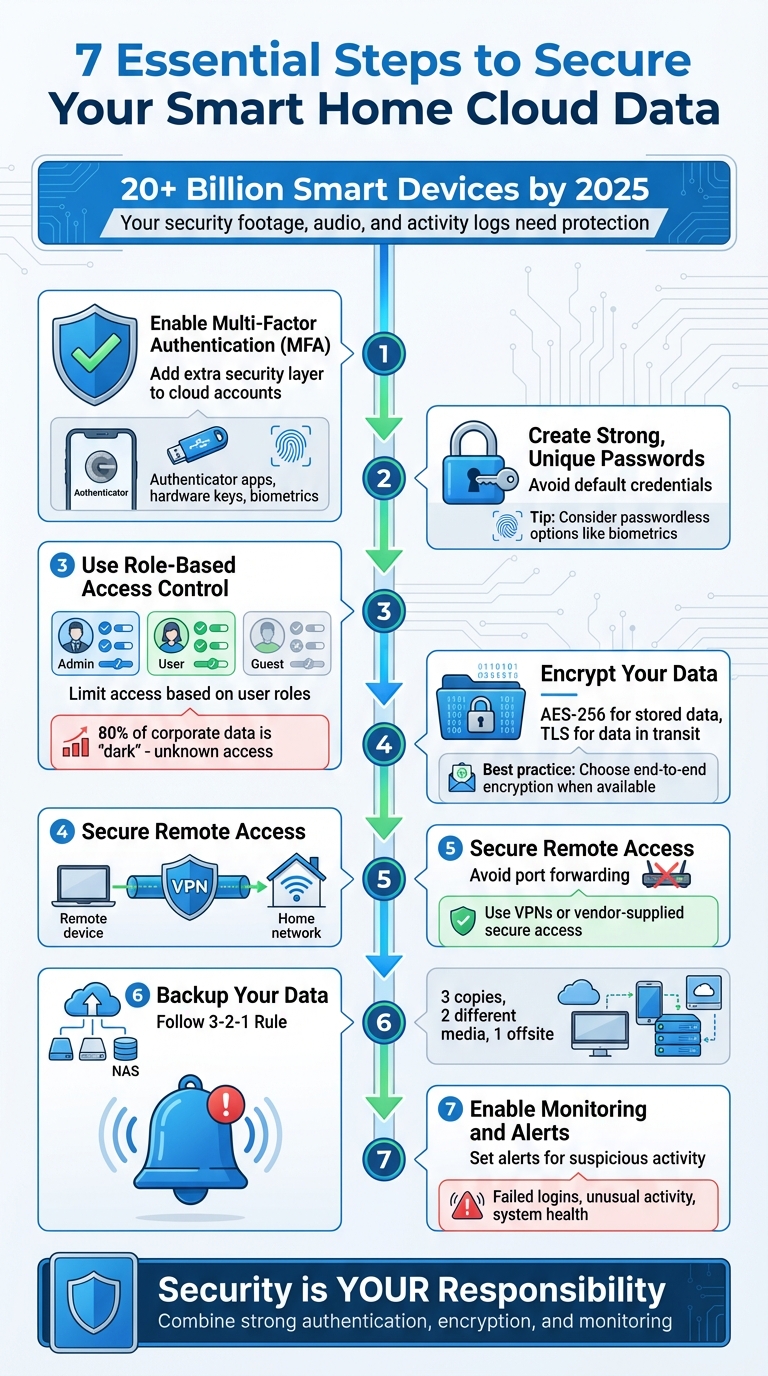
Your smart home generates sensitive data – security footage, audio, and activity logs – that often ends up stored in the cloud. Once in the cloud, you lose direct control over its storage and security, increasing risks of breaches. Weak smart devices can also compromise your entire network. With over 20 billion devices in use by 2025, protecting your data is critical.
Here’s how to secure your smart home data:
- Enable Multi-Factor Authentication (MFA): Add an extra layer of security to cloud accounts. Use options like authenticator apps or hardware keys.
- Create Strong, Unique Passwords: Avoid default credentials and consider passwordless options like biometrics.
- Use Role-Based Access Control: Limit access to sensitive data based on user roles.
- Encrypt Your Data: Ensure your provider uses AES-256 for stored data and TLS for data in transit. Opt for end-to-end encryption when available.
- Secure Remote Access: Avoid port forwarding; use VPNs or vendor-supplied secure access methods.
- Backup Your Data: Follow the 3-2-1 rule: 3 copies, 2 different media, 1 offsite. Test backups regularly.
- Enable Monitoring and Alerts: Set alerts for failed logins, unusual activity, and system health issues.
Key takeaway: Security is your responsibility. Combine strong authentication, encryption, and monitoring to protect your smart home data.
7 Essential Steps to Secure Smart Home Cloud Data
Your Smart Home Is Listening (and Watching) – Let’s Fix That
sbb-itb-c5b321b
Authentication and Access Control
Protecting your Northern NJ smart home data stored in the cloud starts with controlling access and verifying user identities. Every account tied to your smart home is a potential vulnerability, so securing these entry points is essential. Below are key steps to strengthen your authentication and access controls.
Enable Multi-Factor Authentication (MFA)
Multi-Factor Authentication (MFA) adds an extra layer of security by requiring more than just a password to access your account. This step is critical because cloud storage often contains sensitive data like video footage, audio recordings, and activity logs, all of which remain at risk if your password is compromised [3][5].
The Federal Trade Commission (FTC) emphasizes the importance of MFA:
If a device offers two-factor authentication (a password plus something else, like a code sent to your phone or a thumbprint scan), use it [5].
Make sure MFA is enabled for every user who has access to shared cloud resources, not just the primary account holder [1]. To set it up, log into your cloud provider’s account settings and choose a secondary verification method. Options include SMS codes, authenticator apps like Microsoft Authenticator, biometrics (e.g., fingerprint or facial recognition), or physical FIDO2 security keys [3]. Once set up, store backup or recovery codes securely in an offline location for emergencies.
| MFA Method | Security Level | User Effort |
|---|---|---|
| SMS/Text Code | Moderate | Low (Requires cell service) |
| Authenticator App | High | Moderate (Requires smartphone) |
| Biometrics | Very High | Low (Fingerprint/Face ID) |
| Hardware Key (FIDO2) | Highest | Moderate (Requires physical key) |
Be cautious of phishing attempts. Cybercriminals may send fake MFA prompts or emails to trick you into providing credentials on fraudulent sites [1]. If you receive an unexpected MFA code, it could signal an unauthorized access attempt.
Create Strong, Unique Passwords
While MFA provides an additional layer of security, your password is still the first line of defense. The FTC warns:
Hard coding passwords in cloud-based applications or source code… is the business equivalent of a ‘Hack me!’ sign [4].
Avoid using default credentials, as these are often publicly available and easy targets for attackers. Change them to unique, complex passwords during setup [2]. Additionally, configure your cloud account to block or alert you after multiple failed login attempts, which can help prevent automated attacks [2].
For even greater security, consider moving away from traditional passwords altogether. Passwordless options such as FIDO2 security keys, biometrics, or mobile authenticator apps reduce the risk of password theft entirely. Microsoft highlights this shift:
While passwords are the first line of defense against unauthorized access, we are aware that passwords can be stolen, leaked, or compromised [3].
Set Up Role-Based Access Control
In households with multiple users, not everyone needs full access to all cloud-stored data. The principle of least privilege ensures that individuals only have access to what they truly need. The FTC advises:
Unless employees have a legitimate business reason, they shouldn’t have access to your cloud resources [4].
This advice applies to family members and temporary users, like guests or service providers. Use your cloud provider’s management tools to assign permissions based on specific roles. For instance, a teenager using the home audio system doesn’t need access to security camera footage, and a guest connected to your Wi-Fi shouldn’t be able to view your cloud storage.
Regularly review and update these permissions as your household’s needs evolve. With estimates suggesting that 80% of corporate data is "dark" – meaning organizations often don’t know where sensitive data resides or who can access it [3] – routine audits are vital to maintaining security and preventing unauthorized access.
Data Encryption Standards
After ensuring strong authentication, the next step in protecting your smart home security is encrypting your data. Encryption transforms your information into an unreadable format, making it inaccessible to unauthorized parties. Without this safeguard, intercepted data – whether during transmission or storage – can expose sensitive details. As the Federal Trade Commission (FTC) emphasizes:
If your data contains sensitive information, encrypting that data is a basic principle of security regardless of where it’s stored [4].
For data stored on servers, your cloud provider should implement 256-bit Advanced Encryption Standard (AES-256). This widely-used encryption method is the gold standard for safeguarding stored objects, disks, and databases. Major cloud providers rely on AES-256 to secure data at rest [3]. When it comes to data in transit – information traveling between your devices and the cloud – Transport Layer Security (TLS) is crucial. The Cybersecurity and Infrastructure Security Agency (CISA) highlights the risks:
If your cloud service does not provide end-to-end encryption for data shared between your device and the cloud service, a threat actor could intercept it [1].
These encryption methods work hand-in-hand with the access controls discussed earlier, ensuring a comprehensive approach to data protection.
Verify End-to-End Encryption Support
End-to-end encryption (E2EE) ensures that only you can decrypt your data, keeping it hidden even from your cloud provider. Providers offering "Zero Knowledge" architectures take this a step further – they neither store nor have access to your encryption keys [3][1]. To confirm E2EE support, review your provider’s documentation carefully. Ensure they offer encryption for both data in transit and at rest, use TLS 1.2 or higher for all connections, and strictly block non-HTTPS requests.
Another factor to consider is the provider’s legal jurisdiction. Opt for companies based in regions with strong privacy laws, as this can help protect your data from being disclosed under legal pressure [1].
Once you’ve verified encryption protocols, the next step is securing your encryption keys.
Use Secure Key Management Practices
Encryption keys are the gatekeepers to your data. If compromised, they render encryption useless. Avoid embedding keys or passwords in device source code or cloud applications, as this creates vulnerabilities [4]. Instead, use dedicated secret management tools like AWS Secrets Manager or Google Secret Manager to store and rotate keys securely.
Additionally, implement multi-factor authentication (MFA) for anyone who manages or accesses encryption keys [3][1]. Some providers offer customer-managed keys, allowing you to rotate or disable them independently. While this provides greater control, it may require extra effort to manage [6]. As Microsoft advises:
"Maintaining and securing data, devices, and identities is always the customer’s responsibility" [3].
Secure Remote Access Configuration
Once you’ve locked down your data with strong encryption, it’s time to ensure your remote access setup is just as secure. Remote access – whether it’s for checking security cameras, tweaking your thermostat, or managing other smart devices – adds convenience to your life. But if not configured properly, it can also open the door to potential threats. As the Federal Trade Commission (FTC) puts it:
A security weakness at the contact point where a service communicates with your device could give scammers a foothold into your network [2].
To reduce these risks, it’s crucial to use secure methods that limit how your devices connect to the public internet. Here are some practical steps to safeguard remote access.
Avoid Direct Port Forwarding
Direct port forwarding can leave your devices vulnerable to cyberattacks. If remote management features aren’t absolutely necessary, it’s best to disable them [5][7]. Instead of opening ports on your router, consider alternatives that keep your devices hidden from public view.
Use a VPN for Remote Access
A Virtual Private Network (VPN) adds an extra layer of security by creating an encrypted tunnel between your device and your home network. This ensures that access is granted only after a secure and authenticated connection is established. By using a VPN, you can securely access your entire network while keeping individual devices shielded from exposure on the public internet.
Opt for Vendor-Provided Secure Channels
Many professional smart home solutions come with built-in secure access options provided by the vendor. These solutions often include features like end-to-end encryption, centralized authentication, and automated security updates. By using these secure channels, you can minimize risks without needing to configure additional settings yourself.
Backup and Disaster Recovery Strategy
Even with robust encryption and secure remote access, smart home data can still face risks like failures, cyberattacks, or outages. As the Cybersecurity and Infrastructure Security Agency (CISA) warns:
"If you only store your data in the cloud and don’t save a local copy, cyber incidents such as a denial-of-service attack could lead to temporary or even permanent loss of your data." [1]
A strong backup plan is your safety net in these situations. The goal is redundancy – keeping multiple copies of your data across different locations – and routine testing to ensure those backups work when you need them. These steps go hand-in-hand with other security measures to keep your data accessible, even during unexpected disruptions.
Set Up Redundant Backup Systems
Relying on a single backup method is risky. Instead, follow the 3-2-1 rule: keep three copies of your data, use two different storage media, and store one copy offsite [8]. For luxury smart home designs, this could mean saving one copy on your local network, another on a physical device like an external hard drive, and a third in the cloud.
Consider enhancing this approach with the 3-2-1-1-0 rule, which adds an immutable offline copy to protect against ransomware and ensures zero errors in your backups [8]. Encrypt all backups – especially those containing sensitive data, like security camera footage – to safeguard them while stored [4][3].
It’s important to remember that while cloud providers secure their infrastructure, the responsibility for backing up and restoring your data ultimately lies with you [3].
Once you’ve set up backups, the next step is to ensure they’re functional.
Test Backup Integrity Regularly
Creating backups is just the beginning; you need to confirm they’ll actually work when disaster strikes. As Aikido aptly states:
"The main question is not if you take backups, but whether you can recover with those backups." [8]
Schedule quarterly recovery drills to check both your Recovery Point Objective (RPO) – how much data you can afford to lose – and your Recovery Time Objective (RTO) – the time needed to restore operations [8].
During these drills, test both local and cloud backups. Confirm that configuration files, device settings, and any recorded footage can be restored without issues. Document the recovery process to streamline efforts during an emergency [8][9]. As Aikido reminds us:
"Testing backups may feel unnecessary when everything’s running smoothly, but outages don’t happen on schedule." [8]
Taking the time to test ensures you’ll be ready when it matters most.
Monitoring and Alert Configuration
Backups are essential for recovering smart home data after an incident, but monitoring and alerts play a crucial role in preventing issues before they spiral out of control. As Kyle Calzaretta, Senior Director of Marketing at Synchronoss, explains:
Being proactive about data privacy isn’t just a good practice; it’s an essential part of digital life in the 21st century. [11]
The idea is straightforward: alerts notify you immediately of suspicious activities, like unusual logins or sudden data spikes, so you can act fast. These alerts set the stage for more targeted measures, starting with tracking login failures.
Enable Login Failure Alerts
Failed login attempts often signal the first hint of trouble. Cybersecurity expert Okan Yıldız cautions:
A security breach can lead to identity theft, financial loss, and invasion of privacy. [12]
Set up alerts to catch brute force attacks, which typically involve multiple rapid failed login attempts [12]. Keep an eye on credential misuse by monitoring failed attempts tied to service account HMAC keys or expired tokens [6]. Many cloud platforms allow you to define thresholds, like triggering an alert after five failed attempts within 10 minutes.
To minimize long-term risks, consider using time-limited access tokens, often called "Signed URLs", which expire automatically after a set duration [6]. Strengthen these measures with Multi-Factor Authentication (MFA), ensuring that even if a password is guessed, access still requires a second verification step [11].
Monitor System Health and Resource Usage
Monitoring system health is another key part of keeping your data secure. The Federal Trade Commission underscores this responsibility:
Using cloud services doesn’t mean you can outsource security. Throughout the lifecycle of data in your company’s possession, security remains your responsibility. [4]
Keep tabs on capacity, CPU usage, and firmware updates using your provider’s console, and set up automated alerts for misconfigurations or vulnerabilities [4]. Watch data transfer volumes closely – unusually large uploads or downloads could indicate data exfiltration [2].
Make sure to log and alert on unrecognized logins, abnormal file transfers, and repeated failed password attempts [10][13]. Real-time monitoring tools can also flag malware or unsafe processes before they compromise your cloud accounts [10]. Regularly review your stored data to verify that security settings align with the sensitivity of the information [4]. When combined with strong authentication and encryption, continuous monitoring forms a solid foundation for a multi-layered security approach.
Conclusion
Keeping your smart home data secure in the cloud means building multiple layers of protection to defend against a variety of risks. As the Federal Trade Commission wisely points out:
Security is your responsibility. Using cloud services doesn’t mean you can outsource security. [4]
A layered defense strategy involves securing your network, devices, and data all at once. This way, even if one layer is breached – like a stolen password – other safeguards such as multi-factor authentication, encryption, and access controls can still protect your system. As technology evolves, so does the range of potential vulnerabilities, making these measures more critical than ever [2].
For families in Northern New Jersey looking for professional-grade solutions, One Sound Choice offers expertly designed smart home systems with built-in enterprise-level security from the start. With over 30 years of experience and more than 2,500 installations, their services include network segmentation, access control, and continuous monitoring. Guided by Ryan "The Smart Guy" Herd, their team ensures your system is secure, reliable, and customized to fit your family’s needs.
What One Sound Choice clients say
Ryan listened to us – he understood what we wanted to accomplish. (The 1 Sound Choice team’s) commitment to post-installation support and service has been unbelievable. They are professionals in every aspect and have gained our trust throughout the completion of our project.
– Mr. & Mrs. Maytin (1 Sound Choice client testimonials)
I’d (tell others) that Ryan’s very professional and very easy to work with, in terms of budgeting and listening to what you want to have done. He never pushed us toward anything we couldn’t afford or didn’t want and he got the job done on time.
– Mr. & Mrs. DeSantis (1 Sound Choice client testimonials)
I have hired 1 Sound Choice on several occasions over the past 10 years for several projects (from minor implementations to a whole house system). Ryan and the team at 1 Sound Choice are consummate professionals – extremely knowledgeable and up to date with technology, focused on delivering the best solution to fit your need, and highly customer service oriented. This combination plus the quality of finished product (every time) have made me a loyal customer… I highly recommend 1 Sound Choice.
– Terry Maytin (Houzz review)
FAQs
What are the best practices for keeping my smart home data secure in the cloud?
To keep your smart home data safe in the cloud, it’s important to follow a few best practices:
- Encrypt your data during storage and transmission to protect it from prying eyes.
- Enable multi-factor authentication (MFA) for an extra layer of security on your accounts.
- Set up least-privilege access controls, so only the people or devices that truly need access can get it.
- Regularly review and clean up your stored files by removing outdated or unnecessary data.
- Use your cloud provider’s security tools, like managed encryption keys and detailed permission settings, to strengthen your defenses.
These steps can go a long way in keeping your smart home system private and secure. If you’re looking for expert solutions, consider reaching out to a trusted company like One Sound Choice, known for providing secure smart home systems for families in Northern New Jersey.
How can I set up Multi-Factor Authentication (MFA) to protect my smart home devices?
To boost the security of your smart home devices, make sure to enable Multi-Factor Authentication (MFA) on all accounts and hubs. Opt for phishing-resistant methods whenever you can, such as hardware security keys or biometrics, instead of relying on SMS or email codes. It’s also a good idea to have multiple authenticator options ready as a backup, and keep your recovery codes stored securely in a safe place.
For an extra layer of security, you might want to explore adaptive MFA prompts that adjust based on potential risks. Regularly reviewing and updating your security settings ensures you’re staying ahead of potential threats. Centralizing your MFA policies across all devices can simplify management and keep everything consistent. These measures can go a long way in protecting your smart home from unauthorized access.
Why is encryption essential for protecting smart home data both in storage and during transmission?
Encryption plays a key role in keeping your smart home data private and secure. It protects data at rest – stored in the cloud – from unauthorized access and guards data in transit – traveling across networks – from being intercepted or tampered with. This two-pronged protection ensures your smart home systems remain secure and function as intended.
With encryption in place, the chances of sensitive information being exposed or modified are significantly reduced. It’s a vital step in safeguarding your family’s privacy in today’s increasingly connected world.
Related Blog Posts
- AI-Powered Smart Security System
- Smart Home Questions Answered: 15 Common Concerns for Families
- How Failover Protects Smart Home Systems
- Touchscreen Panels vs. Mobile Apps for Smart Homes
Same password on every device? See our one password page.
More questions
Should I turn on 2-step login for my camera app?
Yes. A second step, like a code from an app, makes it much harder for someone else to get into your account.
One Sound Choice, 8 Tilley Ave, Pompton Plains, NJ 07444. Call or text (973) 945-5275. We work in homes across Morris, Passaic, Bergen, Essex, Somerset, and Hunterdon counties. Written by Ryan Herd, founder of One Sound Choice.