
What’s the best way to control your smart home? It comes down to two main options: touchscreen panels and mobile apps. Each has its strengths and challenges, and most homes use a mix of both. Here’s the breakdown:
- Touchscreen Panels: Fixed in place, always powered, and designed for quick access. They’re perfect for shared spaces and in-home use, offering reliable performance without relying on Wi-Fi or batteries.
- Mobile Apps: Provide flexibility and remote control from anywhere. They’re ideal for monitoring and managing your home while away, but depend on your smartphone’s battery and internet connection.
Quick Comparison:
| Feature | Touchscreen Panels | Mobile Apps |
|---|---|---|
| Accessibility | 0–1 steps for control | 3–5 steps (unlock, open app) |
| Reliability | Hard-wired, always ready | Wi-Fi and battery-dependent |
| Remote Access | Limited | Strong |
| Cost | High upfront, long-lasting | Free/low, frequent updates |
| Ease for Guests | Simple for anyone to use | Requires personal device |
For most families, combining both options offers the best experience – use panels for quick, in-home control and apps for flexibility on the go.
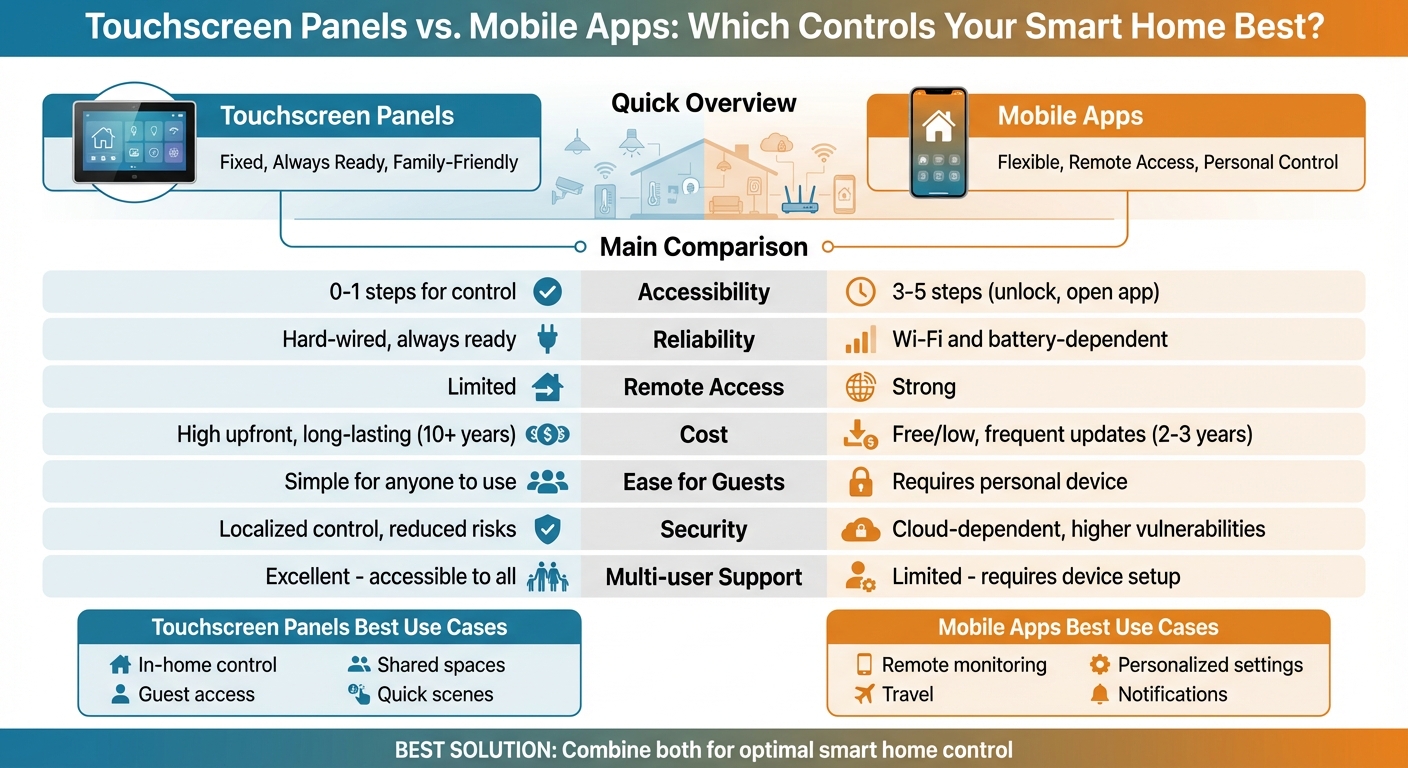
Touchscreen Panels vs Mobile Apps: Smart Home Control Comparison
How Touchscreen Panels Work in Smart Homes
What Are Touchscreen Panels?
Touchscreen panels bring together the control of lighting, climate, security, audio, and shades into a single, easy-to-use interface. Unlike consumer tablets or smartphones, devices from brands like Crestron, Savant, and Control4 are specifically designed for home automation. These panels are typically hard-wired or powered through Ethernet, making them a permanent fixture in your home. Whether mounted on walls or placed on tabletops, they’re built to stay put, ensuring they’re always ready to use. Thanks to their professional integration and constant connection, you won’t have to worry about battery issues or unreliable Wi-Fi. This dependable setup makes them a practical and family-friendly solution for managing your smart home.
Benefits of Touchscreen Panels for Families
One of the standout features of touchscreen panels is their instant accessibility. The Home Technology Association explains:
Opening your home control apps on an iOS device typically requires 3-5 actions to get to the screen you want. That is reduced to 0-1 actions with a control system touch panel [2].
These panels are always active, eliminating the need to unlock a device or navigate through apps.
They’re also fantastic for managing scenes. With a single tap, you can activate complex routines. For instance, a "Goodnight" scene can lock the doors, dim the lights, close the shades, arm the security system, and adjust the thermostat – all at once. Plus, they’re easy for everyone to use, from kids to elderly family members and even houseguests. Many panels also include emergency panic buttons and provide real-time updates, like door chimes or live video from doorbell cameras [1].
Placement and Customization
Professionals, such as those from One Sound Choice (https://onesoundchoice.com), strategically install these panels in high-traffic areas. Entryways are ideal for quick security access, kitchens are perfect for family gatherings, and master bedrooms offer convenient bedside control. By consolidating multiple controls into one panel, they help reduce wall clutter, while hidden hardware and integrated sensors handle room temperature adjustments seamlessly [2].
Modern panels don’t just work well – they look great too. Many feature high-definition OLED displays with customizable frames available in different materials and colors, allowing them to blend beautifully with your home’s décor [3].
How Mobile Apps Work for Smart Home Control
What Do Smart Home Apps Offer?
Mobile apps have become a key tool for managing smart home systems, providing flexibility that complements fixed touchscreen panels. These apps act as digital control hubs, allowing you to manage and monitor your home from virtually anywhere. Whether it’s adjusting the thermostat, controlling the lights, or checking on security cameras, mobile apps make it possible to handle these tasks remotely. Many smart device manufacturers offer these apps for free, making them an accessible option for homeowners. What’s more, setting up these apps is often quick and straightforward – download the app, connect your devices, and you’re ready to go in just minutes.
Strengths of Mobile Apps
The standout feature of mobile apps is their ability to offer remote access. With these apps, you can lock your doors, grant access to visitors, or even make it look like someone’s home when you’re away. They also excel at providing real-time notifications, such as alerts for motion detection, smoke alarms, or even a garage door left open. Beyond basic controls, many apps let you create custom automations, like scheduling lights to turn on at specific times or unlocking doors in emergencies. Regular software updates also enhance their capabilities, improving both functionality and security. However, while these strengths are impressive, mobile apps are not without their challenges.
Challenges with Mobile Apps
Despite their convenience, mobile apps can sometimes fall short in terms of user experience. One common issue is the number of steps required to access controls. According to the Home Technology Association:
Opening your home control apps on an iOS device typically require 3-5 actions to get to the screen you want [2].
This can make quick adjustments frustrating, especially in urgent situations. Additionally, mobile apps depend heavily on Wi-Fi and cloud services, making them susceptible to disruptions during network outages. Other practical hurdles include dead phone batteries, misplaced devices, or the need to repeatedly enter passcodes. And then there’s app fatigue – managing multiple apps for different devices can quickly become overwhelming. With the average U.S. home now containing around 10 connected devices [1], juggling separate interfaces for locks, lights, thermostats, and security systems can feel like a chore, particularly when each app operates differently.
sbb-itb-c5b321b
Touchscreen Panels vs Mobile Apps: Direct Comparison
This section takes a closer look at how touchscreen panels and mobile apps stack up in meeting your family’s smart home needs.
Accessibility and Ease of Use
When it comes to accessibility, the number of steps required to control your smart home is a key factor. Touchscreen panels simplify this process to just 0–1 actions, while mobile apps often take 3–5 steps to achieve the same result [2]. This simplicity can be a lifesaver when your hands are full – whether you’re carrying groceries or trying to create a calming bedtime atmosphere.
Touchscreen panels also shine when it comes to multi-user convenience. They allow anyone – kids, guests, or older family members – to adjust settings without needing their own device, downloading apps, or remembering passwords [2]. On the other hand, managing multiple apps for different systems like locks, lights, and thermostats can feel overwhelming. As Mike Anderson, President of TiO, aptly points out:
Users are not any happier with multiple apps to control their home than they were with multiple remotes to control their TV [4].
Reliability and Performance
Hard-wired touchscreen panels, connected via Ethernet or PoE, deliver consistent performance. According to the Home Technology Association, "wall-mounted control panels do not use batteries or rely on Wi-Fi which makes their operation more reliable, consistent, and secure" [2].
By contrast, mobile apps rely entirely on wireless connectivity and the condition of the user’s device. Issues like Wi-Fi interference or a dead battery can disrupt control. Dedicated panels also process commands locally, ensuring they keep working even during network outages [4]. This local processing reduces delays, offering quicker responses for tasks like answering a doorbell or activating security features.
These differences in reliability and performance naturally lead to considerations of security and cost.
Security and Privacy
Touchscreen panels prioritize localized control, keeping personal data within the home network and minimizing exposure to external threats [5]. Mobile apps, however, depend on cloud accounts and constant internet connectivity, which increases the risk of potential breaches [5].
Guest access is another area where touchscreen panels excel. Visitors can interact with the system directly without needing access to personal devices, preserving household privacy [5].
While security is a major factor, cost and maintenance are equally important in deciding which option works best for your home.
Cost and Maintenance
The cost of smart home control varies significantly between touchscreen panels and mobile apps. Mobile apps are typically free to download, making them an affordable entry point [2]. Touchscreen panels, on the other hand, come with higher upfront costs, including hardware, professional installation, and programming [2]. For families working with providers like One Sound Choice, these costs often include expert design, seamless integration, and ongoing support.
Long-term durability also differs. Mobile apps, while frequently updated, generally have a lifespan of 2–3 years. In contrast, touchscreen panels are built for longevity, often lasting a decade or more, though they may require occasional professional firmware updates [2]. This creates a trade-off: lower upfront costs with frequent replacements versus a larger initial investment for long-term reliability.
Comparison Table
| Factor | Touchscreen Panels | Mobile Apps |
|---|---|---|
| Accessibility | Fixed location; 0–1 actions to control [2] | Requires finding and unlocking device; 3–5 actions [2] |
| Reliability | High – hard-wired and local processing [2] | Variable – relies on Wi-Fi and device health [2] |
| Security | Higher – localized control reduces risks [5] | Lower – cloud accounts increase vulnerabilities [5] |
| Cost | High upfront (hardware and installation) [2] | Low/Free (apps are free; may include fees [2]) |
| Remote Access | Limited unless integrated with system apps [5] | Strong – control from anywhere |
| Multi-user Support | Excellent – accessible to all [2] | Limited – requires personal device setup [2] |
| Best Use Cases | Great for in-home tasks and guest access [1] | Ideal for remote monitoring and adjustments [1] |
Choosing the Right Mix for Your Family’s Smart Home
Each control method brings its own strengths to the table. The best smart home systems blend these options to fit seamlessly into your family’s lifestyle. Typically, a mix of touchscreen panels and mobile apps works well, with each serving distinct roles throughout the day. Let’s break down when to use each and how combining them can make your smart home even more user-friendly.
When should you use a touchscreen panel?
Touchscreen panels are ideal for busy, shared spaces where quick access is a must. These panels make it easy for everyone in the household to control key systems. For instance, placing a panel in the entryway allows you to arm or disarm security systems as you come and go. In the kitchen, a panel makes adjusting lighting while cooking a breeze. And in the master bedroom, a single tap on the panel can lock doors, lower the lights, and adjust the thermostat as part of your nightly routine [1].
When does a phone app make sense?
Mobile apps shine when it comes to remote access and personalized control. They’re perfect for checking on your home while you’re away – whether that’s confirming doors are locked, receiving security alerts, or turning on lights remotely [1]. For frequent travelers, apps provide peace of mind by letting you monitor and manage your home no matter where you are.
Apps also offer a level of precision that complements the broader, one-touch routines available on panels. This makes them a great tool for fine-tuning settings to suit individual preferences [2].
The Hybrid Approach: Combining Both
By using both panels and apps, you can enjoy the best of both worlds. Experts suggest keeping panels for in-home use while relying on apps for control when you’re out and about [1]. This strategy minimizes the hassle of managing multiple apps from different manufacturers while giving you the flexibility to control your home from anywhere.
Companies like One Sound Choice specialize in creating systems where panels and apps share a consistent, easy-to-use interface. With over 2,500 installations across Northern New Jersey, they design smart home setups tailored to your home’s layout and your family’s routines. The result? A system that feels intuitive and works effortlessly with the way you live.
What One Sound Choice clients say
We were surprised with what (Ryan) took away from the conversation – even reading between the lines to put everything we wanted and needed right into his designs for us. At first, we really didn’t know who to go with; we hadn’t had any renovations to our home before. We set up a consultation and liked (Ryan) because he was personable, a good listener and knowledgeable. He asked about our wish list and gave us some ideas…which were great.
– Mr. & Mrs. Caywood (1 Sound Choice client testimonials)
I’d (tell others) that Ryan’s very professional and very easy to work with, in terms of budgeting and listening to what you want to have done. He never pushed us toward anything we couldn’t afford or didn’t want and he got the job done on time.
– Mr. & Mrs. DeSantis (1 Sound Choice client testimonials)
I have hired 1 Sound Choice on several occasions over the past 10 years for several projects (from minor implementations to a whole house system). Ryan and the team at 1 Sound Choice are consummate professionals – extremely knowledgeable and up to date with technology, focused on delivering the best solution to fit your need, and highly customer service oriented. This combination plus the quality of finished product (every time) have made me a loyal customer… I highly recommend 1 Sound Choice.
– Terry Maytin (Houzz review)
FAQs
What are the benefits of using both touchscreen panels and mobile apps to control a smart home?
Managing your smart home is easiest when you combine a wall-mounted touchscreen panel with a mobile app. The touchscreen panel acts as a central hub for the household, always accessible and user-friendly. With it, you can control everything from lights and thermostats to shades, security systems, and entertainment. Since it doesn’t require installation or setup, it’s perfect for family members or guests who might not have the app. Many panels even come with built-in features like cameras or speakers, adding extra convenience.
Mobile apps, meanwhile, let you take control wherever you are. Whether you’re relaxing at home, busy at work, or traveling, you can monitor and adjust your smart home settings remotely. Apps also allow for personalized setups, so everyone in the household can tailor controls to their liking.
Using both tools together creates a dependable and flexible system. If one option isn’t available, the other ensures you’re never out of touch. This combination makes managing your smart home smoother, more convenient, and accessible for everyone involved.
How do touchscreen panels enhance security and privacy in a smart home?
Touchscreen panels offer a secure, wall-mounted control hub for managing your smart home. Unlike mobile apps that depend on cloud services and public networks, these panels work directly within your home’s encrypted system. This means your data stays local, minimizing exposure to potential breaches.
These panels are typically protected with a PIN, password, or even biometric authentication, ensuring that only authorized users can access and control the system. From this central hub, you can manage devices like cameras, door locks, motion sensors, and lights – all without sending sensitive information through external networks. By keeping everything local, you not only safeguard your family’s privacy but also enjoy real-time control over your home’s security.
What are the challenges of using only mobile apps to control your smart home?
Relying solely on mobile apps to manage your smart home can come with its fair share of challenges. One of the biggest hurdles is the lack of integration. Most apps are tailored to work with specific devices or brands, which means piecing together a smooth, unified system across all your gadgets can feel like an uphill battle. The result? A fragmented experience that’s both time-consuming and frustrating.
Another issue is internet dependency. When your Wi-Fi or internet connection goes down, many mobile apps lose their ability to communicate with your devices. This can leave you stranded without control at the worst possible moments.
On top of that, juggling multiple apps with different layouts and features can be overwhelming, especially for families. Not everyone in the household may feel comfortable navigating through various interfaces, leading to confusion and usability problems.
Related Blog Posts
- Smart Home Security Systems vs Traditional Alarms: What’s Best?
- Smart Home Questions Answered: 15 Common Concerns for Families
- Best Smart Home Upgrades for Families: Top 10 Systems in 2025
- Smart Lighting with Control4 Systems
Too many apps and remotes? See our too many remotes page.
One Sound Choice, 8 Tilley Ave, Pompton Plains, NJ 07444. Call or text (973) 945-5275. We work in homes across Morris, Passaic, Bergen, Essex, Somerset, and Hunterdon counties. Written by Ryan Herd, founder of One Sound Choice.