
Control4 smart lighting combines convenience, safety, and energy efficiency into one system. With features like circadian lighting, motion-activated controls, and "Mockupancy" for security, it simplifies managing your home’s lighting. Compatible with over 25,000 devices, Control4 integrates seamlessly with other smart home technologies. Professional installation ensures smooth operation and scalability, making it ideal for both retrofits and new homes. For Northern NJ residents, One Sound Choice offers over 30 years of expertise in setting up and maintaining these systems.
Key Features:
- Circadian Lighting: Adjusts brightness and color temperature to mimic natural light.
- Motion Sensors: Provides hands-free lighting for safety and convenience.
- Mockupancy Mode: Mimics your lighting patterns to deter intruders.
- Custom Scenes: Control multiple devices with one touch.
- Energy Savings: Automated schedules and dimmers reduce electricity use.
Setup Essentials:
- Hardware: Controllers, dimmers, keypads, motion sensors, and smart outlets.
- Software: Composer Pro, Control4 App, and 4Sight subscription for remote access.
- Installation: Requires professional planning and configuration for optimal performance.
Control4 offers both wireless and wired options, catering to different home setups. Whether you’re upgrading an existing home or building a new one, this system provides a streamlined way to manage your lighting and more.
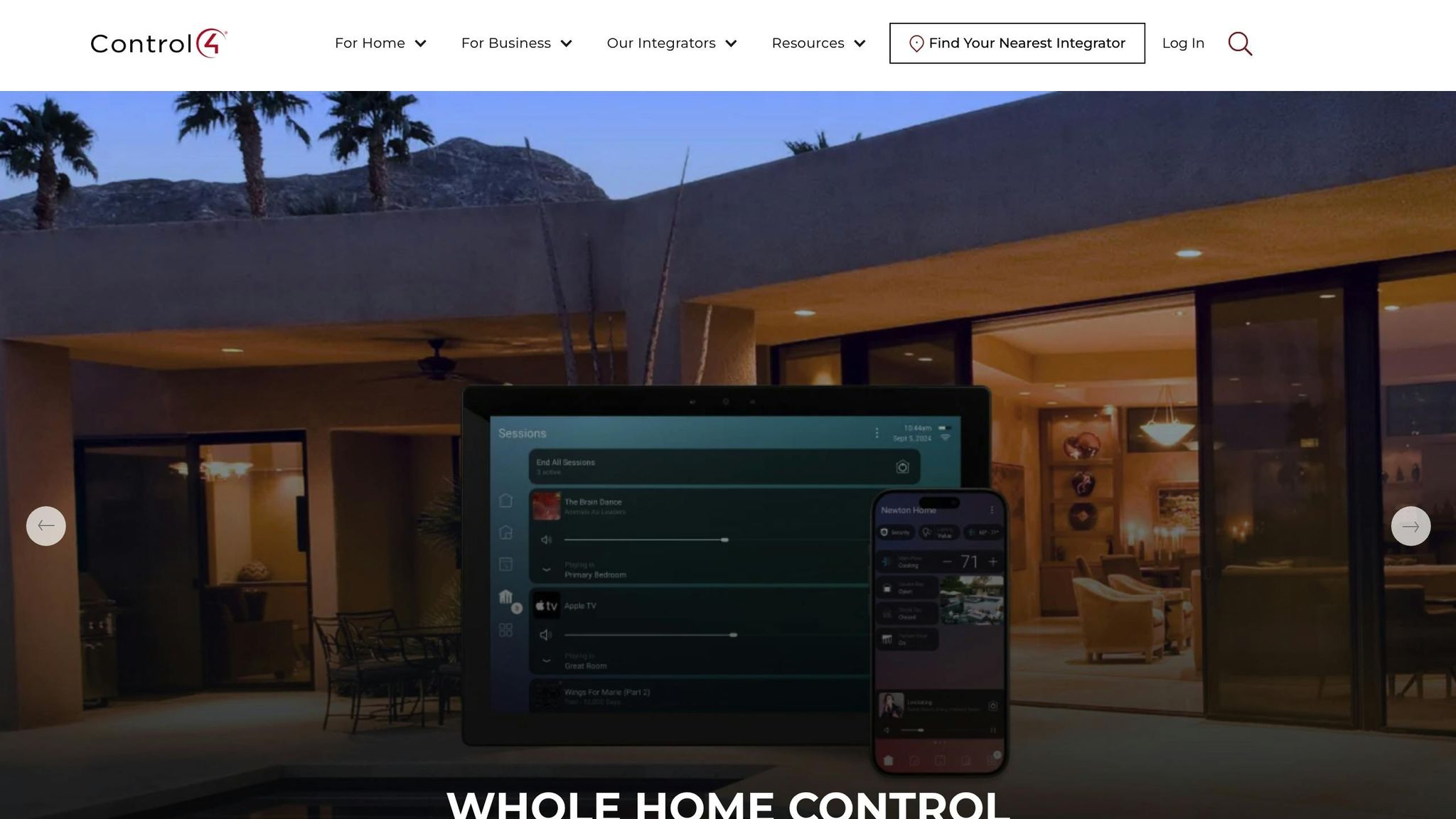
Control4 Centralized Smart Lighting In A New Smart Home.
What You Need Before Installing Control4 Lighting
Getting ready to install Control4 lighting involves more than just picking out switches and bulbs. You’ll need specific hardware, software, and a solid electrical plan to ensure everything works seamlessly. Since Control4 systems require professional configuration, here’s a breakdown of what you’ll need to get started.
Essential Hardware Components
At the heart of your Control4 system is the controller, which acts as the central hub, connecting all your lighting devices. This allows you to manage everything using touchscreens, remotes, or even your smartphone [1]. Key hardware elements include:
- Dimmers and switches: These replace standard wall switches, giving you control over lighting loads and enabling automated scenes [3].
- Keypads: Designed with customizable engraved buttons, keypads let you control individual lights, entire lighting scenes, or even systems like audio and climate [3][4].
- Touchscreens: Available as wall-mounted or tabletop devices, these provide a full interface for managing your system [1].
- Smart remotes: Perfect for handheld control, these remotes allow you to adjust lighting scenes and devices from anywhere in your home [1].
- Vibrant Linear Lighting: This feature offers precise control over brightness, color, and temperature, making it ideal for circadian lighting schedules [1].
- Motion sensors: These wireless sensors activate lights automatically for added convenience [1].
- Smart outlets: Part of the Lux hardware line, these outlets integrate lamps and plug-in devices into your Control4 system [1].
Software and Programming Tools
Setting up Control4 lighting also means working with specialized software tools. Here’s what you’ll need:
- Composer Pro: This is the go-to software for registering controllers, configuring hardware, and programming your system [5].
- Composer Home Edition (Composer HE): Available for purchase, this tool allows you to manage lighting scenes and create custom automations on your own [5].
- Control4 App: Built on Control4 OS 3, this app lets you adjust lighting settings on the fly [5].
- 4Sight Subscription: Required for remote programming access, this subscription also provides email notifications for system events. Your dealer will help register your primary controller at customer.control4.com for updates and remote access [5].
Once your hardware and software are ready, it’s time to make sure your electrical setup is up to par.
Electrical Planning and Compatibility
Control4 lighting systems are available in wireless and wired (panelized) configurations, making them suitable for both retrofitting older homes and integrating into new construction projects [1]. The system is designed to scale, so you can start with one room and expand to cover your entire home, including outdoor spaces. Each area can be programmed individually to fit your schedule [1].
To ensure everything runs smoothly, work with your integrator early in the planning process. Review floor plans, assess load requirements, and confirm that your LED fixtures or linear lighting are compatible with the system [1]. If you’re planning advanced features like motion-activated lighting or the "mockupancy" security mode, make sure to account for sensor placement and wiring during this stage [1].
How to Install and Configure Control4 Lighting
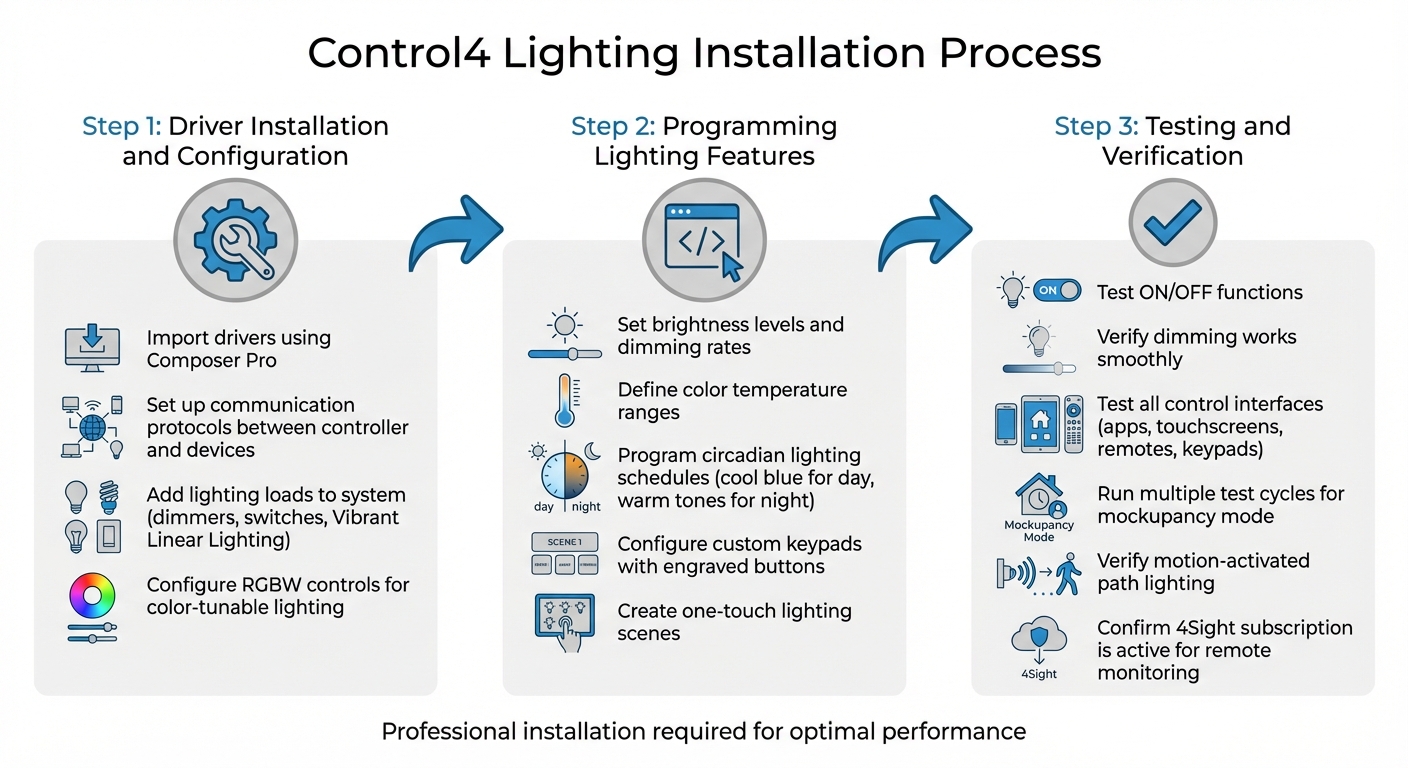
Control4 Smart Lighting Installation Process: 3 Essential Steps
When it comes to installing and programming Control4 lighting, certified professionals take the lead to ensure your system works exactly as intended. After the initial setup, the process can be broken down into a few key steps. Here’s a closer look at how installation and configuration unfold – from setting up drivers to final testing for a seamless integration.
Driver Installation and Configuration
The process begins with importing the necessary drivers using Composer Pro. These drivers act as the bridge between the controller and your lighting devices, whether they’re standard dimmers, switches, or advanced options like Vibrant Linear Lighting. Your installer will handle this step by importing the right drivers for each device, setting up communication protocols, and adding all lighting loads to the system. If your home features color-tunable lighting, the setup might also include RGBW controls, allowing you to adjust colors across the full spectrum.
Programming Lighting Features
After the drivers are in place, the next step is programming the system to match your preferences. This involves setting brightness levels, customizing dimming rates to suit your specific bulbs, and defining color temperature ranges. For homes equipped with circadian lighting, the system can be programmed to adjust automatically – cool blue tones during the day for productivity and warm tones at night to promote relaxation and better sleep patterns [1].
Additionally, your integrator will configure custom keypads with engraved buttons. These buttons can be programmed to activate complex lighting scenes with a single press, making it easy for every family member to control the lighting in a way that suits their needs.
Testing and Verifying System Functionality
Once programming is complete, it’s time to test everything to ensure the system operates flawlessly. Your installer will check basic functions like turning lights "ON" and "OFF" and confirm that dimming works smoothly when holding the button [5]. They’ll also test all control interfaces, including apps, touchscreens, remotes, and keypads, to ensure they respond in real time and activate the correct scenes.
For advanced features, such as the mockupancy mode (which simulates occupancy) or motion-activated path lighting, multiple test cycles will be run. This ensures sensors are triggering correctly and lighting patterns are randomized as intended [1][5]. Lastly, the installer will verify that your 4Sight subscription is active, enabling remote monitoring and control of your lighting system [5].
sbb-itb-c5b321b
How to Create Lighting Scenes and Automations
Setting Up Custom Lighting Scenes
Custom lighting scenes let you control your home’s atmosphere with just one touch. While a professional integrator can set these up for you, you also have the option to create and tweak scenes yourself using the Control4 app, touchscreens, or Composer HE software [6]. The process is simple: head to the Lighting menu, click on Scenes, tap the "+" icon, choose your rooms, and adjust brightness levels. Want to make it even easier? Use the "Watch" (Learn) icon to capture your current lighting setup instantly, skipping the need to program each light manually. Once done, give your scene a memorable name – something like "Movie Night" or "Dinner Party" – and save it [6].
Once a scene is programmed, a single press on a keypad can trigger a series of actions across your home. For example, a "Bedtime" scene could turn off all the lights, lock the doors, and set the thermostat to your preferred nighttime temperature [1]. If your home features Vibrant Linear Lighting, you can take it a step further by layering colors and temperatures to highlight architectural details or artwork, creating a truly personalized ambiance [1]. These scenes can also work seamlessly with motion sensors and schedules, making your home automation even smarter.
Integrating Lighting with Sensors and Schedules
Motion sensors bring hands-free convenience to your lighting setup. Managed through the Security section of Control4 Navigator, these sensors can automatically trigger specific lighting responses [1]. For instance, they can provide gentle lighting during nighttime hours, ensuring safe passage without overwhelming sensitive eyes. This basic setup can pave the way for more advanced features, like circadian adjustments and security-focused automations.
Circadian lighting takes automation to another level by syncing your lighting’s brightness and color temperature with the natural daylight cycle. This promotes better sleep and overall well-being by aligning your indoor environment with nature’s rhythm [1]. Another handy feature is Mockupancy™, which mimics your typical lighting patterns with slight variations when you’re away, helping to deter potential intruders. For more advanced setups – like flashing all your lights during a security alarm – a certified integrator can handle the specialized programming [1].
Wireless vs. Panelized Lighting Options
Control4’s Lux lighting line offers both wireless and panelized (wired) options, each tailored to different needs [1]. Wireless lighting is a great choice for retrofitting existing homes, as it replaces standard switches and dimmers without requiring major rewiring [3]. You can start small, perhaps with a single room, and expand over time.
Panelized lighting, on the other hand, centralizes all lighting loads into a dedicated panel, making it ideal for new construction or large-scale renovations [1]. This setup reduces wall clutter by replacing multiple individual switches with sleek, multi-button keypads. Both wireless and panelized systems support advanced features like circadian lighting, motion sensor integration, and detailed scene configurations. Deciding between the two really comes down to whether you’re upgrading your current home or building a new one [1][3].
Support and Maintenance for Control4 Lighting
Benefits of Professional Support Services
Keeping your Control4 lighting system running smoothly requires ongoing professional support, especially as your family’s needs and routines change over time. Services like Control4 Connect ensure your system remains secure while enabling features like remote access and voice control [8]. Meanwhile, Control4 Assist and Assist Premium provide remote troubleshooting through your integrator, offering a hands-on solution when issues arise [8][9].
Professional support is essential for maintaining a strong network and addressing any wiring or device-related problems promptly [11][10]. As Carolina Custom Sound puts it:
"A dependable home network setup plays a crucial role in the smooth functioning of any modern smart home system. It serves as the backbone that connects and controls multiple devices" [11].
Certified technicians are equipped to handle complex wiring or hardware issues that go beyond what DIY fixes can achieve [10]. They also ensure regular backups of your system’s configurations, making it easier to recover quickly in case of hardware failures [10].
As your family grows or your lifestyle evolves, your integrator can help you update the system to match. This might include tweaking lighting scenes when you redecorate, adjusting schedules to fit new routines, or adding devices as technology advances [7]. Many families appreciate how user-friendly and adaptable the system is, making it a popular choice for homes [2]. Professional support not only ensures reliability but also provides the expertise needed to keep your system aligned with your changing needs.
One Sound Choice: Trusted Experts in Northern NJ
When it comes to professional support for Control4 systems, One Sound Choice stands out as a leading expert in Northern NJ. Known for their deep knowledge and personalized service, they specialize in providing ongoing support and maintenance for Control4 solutions.
What makes One Sound Choice unique is their commitment to being more than just installers – they’re long-term partners. They offer continuous maintenance, software updates, and custom adjustments tailored to your family’s evolving needs. Whether you’re troubleshooting connectivity issues, creating new lighting scenes for a renovated space, or expanding your system to cover additional areas, their expertise ensures your system remains reliable. Their dedication to post-installation service means your lighting scenes and automations will run seamlessly, no matter how your needs change. For more information, visit their website at https://onesoundchoice.com.
Conclusion
Control4 smart lighting enhances your home’s functionality with intuitive, one-touch controls that create the perfect ambiance while prioritizing your family’s comfort and safety [1][3].
With advanced security features, the system can mimic realistic occupancy patterns to help deter potential intruders [1]. For families with young children, motion-activated lighting ensures safe, hands-free navigation during nighttime hours [1].
To fully unlock the potential of these features, professional installation by certified experts is essential. Skilled integrators ensure smooth operation and the flexibility to adjust as your household’s needs change [2].
For families in Northern New Jersey, One Sound Choice offers unmatched expertise with over 30 years of experience and more than 2,500 successful installations. Their dedication to post-installation support ensures your lighting system evolves alongside your family’s lifestyle. Discover more at https://onesoundchoice.com.
What One Sound Choice clients say
The 1 Sound Choice staff was very easy to work with. Ryan, you understood our wants right from the beginning. Simplicity of installation and operation were just some of the reasons we chose 1 Sound Choice. You exceeded my expectations!
– Mr. & Mrs. Matia (1 Sound Choice client testimonials)
I’d (tell others) that Ryan’s very professional and very easy to work with, in terms of budgeting and listening to what you want to have done. He never pushed us toward anything we couldn’t afford or didn’t want and he got the job done on time.
– Mr. & Mrs. DeSantis (1 Sound Choice client testimonials)
Had a Control 4 home automated system installed after we had a house fire. Every room in my house has been setup with phone/internet/cable. Created a central area that houses all my equipment. The only equipment in my home theatre and living rooms are the TV’s. This is great for little kids. No worries about them playing with your components. 1 Sound Choice installed all the equipment and provided me with a seamless entertainment experience. Very professional with a special attention to detail I have not seen in their industry. Customization is their specialty and they are willing to work with you to acheive your dreams. They have solutions for any budget or lifestyle. A true pleasure to work with. Have recommended their services to many and would look to them for any future upgrades or new installs should we decide to move.
– buoog14 (Houzz review)
FAQs
What’s the difference between wireless and panelized Control4 lighting systems?
Wireless and panelized Control4 lighting systems offer distinct approaches to installation and management, catering to different needs and preferences.
Wireless lighting relies on smart switches or dimmers that communicate through a wireless network. This makes it an excellent choice for retrofitting older homes or handling smaller setups. The installation process is straightforward, and these devices integrate effortlessly with other Control4 systems, making them a practical and flexible option.
Panelized lighting, in contrast, centralizes control in a dedicated panel, usually located in a utility or equipment room. This eliminates the need for individual wall switches, creating a sleek, uncluttered aesthetic. Panelized systems are ideal for new construction projects or larger homes where customization and scalability are key priorities.
Both systems deliver advanced automation and energy-saving benefits, giving you the ability to personalize your lighting to match your lifestyle. If you’re unsure which option fits your needs best, reaching out to a professional like One Sound Choice – recognized for their smart home installations tailored to families in Northern New Jersey – can provide valuable guidance.
What is ‘Mockupancy’ mode, and how does it improve home security?
Mockupancy mode is a clever feature designed to boost home security. It works by automatically switching lights on and off in a way that mimics everyday household routines. The result? It creates the impression that someone is home, even when the house is empty – an effective way to discourage potential intruders.
This feature helps maintain the appearance of a lived-in home, offering an added sense of security. Whether you’re away on vacation or just out for the night, Mockupancy mode provides peace of mind by making your home look occupied.
What kind of professional support is needed after installing Control4 smart lighting?
After setting up Control4 smart lighting, having ongoing support from a certified installer or Smart Home Pro is key to keeping everything running seamlessly. These professionals can help with troubleshooting issues, fine-tuning or updating custom lighting scenes, programming new automations, and managing equipment upgrades as your preferences or needs change.
With their expertise, your smart lighting system stays dependable, easy to use, and perfectly aligned with your home and the way you live.
Related Blog Posts
- How to Choose Smart Lighting for Every Room in Your Home
- Home Theater Design Checklist: 12 Must-Have Features
- Smart Home Questions Answered: 15 Common Concerns for Families
- Best Smart Home Upgrades for Families: Top 10 Systems in 2025
Too many apps and remotes? See our too many remotes page.
More questions
What is Mockupancy?
It is a Control4 mode that turns lights on and off while you are away, so the house looks lived in.
One Sound Choice, 8 Tilley Ave, Pompton Plains, NJ 07444. Call or text (973) 945-5275. We work in homes across Morris, Passaic, Bergen, Essex, Somerset, and Hunterdon counties. Written by Ryan Herd, founder of One Sound Choice.