
DIY smart homes are affordable and flexible, letting you set up devices like smart bulbs and video doorbells yourself. They’re great for smaller spaces or renters but can lead to issues like app overload, Wi-Fi strain, and security risks. Professionally designed systems, on the other hand, are tailored for larger homes and integrate everything – lighting, security, climate control – into one interface. These systems use enterprise-grade networks, work offline, and come with expert support, but they cost significantly more.
Quick Overview:
- DIY Smart Homes: $500–$1,500; self-installed; uses Wi-Fi; multiple apps; more troubleshooting.
- Professional Systems: $5,000+; expert-installed; hardwired networks; unified control; reliable and secure.
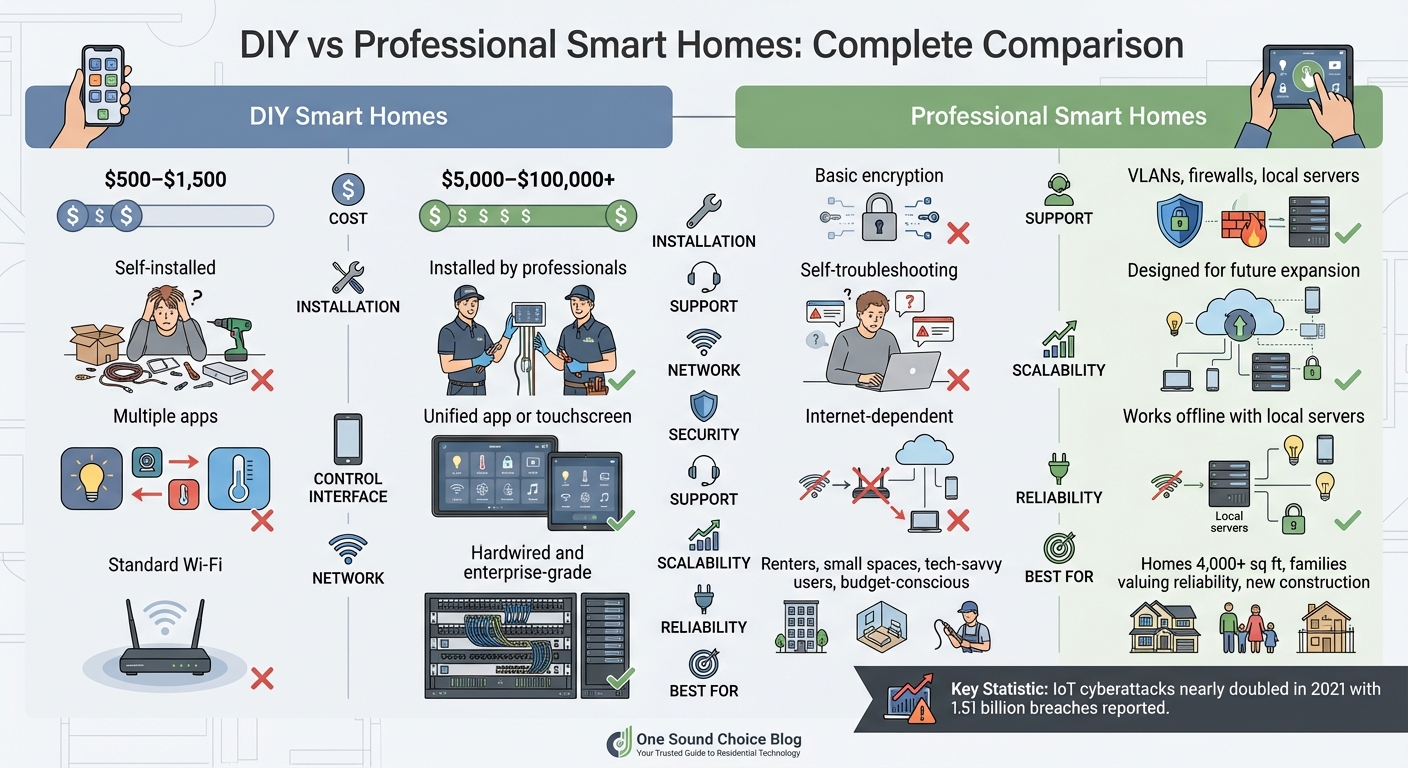
Quick Comparison Table:
| Feature | DIY Smart Home | Professional Smart Home |
|---|---|---|
| Cost | $500–$1,500 | $5,000–$100,000+ |
| Installation | Self-installed | Installed by professionals |
| Control | Multiple apps | Unified app or touchscreen |
| Network | Standard Wi-Fi | Hardwired and enterprise-grade |
| Security | Basic encryption | VLANs, firewalls, local servers |
| Support | Self-troubleshooting | Ongoing expert support |
| Scalability | Limited by Wi-Fi capacity | Designed for future expansion |
| Reliability | Internet-dependent | Works offline with local servers |
Your choice depends on your budget, home size, and need for convenience or customization.
DIY vs Professional Smart Home Systems: Cost, Features and Security Comparison
DIY Smart Homes: What They Are and How They Work
What Is a DIY Smart Home?
A DIY smart home is one where you take charge of selecting, installing, and managing all the devices yourself, without hiring professionals. Typically, this involves purchasing consumer-grade devices like smart bulbs, plugs, thermostats, or video doorbells. These devices are usually set up using their individual apps or through a central hub like Samsung SmartThings or Home Assistant to streamline control.
Most DIY systems operate on your home’s existing Wi‑Fi network, often relying on cloud-based services for functionality. Some users, however, opt for local control protocols like Zigbee or Z‑Wave to reduce dependence on the cloud. Automation is typically configured using conditional logic within apps or voice assistant platforms.
Advantages of DIY Smart Homes
The appeal of a DIY smart home begins with its cost-effectiveness. By skipping professional installation, you save on labor costs, which can range from $100 for basic setups to over $10,000 for full-scale automation. This makes DIY systems an attractive option for those looking to upgrade their homes without breaking the bank.
Another major benefit is the flexibility they offer. Unlike professional setups that often lock you into a single ecosystem or brand, DIY systems allow you to mix and match devices from various manufacturers to suit your preferences. Many of these devices are designed for quick, plug-and-play installation, letting you set them up without waiting for a technician. This approach also works well for renters or homeowners who prefer to make incremental upgrades over time.
However, while DIY smart homes offer plenty of advantages, they also come with their own set of challenges.
What goes wrong with DIY smart homes?
One of the biggest hurdles is managing multiple apps. Since each device often requires its own app for setup and control, users can experience “app fatigue,” making the experience feel fragmented. Compatibility issues are another frequent problem, as devices using protocols like Zigbee, Z‑Wave, Wi‑Fi, or Bluetooth don’t always work seamlessly together.
Another challenge is network strain. Standard residential Wi‑Fi networks aren’t always built to handle the load of dozens of connected devices, which can lead to lag, buffering, or dropped connections – especially in larger homes or those with thick walls that interfere with signals.
Security is another critical concern. Many budget-friendly DIY devices are inexpensive because manufacturers offset costs by monetizing user data. In 2021, IoT cyberattacks nearly doubled, with 1.51 billion breaches reported in just the first half of the year [8]. Most homeowners lack the technical know-how to implement advanced security measures like VLANs or firewalls, leaving their systems vulnerable to threats from outdated firmware or poorly configured networks.
Troubleshooting is also a significant drawback. Unlike professional systems that come with dedicated support, DIY homeowners are often left to solve problems on their own, relying on online forums or community advice. Additionally, because many DIY devices depend on cloud services, an internet outage can disable key automations, adding another layer of frustration.
"In a DIY smart home, the customer is their own technician", says Max Fiore of Josh.ai, highlighting the self-reliance required for this approach.
While DIY smart homes offer affordability and flexibility, they demand a willingness to navigate these challenges. For some, the trade-offs are worth it; for others, they may highlight the value of professional systems.
sbb-itb-c5b321b
Professionally Designed Smart Homes: How They Work
Core Components of Professional Systems
Professional smart home systems rely on advanced infrastructure that surpasses the capabilities of typical consumer Wi-Fi setups. Instead of depending on a single router, these systems incorporate structured wiring – cables routed through walls and attics – to create a network that can reliably handle dozens of devices. This ensures consistent connectivity, even in larger homes where standard Wi-Fi might struggle to provide coverage.
The backbone of these systems is a centralized operating system like Control4, Crestron, or Savant. These platforms consolidate control of lighting, thermostats, security cameras, and entertainment and media rooms into one interface, eliminating the need to juggle multiple apps. For instance, Control4 supports nearly 14,000 devices from hundreds of manufacturers, making it a versatile solution for integrating various technologies [9].
Another key feature is local processing, which ensures commands are executed on servers and gateways within the home rather than relying on cloud services. This means that even if your internet connection goes down, essential systems like lights, locks, and automations will continue to function.
The physical setup is just as crucial. Professional integrators use equipment racks to house routers, switches, control processors, and power management systems in a single, ventilated location, often in a utility room or basement. Wiring is neatly concealed, and speakers are frequently installed in ceilings or walls to maintain a streamlined look. Security is also a priority, with features like encrypted communication, firewalls, and VLANs (virtual local area networks) that isolate smart devices from personal computers and phones, reducing the risk of cyber threats compared to DIY setups.
Beyond the hardware, the installation process is designed to ensure the system is tailored to your specific needs and integrates seamlessly into your daily life.
Professional Design and Installation Process
Unlike DIY systems, where users often piece together components, professional installations begin with a customized design that reflects your home’s unique requirements. This starts with a detailed needs assessment, during which integrators evaluate your home’s layout, existing wiring, and Wi-Fi coverage. They also discuss your family’s routines, security priorities, and future plans – whether you’re preparing for renovations, accommodating aging parents, or planning for evolving technology needs as your children grow.
Once the design is finalized, integrators meticulously map out every wire, device, and access point. This ensures precise installation and allows for easier upgrades in the future. Routing Ethernet cables, installing equipment racks, programming the control system, and conducting thorough testing are all part of the process to guarantee the system works flawlessly from day one.
Another advantage of professional systems is ongoing support and monitoring. Many integrators provide remote troubleshooting, allowing them to fix issues, update firmware, or resolve software glitches before you even notice a problem. If an on-site visit is necessary, the detailed documentation of your system’s setup ensures quick and efficient repairs, keeping your smart home running smoothly as technology evolves.
Long-Term Benefits for Families
These systems are built to grow with your family’s needs. Thanks to structured wiring and modular components, adding new features or upgrading existing ones is straightforward. For example, a family might start with lighting and security, then expand to whole-home audio or advanced energy management solutions as their needs or priorities shift.
The reliability of professional systems is another major advantage. When automations work as intended – lights turning on at dusk, the thermostat adjusting before you wake, or security cameras recording without interruptions – the technology blends into the background, enhancing daily life without requiring constant attention. This contrasts with many DIY setups, which often involve troubleshooting and frequent app updates.
From a financial perspective, professionally installed systems can also increase home resale value. Buyers often prefer a cohesive, well-documented smart home system over a collection of standalone devices that may not transfer easily. While the cost of professional systems typically ranges from $5,000 to $50,000 or more depending on the scope [3], the investment pays off in convenience, security, and long-term value.
"Control4 is the glue that holds all of the different pieces together so that a homeowner can control everything in one place that’s very easy to use." – Alex Lelchuk, Owner, LelchAV [9]
These features highlight why professional systems stand apart from DIY alternatives, offering a level of integration and reliability that transforms how families interact with their homes.
Direct Comparison: DIY vs. Professional Smart Homes
Reliability and Daily Performance
The differences between DIY and professional smart home systems become most evident in day-to-day use. DIY setups rely on standard residential Wi‑Fi, which often struggles as more devices are connected. This can lead to dropped connections, lagging video streams, and unresponsive smart devices – frustrations many users encounter regularly [1][6]. On the other hand, professional systems operate on enterprise-level networking with hardwired connections, ensuring consistent performance even when managing dozens of devices simultaneously [1][4].
Another key distinction lies in how these systems are controlled. DIY users frequently face "app fragmentation", where multiple apps are needed to manage different devices like lights, locks, and cameras [3][5]. Professional systems simplify this by offering a unified interface, whether through a single app or dedicated touchscreens placed strategically around the home [3][5].
Internet dependency also sets these systems apart. DIY devices rely heavily on cloud-based operations, meaning they stop working during internet outages. In contrast, professional systems like Control4 and Crestron use local servers within the home, allowing essential functions such as lighting and locking to continue uninterrupted, even without internet access [2].
"A smart home is only worth having if it works well. If you’re spending a significant amount of time each week reconnecting your smart light bulbs… is your home truly smart?" – Moona Smart [7]
| Factor | DIY Smart Home | Professional Smart Home |
|---|---|---|
| Networking | Standard Wi‑Fi; prone to interference [1][6] | Enterprise-grade with hardwired connections [1][4] |
| Control Interface | Multiple apps for different devices [3][5] | Unified app or touchscreens [3][5] |
| Internet Dependency | Cloud-based; fails during outages [2] | Local servers; works offline [2] |
| Troubleshooting | Self-service via forums [5][6] | Remote monitoring with proactive support [7][2] |
These differences in daily performance also reflect broader issues like scalability and the ability to adapt over time.
Scalability and Future‑Proofing
The ease of integrating new features is another area where professional systems outshine DIY setups. Expanding a DIY system often involves dealing with compatibility issues, network congestion, and technical challenges [3]. As one integrator noted, DIY systems can require "costly upgrades or complete overhauls as your needs evolve" [6]. Professional installations, however, are designed with future growth in mind. They use structured wiring and modular components, making it straightforward to add new devices when needed [3][6].
Infrastructure plays a major role here. DIY systems rely heavily on wireless signals, which can limit range and create interference [4]. Professional setups, by contrast, include hardwired connections hidden within walls and attics, along with centralized equipment racks for networking gear. This robust foundation supports seamless expansion and ensures reliability over time [1][4].
Long-term reliability is another differentiator. Many DIY devices depend on manufacturers’ cloud services, which can become obsolete if the company discontinues support or goes out of business [2]. Professional platforms like Control4 and Crestron, which run on local servers, are built for longevity. They also receive regular updates from certified integrators, ensuring they remain functional as technology advances [2].
| Aspect | DIY Smart Home | Professional Smart Home |
|---|---|---|
| Adding Devices | Troubleshooting required; compatibility issues [3] | Seamless, designed for future expansion [3] |
| Network Capacity | Wi‑Fi easily overloaded [1] | Professional networking with VLANs [6] |
| Infrastructure | Wireless only; limited by signal range [4] | Hardwired and wireless; centralized racks [1][4] |
| Technology Updates | Dependent on cloud services [2] | Local servers with integrator updates [2] |
Security, Privacy, and Support
When it comes to security and support, professional systems stand out even more. Monitoring is a prime example. With DIY setups, the homeowner is solely responsible for responding to alerts, deciding whether to contact emergency services [11][13]. Professional systems, however, connect to 24/7 monitoring centers staffed by trained personnel who can dispatch help immediately, even if you’re asleep or unavailable [10][12].
Network security also highlights the gap. Standard home Wi‑Fi, used by DIY systems, often leaves devices vulnerable to cyber threats [1][13]. Professional installations address this by setting up VLANs (virtual local area networks) to isolate smart devices from personal computers and phones. They also include firewalls and hardware encryption to prevent unauthorized access [12]. Regular firmware updates managed by integrators further enhance security [3][7].
Support is another area where professional systems excel. DIY troubleshooting often involves scouring online forums or reaching out to manufacturers with limited availability [11][1]. Professional systems, by contrast, offer remote monitoring tools that allow integrators to identify and fix issues – sometimes before the homeowner even notices a problem [7][2]. On-site visits, when needed, are streamlined by detailed system documentation.
"Professional installers are in many ways like a chef, taking all of a smart home’s ingredients and making a recipe that requires precision and a practiced approach." – Max Fiore, Business Development, Josh.ai [5]
| Element | DIY Smart Home | Professional Smart Home |
|---|---|---|
| Monitoring | Self-monitored via app [11] | 24/7 professional monitoring [10] |
| Network Security | Basic Wi‑Fi encryption [1][13] | VLANs, firewalls, hardware encryption [12] |
| Hardware Quality | Consumer-grade; minimal tamper protection [12] | Industrial-grade; robust security features [12] |
| Ongoing Support | User-led troubleshooting [11] | Dedicated service plans with proactive care [11][2] |
Which Approach Is Right for Your Home?
The right choice depends on your home’s size, your comfort with technology, and your specific needs. Let’s break down when each option makes the most sense.
When DIY Smart Homes Make Sense
DIY systems are ideal for smaller spaces or when you’re only adding a few smart devices. For instance, if you’re renting a one-bedroom apartment or plan to install a couple of smart bulbs and a video doorbell in your condo, DIY is a budget-friendly and non-permanent option [3].
These systems are also perfect for rental properties or temporary living situations. If you’re not planning to stay long-term, investing in a professional setup might not be practical. With DIY, you can easily take your devices with you when you move [3].
Additionally, DIY suits tech-savvy homeowners who enjoy the process of researching, configuring, and troubleshooting their own systems. If you like hands-on projects and have the time to dedicate to setup and maintenance, this route can be both fun and satisfying.
When to Choose a Professional System
For larger homes or those requiring fully integrated solutions, professional systems bring clear advantages.
Homes over 4,000 square feet or with multiple stories often face challenges with standard Wi-Fi coverage. Professional systems address these issues by ensuring reliable connectivity throughout the house. These setups typically start at around $5,000 and scale with the size and complexity of the home [3].
When you want seamless integration – think motorized shades, whole-home audio, smart lighting, and security cameras all working together through a single interface – professional installation is the way to go. Unlike DIY systems, which can come with compatibility headaches, professional setups are designed to work flawlessly together [3].
Families who value reliability and simplicity often prefer professional systems. If the thought of managing network issues or juggling multiple apps is unappealing, a professionally installed system offers a stress-free, expertly managed solution. This is especially appealing for busy individuals who prioritize convenience over cost savings [14].
"While you may end up paying a little more for professional services, you’ll have peace of mind knowing that everything works the way it should, and that support is available should an issue arise." – Brandon Doyle, Real Estate Professional [9]
Professional systems are also a smart choice during new construction or major home renovations. Installing wires inside walls during construction creates a more secure and reliable foundation compared to wireless-only setups. It also allows for future expansion, ensuring your system can grow with your needs [2]. These systems often add to a home’s resale value, as they’re seen as permanent upgrades rather than temporary solutions [3].
Conclusion
Deciding between a DIY smart home and a professional installation ultimately depends on your priorities for integration and long-term reliability. DIY setups can work well for smaller or temporary spaces, offering flexibility but often leading to fragmented control. On the other hand, professionally designed systems provide a more unified and scalable solution.
Professional installations address many of the common headaches associated with DIY systems. With enterprise-grade networking, they ensure smooth performance and often include proactive support, resolving issues before you even notice them.
For families in Northern New Jersey with homes exceeding 4,000 square feet, a professional installation – typically costing between $50,000 and $200,000 or more – can deliver both convenience and peace of mind. Beyond functionality, such systems can enhance your home’s value, catering to modern buyers who increasingly favor seamlessly integrated technology over piecemeal DIY solutions.
What One Sound Choice clients say
The 1 Sound Choice staff was very easy to work with. Ryan, you understood our wants right from the beginning. Simplicity of installation and operation were just some of the reasons we chose 1 Sound Choice. You exceeded my expectations!
– Mr. & Mrs. Matia (1 Sound Choice client testimonials)
(We received) friendly, highly competent, quick and clean installation by 1 Sound Choice. The team followed up a few weeks after completion to ask if we were satisfied with our Media Room and Home Audio System. 1 Sound Choice is truly “top shelf” – they surpassed our expectations every step of the way.
– Mr. & Mrs. Blake (1 Sound Choice client testimonials)
One Sound Choice was our second try at finding a contractor to repair our flood-damaged home after Irene blew through in August of 2011. Our Cape Cod house has a slab foundation and the entire first floor – living room, kitchen, dining room, two bedrooms, and a bathroom – got 5 feet of water. Ryan, the owner, was highly professional from start to finish. He worked closely with us to produce a contract that was within our insurance budget, and he came in on time and on budget. In some cases, he went over and above the call of duty; for example, surprising me with some crown molding in the bathroom and dining room that I had really wanted but just didn’t have the money for. We actually had enough left to hire him to do our home theater and bedroom media center! We were so pleased to have discovered the truly good people at One Sound Choice, and hope to work with them again when we are ready to remodel our upstairs rooms.
– bethbarnhill (Houzz review)
FAQs
Can I start DIY and upgrade to a professional system later?
Yes, starting with a DIY smart home setup and transitioning to a professional system later is entirely possible. That said, the feasibility of this upgrade largely depends on how complex your needs are and whether the initial system allows for maintenance and expansion. Professional systems often provide more reliable scalability, seamless integration, and consistent performance, making them a more practical option for those with long-term goals in mind.
How many devices can my Wi‑Fi handle before a DIY setup gets unreliable?
Most home Wi-Fi networks start to falter when tasked with supporting 20 to 50 devices. DIY solutions often hit their limits in this range, resulting in slower speeds and frequent connection drops. On the other hand, professional-grade systems are built with stronger network infrastructure, allowing them to support a much higher number of devices without compromising reliability. This makes them a smarter option for larger households or more intricate smart home configurations.
What should I ask an integrator before paying for a professional smart home?
Before you hire a professional smart home integrator, it’s important to ask the right questions to ensure you’re making an informed decision. Start by discussing their experience in the field and whether they hold the necessary licenses. Find out if they rely on employees or subcontractors for the installation process, as this can impact consistency and accountability.
You should also ask about the brands they specialize in and whether they offer warranties or service plans for ongoing support. Pricing clarity is another key point – make sure they’re upfront about costs to avoid surprises later. Additionally, confirm that they can work seamlessly with your existing technology to create a system that fits your needs.
These questions will help you gauge their expertise, trustworthiness, and ability to deliver a secure and customized smart home setup.
Related Blog Posts
- Smart Home Security Systems vs Traditional Alarms: What’s Best?
- Smart Home Questions Answered: 15 Common Concerns for Families
- Smart Home Investment: Quality vs. Cost
- “How Do I Avoid Spending Money on Home Technology I’ll Regret in a Few Years?”
Want to see what a planned system looks like? See our smart home page.
One Sound Choice, 8 Tilley Ave, Pompton Plains, NJ 07444. Call or text (973) 945-5275. We work in homes across Morris, Passaic, Bergen, Essex, Somerset, and Hunterdon counties. Written by Ryan Herd, founder of One Sound Choice.