
Encrypted cloud backup is a must for families with smart homes. It protects sensitive data – like security camera footage and automation logs – from cyberattacks, breaches, and data loss. Here’s why it matters and how to use it:
- Data Security: Zero-knowledge encryption ensures only you can access your data. Even the provider can’t decrypt it.
- AES-256 Encryption: The strongest protection for sensitive data, like smart home configurations and security footage.
- 3-2-1 Backup Rule: Keep three copies of your data – two locally and one in the cloud – to safeguard against failures or disasters.
- Smart Home Integration: Choose backup services that work seamlessly with your devices and platforms.
- Automation: Set up automatic backups and test recovery to avoid losing critical data.
Encrypted cloud backup combines security and practicality, letting you protect your family’s data without sacrificing usability. Whether you’re securing camera footage or automation logs, it’s a reliable way to ensure your information stays safe.
What is Backup Encryption & How Does it Work?
How Encryption Protects Smart Home Data
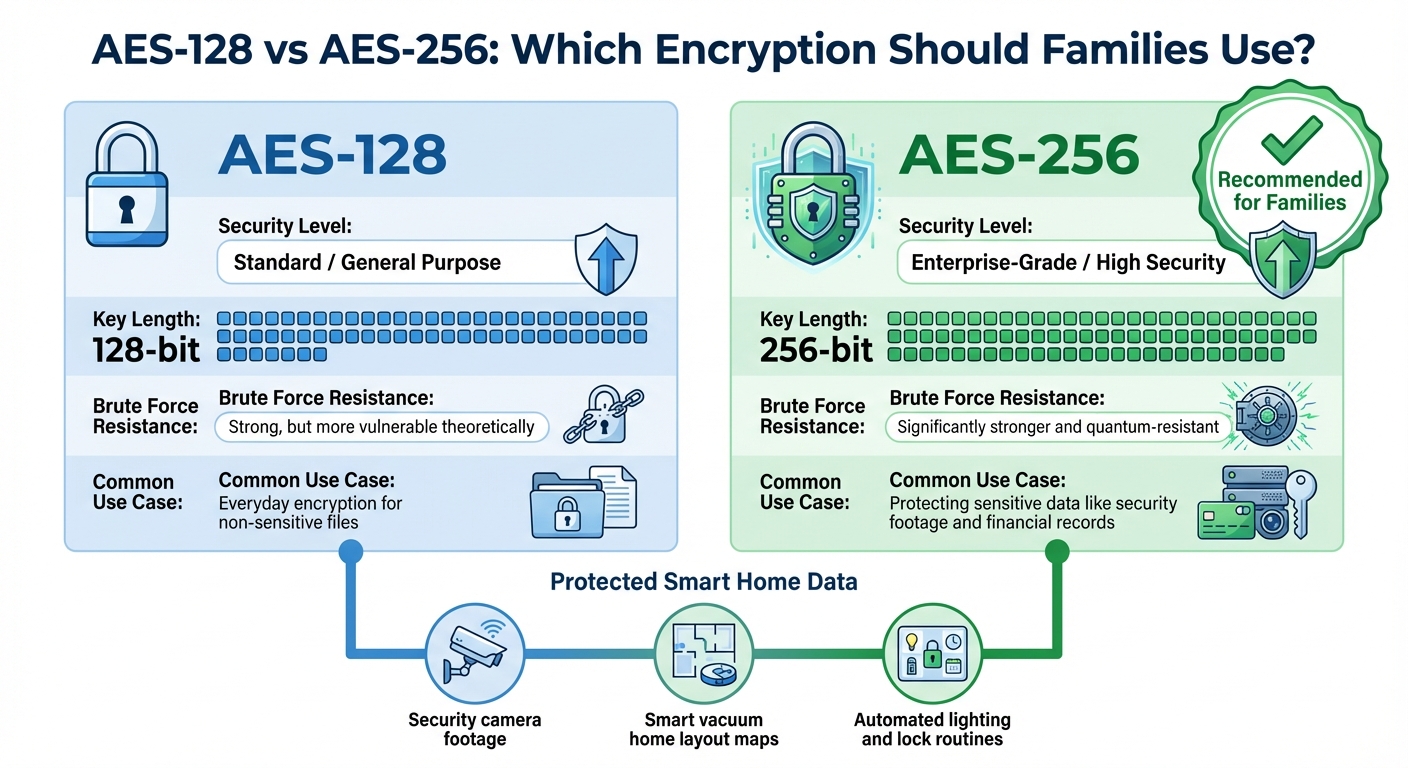
AES-128 vs AES-256 Encryption Comparison for Smart Home Data
Encryption transforms smart home data – like security camera footage and thermostat logs – into a code that unauthorized users can’t read. This ensures that sensitive information remains hidden from prying eyes. Considering that hackers strike every 39 seconds and data breaches are among the top three most common security threats [4], encryption plays a critical role in safeguarding your smart home. Let’s dive into how end-to-end encryption (E2EE) works to secure this data.
How End-to-End Encryption Works
End-to-end encryption (E2EE) protects your smart home data through a three-step process. First, your device – whether it’s a smartphone, tablet, or smart home hub – encrypts the data before it leaves your home. Once encrypted, the data travels to cloud servers, staying scrambled during the entire journey. Only another trusted device can decrypt it [2][8]. The key benefit? Your service provider never has access to your encryption keys, ensuring that even they can’t view your data [6][2].
AES-256 or AES-128: which should families use?
When it comes to encrypted cloud backups, two popular standards dominate: AES-128 and AES-256. Both provide strong protection, but AES-256 is considered the gold standard for securing highly sensitive smart home data [9]. The main difference lies in the key length: AES-256 uses a 256-bit key, making it more resistant to brute-force attacks and better equipped to handle future threats like quantum computing [9].
| Feature | AES-128 | AES-256 |
|---|---|---|
| Security Level | Standard / General Purpose | Enterprise-Grade / High Security |
| Key Length | 128-bit | 256-bit |
| Brute Force Resistance | Strong, but more vulnerable theoretically | Significantly stronger and quantum-resistant |
| Common Use Case | Everyday encryption for non-sensitive files | Protecting sensitive data like security footage and financial records |
For families storing data like security camera footage, smart vacuum maps of their home layout, or routines from automated lighting and locks, AES-256 offers the highest level of protection [8][7]. While AES-128 is secure enough for most everyday tasks and may work slightly faster on low-power devices, modern systems handle AES-256 with minimal performance impact. This makes AES-256 the go-to choice for safeguarding your family’s most private information. A strong encryption standard like this lays the groundwork for selecting a cloud backup solution that aligns with your security needs.
What to Look for in a Cloud Backup Solution
When selecting an encrypted cloud backup service, you need to strike the right balance between security, ease of use, and storage capacity. For families with smart home systems, this is especially important, as these setups often involve sensitive data like security camera footage and automation logs. The best backup solutions work quietly in the background, giving you full control of your encryption keys.
One of the most critical features to prioritize is zero-knowledge encryption. This ensures that only you have access to the encryption key – not the service provider. Even if the company is hacked or served with a legal subpoena, your data remains secure and unreadable [1]. The most reliable backup services are designed with user control as their foundation.
Another key feature to consider is version history, which allows you to recover older versions of files or restore deleted data. Most services offer versioning for 30 to 90 days, though some extend this indefinitely [5]. This is especially useful for smart home setups where configurations might be accidentally overwritten or corrupted. Alongside versioning, automatic backups ensure your data stays current without requiring manual effort.
Automatic Backups and Real-Time Syncing
Relying on manual backups is rarely consistent or practical. The best cloud backup solutions handle this for you, running scheduled or continuous backups automatically [9]. Real-time syncing is another must-have, as it ensures that updates to smart home configurations – like changes to automation routines or security camera settings – are saved immediately, rather than waiting for the next scheduled backup [5].
For added reliability, some services offer dual protection, which mirrors your local backups to the cloud. This creates an additional layer of redundancy [9]. Look for solutions that allow backups only over secure, non-metered networks. This is especially important for families with large smart home data sets, as it prevents excessive mobile data usage and protects sensitive information.
Device Compatibility and Storage Capacity
Smart home setups often involve a mix of devices – smartphones, tablets, laptops, and hubs running various operating systems. A good backup solution should support all major platforms, including Windows, macOS, Linux, iOS, and Android, without requiring separate subscriptions [6]. It should also handle Network Attached Storage (NAS) and use deduplication to maximize storage efficiency [1].
Storage plans typically fall into two categories: unlimited storage for a single device or fixed storage pools (e.g., 5TB or 10TB) that can be shared across multiple devices. For instance, IDrive Personal offers 5TB to 10TB plans starting at around $52 per year, supporting unlimited devices and NAS drives [1]. On the other hand, Carbonite Safe provides unlimited storage for one internal drive at approximately $76 per year, with higher-tier plans needed for external drives.
| Provider | Annual Cost | Capacity | Device Support | Best For |
|---|---|---|---|---|
| IDrive Personal | ~$52/year | 5TB–10TB | Unlimited computers + NAS | Multi-device families with NAS |
| Backblaze Personal | $60/year | Unlimited | 1 computer (no NAS) | Single main PC, simple setup |
| Arq Premium | $60/year | 1TB | Up to 5 computers | Families needing flexibility |
Keep in mind that some "unlimited" plans may impose file size limits, such as capping automatic backups at 4GB per file. Beyond storage, it’s essential to choose a solution that integrates well with your smart home platform.
Smart Home Platform Integration
A backup solution that integrates seamlessly with your smart home ecosystem can significantly enhance your data security. Professional smart home systems generate unique data formats that generic backup services might not handle properly. For example, Home Assistant supports over 3,400 integrations and produces specialized configuration files that require a tailored backup approach [3]. Families with advanced systems often benefit from working with professionals who understand these technical requirements.
For instance, One Sound Choice has been helping families in Northern New Jersey implement encrypted cloud backup solutions for over 30 years. With more than 2,500 successful installations, they ensure that everything from security camera footage to automation logs is backed up securely. Their expertise in enterprise-level networking also allows them to segment IoT devices onto separate VLANs, protecting your primary backup storage from potential vulnerabilities [12].
When evaluating backup services, make sure they support Two-Factor Authentication (2FA) to safeguard against credential leaks [12]. Additionally, ensure that your data is encrypted locally – before it’s uploaded to the cloud – using TLS 1.2 connections for extra security [10]. These technical safeguards are crucial for families storing sensitive smart home data, as they help prevent exposure of daily routines or security weaknesses.
sbb-itb-c5b321b
How to Set Up Encrypted Cloud Backup
Setting up an encrypted cloud backup for your smart home involves a few essential steps. You’ll need to choose the right backup platform, configure security settings, and establish automated backup schedules. For those with advanced smart home systems, working with experienced professionals can ensure that everything – from security camera footage to automation logs – is protected from the start. Let’s break this down, starting with software installation and device setup.
Installing Backup Software and Configuring Devices
The first step is selecting a platform that meets your needs. For instance, Home Assistant’s Backup Wizard simplifies the process by offering encrypted off-site backups with scheduled options, an emergency kit for encryption keys, and integration with Home Assistant Cloud and network shares [13]. Another option is Nextcloud, which allows you to create a private cloud using a dedicated server or VPS, complete with standard security configurations [14].
To secure your data, enable no-knowledge encryption and store your private key in a trusted password manager or a physical safe. As noted by Consumer Reports, losing your encryption key means you could permanently lose access to your backup data [1]. For more complex setups involving multiple hubs, NAS devices, or specialized automation platforms, professional configuration can ensure APIs and systems are integrated correctly.
Creating Backup Schedules and Testing Recovery
Once your backup software is set up, configure automated schedules – daily or weekly backups are common – and establish retention policies that align with how often your data changes. Retention periods can range from 30 days to indefinite, depending on your needs [11].
However, automation alone isn’t enough. Regularly test your backups by restoring a sample of files to ensure data integrity and confirm that your encryption key works properly. This testing step is critical to avoid unpleasant surprises when you actually need to recover your data.
Additionally, configure your software to delete older backups automatically, such as keeping only the last three or ten versions. This prevents storage from filling up unnecessarily. If your household handles large amounts of data, scheduling backups during off-peak hours and using secure, non-metered networks can help you avoid excessive bandwidth usage.
Solving Common Backup Problems
Even with a solid setup, challenges can arise. High data volumes from security cameras or automation logs can quickly eat up storage space. To address this, consider using object storage or file deduplication to optimize space usage.
Another common issue is infrequent backups. If you’re only backing up weekly or monthly, you risk losing significant data if a failure occurs between cycles. Also, keep in mind that many cloud storage services designed for file sharing don’t offer the long-term retention or no-knowledge encryption needed for full system recovery.
For more complex smart home setups, professional support can make a big difference. Skilled integrators – such as those in Northern New Jersey with decades of experience – can configure secure, integrated backup solutions tailored to your needs. Their expertise often includes advanced practices like segmenting IoT devices onto dedicated VLANs, which boosts both security and backup reliability. These measures ensure your encrypted cloud backup is robust enough to protect all critical smart home data effectively.
Conclusion
Encrypted cloud backup is a must-have for families with smart home systems. With end-to-end encryption, you’re the only one holding the keys to your data, while the 3-2-1 backup strategy safeguards against device failures, ransomware, and accidental deletions. Considering that cyberattacks happen every 39 seconds and 93% of companies suffering major data losses face business closure or failure [4], relying on manual file saving or unencrypted storage is simply too risky. This approach offers strong protection against both digital threats and physical data loss.
Striking the right balance between security and usability is key. AES-256 encryption ensures your smart home data – like security camera footage and automation logs – stays protected. However, losing a key could mean losing access to your data permanently [15]. That’s why secure key management, multi-factor authentication, and regular recovery testing are so important. Automated backup schedules help ensure you never forget to save vital data, while isolating IoT devices on separate VLANs adds another layer of security [16].
For families with more advanced smart home setups, professional assistance can make all the difference. Configurations like secure VLANs and seamless system integration provide dependable and streamlined protection. One Sound Choice, with over 30 years of experience and more than 2,500 successful installations, delivers enterprise-grade backup solutions tailored to families in Northern New Jersey. Their expertise ensures your encrypted cloud backup is reliable, properly configured, and capable of protecting your family’s data for the long haul.
What One Sound Choice clients say
We one a vacation home and were concerned with security when we are not there. 1 Sound Choice provided camera that allowed us to record all activity for a month and we could dial into the system from the internet. The system also will automatically flash lights inside the home to discourage intruders from entering.
– The Lavelle Family (1 Sound Choice client testimonials)
Ryan listened to us – he understood what we wanted to accomplish. (The 1 Sound Choice team’s) commitment to post-installation support and service has been unbelievable. They are professionals in every aspect and have gained our trust throughout the completion of our project.
– Mr. & Mrs. Maytin (1 Sound Choice client testimonials)
I have hired 1 Sound Choice on several occasions over the past 10 years for several projects (from minor implementations to a whole house system). Ryan and the team at 1 Sound Choice are consummate professionals – extremely knowledgeable and up to date with technology, focused on delivering the best solution to fit your need, and highly customer service oriented. This combination plus the quality of finished product (every time) have made me a loyal customer… I highly recommend 1 Sound Choice.
– Terry Maytin (Houzz review)
FAQs
What is zero-knowledge encryption, and why is it important for smart home data security?
Zero-knowledge encryption ensures that your smart home data is encrypted directly on your devices before it ever reaches the cloud. What does this mean for you? Only you hold the decryption keys, so even the cloud provider can’t access your information.
With this method, the chances of unauthorized access or data breaches drop dramatically. Families can rest easy knowing that sensitive information – like footage from security cameras or system configurations – stays private and under their control.
Why is AES-256 encryption considered more secure than AES-128 for smart home data?
AES-256 encryption is often seen as a stronger option compared to AES-128 because it uses a 256-bit key. This key length results in an astronomically higher number of possible combinations than the 128-bit key used by AES-128, making brute-force attacks virtually unfeasible with current computing capabilities.
For families relying on smart home systems, this added layer of security plays a crucial role in protecting sensitive information, such as security camera feeds, access codes, or personal settings. Opting for AES-256 encryption is a smart choice to help keep your home and loved ones secure in an increasingly connected digital landscape.
Why should families use encrypted cloud backup for their smart home systems?
Encrypted cloud backup offers a secure and off-site safeguard for your smart home data, keeping your personal information and device settings safe from hardware failures and cyber threats. It ensures you can recover quickly from unexpected issues, helping you avoid unnecessary downtime and disruptions to your daily routines.
This type of storage also provides a flexible and dependable option that puts your privacy first. With encryption in place, your data stays protected, offering families a sense of security in an ever-more connected world.
Related Blog Posts
- AI-Powered Smart Security System
- Smart Home Privacy: Cloud Storage Best Practices
- Enterprise-Grade Networking for Remote Home Control
- How Encryption Protects Family Privacy
Same password on every device? See our one password page.
More questions
How often should my backups run?
Set them to run on their own, so you do not have to remember. Then test a restore now and then to make sure your files come back.
One Sound Choice, 8 Tilley Ave, Pompton Plains, NJ 07444. Call or text (973) 945-5275. We work in homes across Morris, Passaic, Bergen, Essex, Somerset, and Hunterdon counties. Written by Ryan Herd, founder of One Sound Choice.