
When it comes to managing a smart home with dozens of connected devices, standard consumer routers just don’t cut it. They struggle with range, performance, and reliability, especially in larger or multi-story homes. Enterprise-grade networking offers a solution by providing:
- Stronger hardware: Handles 250+ devices with ease, compared to consumer routers that max out at ~30 devices.
- Wider coverage: Eliminates dead zones with professional site surveys and multiple access points.
- Enhanced security: VLAN segmentation and next-gen firewalls protect sensitive data from IoT vulnerabilities.
- Reliable connectivity: Wired backbones using Cat6 cables ensure fast, stable connections for stationary devices.
- Remote management: Cloud-based tools allow professionals to monitor and fix issues without on-site visits.
With these systems, your network becomes the backbone for a seamless smart home experience, powering everything from security cameras to climate control. Whether upgrading or building from scratch, enterprise-grade networking ensures your home is ready for today’s demands and tomorrow’s growth.
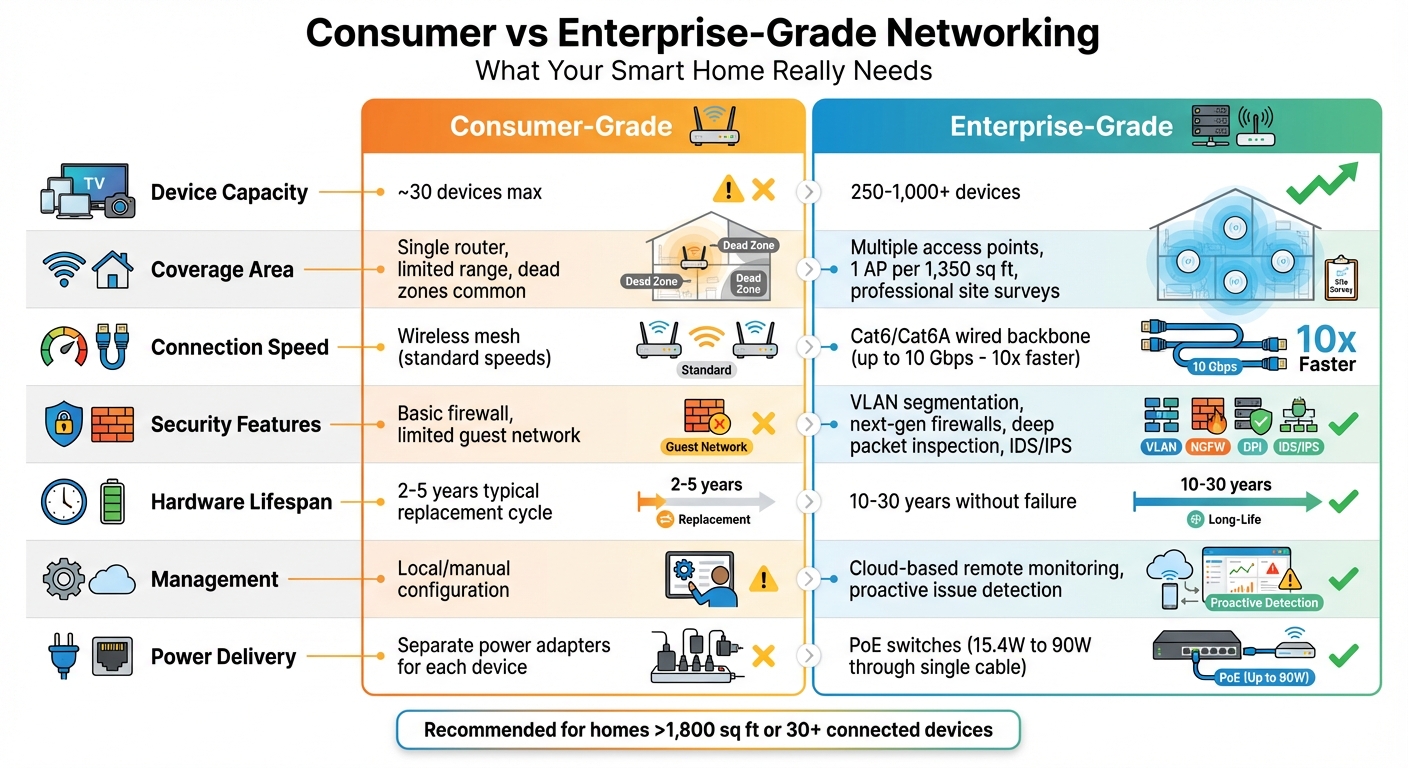
Consumer vs Enterprise-Grade Networking: Feature Comparison for Smart Homes
Enterprise Home Network & Wi-Fi Design | Smart Home Infrastructure Explained
Assessing Your Home’s Network Requirements
Before setting up a home network, it’s crucial to evaluate what your household actually needs. This isn’t about guessing – it’s about carefully considering square footage, the number of connected devices, and how your family uses technology daily.
Site Surveys and Coverage Mapping
Your home’s layout plays a major role in network design. If your home is larger than 1,800 square feet, relying on a single wireless access point won’t be enough. A good rule of thumb is to install one access point for every 1,350 square feet of living space [2]. However, it’s not just about size – building materials like concrete walls or metal studs can significantly weaken Wi-Fi signals, especially the higher-frequency 5GHz and 6GHz bands used by Wi-Fi 6 and Wi-Fi 6e [1][4].
A professional site survey can help by creating Wi-Fi signal heat maps. These maps pinpoint dead zones and account for interference caused by multi-story layouts or dense construction materials [2]. The goal is simple: ensure no device is more than 25 feet away from the nearest access point [2]. Once you’ve mapped out the signal coverage, you’ll also need to calculate how many devices will connect to the network simultaneously.
Calculating Device and Bandwidth Needs
Take stock of every device that connects to your network – not just the obvious ones like laptops and phones. Smart home gadgets such as security cameras, thermostats, door locks, lighting systems, TVs, and gaming consoles all compete for bandwidth.
Think about peak usage times. For instance, when multiple family members are streaming 4K video, participating in Zoom calls, and activating security cameras at the same time, your network can quickly hit its limit. Devices like high-resolution streaming services and always-on security cameras consume significant bandwidth. That’s why professionals often recommend hardwiring stationary, bandwidth-intensive devices like TVs and surveillance cameras using Ethernet. Wired connections provide speeds of up to 10 gigabits, which is about 10 times faster than what a wireless mesh network typically delivers [2]. By understanding how your devices use bandwidth, you can better prepare for the challenges of a large or multi-level home.
Network Challenges in Large and Multi-Story Homes
Large and multi-story homes bring unique networking challenges. Consumer-grade solutions often fall short in homes spanning 10,000 to 100,000 square feet [3].
One key issue is that wireless bandwidth is shared – the more devices connected to a single access point, the slower each device will perform. Enterprise-grade access points, on the other hand, can handle 250 to over 1,000 simultaneous connections, far outpacing consumer-grade options [4]. Additionally, IoT devices can introduce security risks if they aren’t isolated from your primary network. Setting up VLAN segmentation can help minimize these vulnerabilities [1][4]. Without professional planning, large homes often face coverage gaps, slow speeds, and security issues that compromise network reliability.
Core Components of an Enterprise-Grade Network
When it comes to managing a remote home control network, enterprise-grade hardware is the cornerstone. The Home Technology Association puts it best:
"It is not an exaggeration to compare a home’s network to the digital ‘backbone’ of your home that all other home technologies rely on" [3].
This "backbone" relies on several key components working together seamlessly.
Enterprise-Grade Wi-Fi Access Points
Enterprise-grade Wi-Fi access points are built to provide reliable, strong coverage across your entire home. Unlike consumer-grade options, these access points are designed for environments with a high density of connected devices. They support advanced technologies like Wi-Fi 6 and Wi-Fi 6E, which takes advantage of the less-crowded 6 GHz band. Features such as MU-MIMO allow them to handle multiple devices simultaneously, while seamless roaming ensures uninterrupted connectivity as you move throughout your space [4].
Another standout feature is their cloud-based management. This allows for remote monitoring, firmware updates, and troubleshooting – all without requiring an on-site visit [7]. However, a reliable wired backbone is equally important for maintaining consistent, high-speed connectivity.
Structured Cabling and PoE Switches
A solid wired backbone is critical for enterprise-level performance. Using Cat6 or Cat6A cabling, speeds of up to 10 gigabits are achievable [2]. Structured cabling works in tandem with Power over Ethernet (PoE) switches, which can power devices like access points, cameras, and smart lighting systems through a single cable [5].
Modern PoE standards range from 802.3af (15.4W for basic devices) to 802.3bt, which delivers up to 90W for higher-power devices [5]. Enterprise-grade switches also come with "Perpetual PoE", ensuring connected devices stay powered even during switch reboots or software updates [5]. Nathan Holmes, Director of Operations at WhyReboot, underscores the durability of enterprise-grade hardware:
"enterprise-grade hardware is designed to last ten to thirty years without failure" [3].
This longevity is a stark contrast to the shorter lifespan of typical consumer equipment.
VLAN Segmentation and Mesh Networks
To complement robust hardware, logical network segmentation plays a vital role in enhancing both security and performance. Virtual LANs (VLANs) allow a single physical network to be divided into multiple isolated networks. This setup ensures that core devices like computers and phones, IoT gadgets, guest access, and security systems are kept in separate segments. If a device is compromised, the issue is contained within its specific VLAN [1][6].
Additionally, VLANs help reduce network congestion by limiting broadcast traffic – the constant background data exchange that can bog down networks with numerous devices [7][8]. While wireless mesh systems are convenient, achieving enterprise-grade reliability often requires connecting each access point with a dedicated Ethernet backhaul, rather than relying on wireless links between them [2].
Setting Up Secure Remote Access
After choosing the right hardware, the next step is to configure your network for secure and dependable remote access. This involves three key components: creating a solid wired infrastructure, setting up holiday-ready wireless coverage, and utilizing cloud-based management tools.
Building a Wired Network Foundation
A wired network serves as the backbone for secure remote access. The Home Technology Association highlights the importance of proper cabling:
"In a ‘wireless’ world, modern homes require proper cabling… you’ll need wires to go wireless properly" [2].
Connecting stationary devices like smart TVs, surveillance cameras, and home office computers directly to PoE (Power over Ethernet) switches not only ensures stability but also frees up wireless bandwidth for mobile devices [2]. PoE simplifies setup by delivering both power and data through a single cable. For homes with complex layouts or multiple floors, following the ANSI/TIA 570-D standard ensures your cabling meets professional-grade specifications [2].
Once your wired foundation is in place, you can focus on extending the network with a robust wireless setup.
Deploying and Configuring Wireless Networks
Strategic planning for wireless coverage, as previously discussed, ensures optimal placement of access points (APs) throughout your home. To secure your wireless network, enable WPA3 encryption, which provides the highest level of protection against unauthorized access [6]. Limit each AP to three SSIDs to maintain performance [7].
For a seamless experience, configure your network to support smooth roaming. This ensures devices retain the same IP address when switching between APs, which is especially important for automation apps that might otherwise encounter session interruptions [7]. Consistency in policy and IP address settings across all access points within the roaming domain is critical for this setup [7].
With wireless coverage optimized, cloud-based tools can help you manage and troubleshoot the network effectively.
Cloud-Based Network Management Tools
Cloud management platforms make it easy to configure, update, and troubleshoot your network remotely [7]. Tools like Cisco Meraki allow you to adjust settings, push firmware updates, and resolve issues without needing a VPN [7]. Nathan Holmes, Director of Operations at WhyReboot, explains the benefit:
"Remote monitoring and management software allows the service team to pinpoint the exact cause of the problem and resolve it so it does not happen again – often without having to disrupt the customer’s day" [3].
This proactive approach often resolves potential issues before they can affect you. Additionally, modern enterprise systems use a distributed data plane, which processes traffic locally at each AP instead of routing everything through a central controller. This helps prevent bandwidth bottlenecks, especially as Wi‑Fi 6E speeds continue to increase [7].
sbb-itb-c5b321b
Security Best Practices for Remote Home Control
Once your network is up and running, the next step is making sure it’s secure. With an estimated 14.4 billion connected devices worldwide as of 2022 [10] and ransomware striking a business every 11 seconds [9], adopting strong security practices is essential to protect your family’s data and privacy.
Zero Trust Network Access (ZTNA)
Traditional security assumes everything inside your network is safe. Zero Trust Network Access (ZTNA), however, takes a completely different approach: never trust, always verify [11]. Every user and device must continuously prove its identity – even after gaining access. This method limits permissions to the bare minimum needed, ensuring that devices only get the access they require. It also uses context-aware security to adjust access based on factors like device health, user location, or even the time of day [11]. If a login attempt comes from an unusual location, it might trigger a block or prompt additional verification.
The SolutionsHub Editorial Team highlights the importance of this approach:
"The principle of least privilege access ensures that users and devices only have the minimum permissions necessary to perform their roles, significantly reducing the attack surface" [11].
To complement ZTNA, next-generation firewalls add another critical layer of defense.
Next-Generation Firewalls and Threat Detection
Unlike basic consumer firewalls that only check IP addresses and port numbers, next-generation firewalls (NGFW) take it a step further by using deep packet inspection (DPI). This allows them to analyze the actual content of data packets [14]. They operate at the application layer (Layer 7), meaning they monitor specific apps rather than just general network traffic [14]. NGFWs can detect advanced threats like SQL injection or cross-site scripting, which often target smart home web interfaces. Many also integrate intrusion detection and prevention systems (IDS/IPS) to monitor traffic in real time and block known threats [14][4]. To stay ahead of emerging vulnerabilities, these systems tap into cloud-based threat intelligence for continuous updates [14].
Nathan Holmes, Director of Operations at WhyReboot, explains:
"Enterprise-grade hardware provides for a greater level of security built in to the main networking components (network switches, Wi-Fi access points, and router)" [3].
Here’s a quick comparison of consumer-grade firewalls versus enterprise-grade NGFWs:
| Feature | Consumer-Grade Firewall | Enterprise-Grade (NGFW) |
|---|---|---|
| Filtering Level | Layer 3/4 (IP & Port) | Layer 7 (Application Content) |
| Inspection | Basic Packet Filtering | Deep Packet Inspection (DPI) |
| Threat Detection | Static Rules | Real-time IDS/IPS & Threat Intel |
| Segmentation | Limited (Guest Network) | Advanced (Multiple VLANs) |
| Management | Local/Manual | Centralized/Remote Monitoring |
While firewalls are essential, securing individual devices and segmenting your network adds another layer of protection.
Device Authentication and Network Segmentation
Adding multi-factor authentication (MFA) is one of the simplest yet most effective ways to secure your devices. MFA requires at least two forms of verification before granting access. Instead of relying on SMS codes – which can be intercepted through SIM-swapping attacks – use authenticator apps like Google Authenticator or Authy for added security [13].
Network segmentation, achieved through VLANs, works hand-in-hand with MFA by isolating parts of your network. TSP Smart Spaces emphasizes the importance of this approach:
"An enterprise-grade network will consist of multiple VLANs (virtual local area networks) to segment your network, separating your IoT devices from your work devices, and mitigating the damage if a breach occurs" [10].
By separating IoT devices from more sensitive systems, you limit the potential impact of a breach.
Other steps to strengthen your network include immediately changing default credentials, disabling insecure protocols like Wi-Fi Protected Setup (WPS) and Universal Plug and Play (UPnP), and setting up guest networks for visitors. Guest networks ensure that visitors’ devices don’t interact with your core systems [12][13].
When combined with enterprise-grade networking, these security measures provide a solid foundation for protecting your smart home.
Why Choose One Sound Choice for Enterprise-Grade Networking
Setting up enterprise-grade networking at home demands expertise in design, installation, and ongoing support. With over 30 years of experience and more than 2,500 successful installations across Northern New Jersey, One Sound Choice brings corporate-level networking solutions tailored specifically for family life. They specialize in blending advanced networking standards with the unique requirements of modern households.
Custom Network Design for Your Home
Homes in Northern New Jersey come in all shapes and sizes, each with its own set of challenges. A historic estate in Ridgewood, for instance, has vastly different networking needs compared to a sleek, modern home in Alpine or Franklin Lakes. One Sound Choice begins every project with a detailed site survey and coverage mapping, ensuring their solutions are tailored to your home’s specific layout and potential dead zones.
Unlike off-the-shelf mesh systems that rely on a patchy network of wireless connections, One Sound Choice builds a hardwired network backbone using Cat6 or Cat6A cabling. This approach delivers speeds up to 10 times faster than typical wireless mesh setups [2]. Whether it’s supporting 4K security cameras, a high-end home theater, or a demanding work-from-home setup, their networks are designed to handle it all seamlessly, ensuring devices don’t compete for bandwidth. This meticulous design provides the groundwork for a reliable and efficient long-term network.
Long-Term Support and Professional Expertise
The true value of a professional network shines after installation. One Sound Choice employs proactive remote monitoring and management (RMM) tools, allowing them to detect and address potential issues before they affect your daily life [3].
Led by industry expert Ryan "The Smart Guy" Herd, the team offers ongoing support, making your network a reliable long-term investment rather than a source of frustration. As an HTA Certified company, a distinction held by only the top 10% of integration firms [2], One Sound Choice adheres to the highest standards in the industry, ensuring you receive top-tier service and expertise.
Seamless Integration with Smart Home Systems
Your network isn’t just about speed – it’s the "digital backbone" for your entire smart home [3]. One Sound Choice integrates your enterprise-grade network with systems for lighting, security, audio, climate, and entertainment. This ensures you can control everything from a single, easy-to-use interface, eliminating the hassle of juggling multiple apps. With their expertise, your smart home remains secure, intuitive, and perfectly in sync with your lifestyle.
Conclusion
Building a dependable smart home starts with a strong network. With more devices than ever – like 4K security cameras, video calls, and smart systems – your home’s network needs to handle everything at once without skipping a beat.
Opting for enterprise-grade networking ensures long-term reliability and performance [3]. It’s an investment that cuts down on downtime, reduces the need for frequent hardware replacements, and grows alongside your expanding tech needs. Features like VLAN segmentation safeguard your personal data by keeping IoT devices separate, while remote monitoring allows experts to address potential issues before they disrupt your daily routine.
"The enterprise-grade network in your home should be virtually invisible. That is, you should be able to turn on any device, at any time, and simply have it work." – Nathan Holmes, Director of Operations, WhyReboot [3]
These technical benefits translate directly into everyday convenience. A well-designed network is the key to a smart home that works seamlessly – where your lighting, climate control, security, and entertainment systems all function together without a hitch.
For families in Northern New Jersey looking to future-proof their homes, One Sound Choice brings over 30 years of expertise and more than 2,500 successful installations to each project. Their professional solutions ensure your network is ready for today’s demands and tomorrow’s innovations, backed by proactive support to keep everything running effortlessly.
What One Sound Choice clients say
I’d (tell others) that Ryan’s very professional and very easy to work with, in terms of budgeting and listening to what you want to have done. He never pushed us toward anything we couldn’t afford or didn’t want and he got the job done on time.
– Mr. & Mrs. DeSantis (1 Sound Choice client testimonials)
The 1 Sound Choice staff was very easy to work with. Ryan, you understood our wants right from the beginning. Simplicity of installation and operation were just some of the reasons we chose 1 Sound Choice. You exceeded my expectations!
– Mr. & Mrs. Matia (1 Sound Choice client testimonials)
Truly One Sound Choice, you won’t find better. I called a couple of AV companies for quotes but on speaking with Ryan I had confidence that One Sound Choice would do the job right. Most companises had assured me that they would not have to cut holes in my walls to achieve my project goals. Ryan was up front, honest and realistic outlining all the possible challenges my install might face whilst reassuring me that One Sound Choice had the capabilitiy and expertise to meet my goals. Consulation was painless and Ryan and Kenny captured my requirements perfectly and offered advice based on their experience regarding optional additons to the project, which were practical and delivered exceptional enhancements. Ryan provided me with a view of what could be achieved given my requirements and then worked with me complete the project with consideration to my budget, but without compromising the final solution. Even completed the project without requiring any patch work which was a bonus. Ryan and Kenny were a pleasure to work with, respectful and courteous and I had confidence having them in our home. Highly recommend for any AV work you are considering. You will not be disappointed with the results.
– Leighton (Houzz review)
FAQs
What advantages does an enterprise-grade network provide for a smart home?
An enterprise-grade network takes your smart home to the next level by providing faster internet speeds, broader Wi-Fi coverage, and the capacity to support multiple devices without slowing down. Whether you’re streaming movies, gaming, or running automation and security systems, it guarantees reliable, low-latency connections.
On top of that, these networks come equipped with advanced security features to safeguard your family’s data, along with user-friendly management tools to keep everything operating efficiently and securely. For households that rely on smooth, uninterrupted technology, an enterprise-grade network can make all the difference.
How do I figure out how many Wi-Fi access points my home needs?
To figure out how many Wi-Fi access points (APs) your home needs for a dependable smart home network, start by calculating your home’s total square footage. Don’t forget to include spaces like finished basements or attics if they’ll have connected devices. Then, pinpoint high-traffic areas – places like family rooms or home offices – where multiple users might stream, video call, or rely on smart devices at the same time.
In a typical U.S. home, an enterprise-grade access point generally covers about 2,000 to 2,500 square feet. However, obstacles like walls, metal structures, or large appliances can reduce this range. To estimate the number of APs you’ll need, divide your home’s square footage by the coverage range (e.g., 2,200 sq. ft.) and round up. For instance, if your home is 5,200 square feet, you’d need three APs (5,200 ÷ 2,200 ≈ 2.4, rounded up to 3).
In rooms with heavy device usage – like a home theater or gaming area with more than 20 devices – you might want to add an extra AP, even if the space is smaller. For the best results, use a professional heat-mapping tool to check your coverage and fine-tune the placement of your APs for a smooth, reliable connection throughout your home.
What are the best ways to secure a network for remote smart home control?
To keep your remote smart home network secure, start by implementing enterprise-level Wi-Fi security. Use a unique SSID and enable WPA2-Enterprise or WPA3 encryption for better protection. Make sure to set strong, unique passwords and activate your router’s firewall. Regular firmware and device software updates are essential to address potential vulnerabilities.
You can further enhance security by disabling unnecessary features like remote management, setting up MAC address filtering, and creating a separate guest network or VLAN for visitors. For even more robust protection, consider using wireless intrusion detection or prevention systems (WIDS/WIPS) to monitor and block potential threats. These steps will help you maintain a secure and reliable network for managing your smart home remotely.
Related Blog Posts
- How to Set Up Whole Home WiFi: 7 Steps for Better Coverage
- Fixing Slow WiFi at Home: 6 Solutions That Actually Work
- Future-Proofing Smart Homes with Low-Voltage Wiring
- How Failover Protects Smart Home Systems
Rooms that drop Wi-Fi? See our new home Wi-Fi page.
More questions
Can I control my smart home when I am away?
Yes. A secure remote setup lets you check and control the house from your phone while you are out.
One Sound Choice, 8 Tilley Ave, Pompton Plains, NJ 07444. Call or text (973) 945-5275. We work in homes across Morris, Passaic, Bergen, Essex, Somerset, and Hunterdon counties. Written by Ryan Herd, founder of One Sound Choice.