
Smart homes promise simplicity, but for many, they feel more like a tech headache. Managing multiple apps, troubleshooting devices, and dealing with compatibility issues often outweigh the convenience these systems are supposed to bring. Here’s why this happens and how to fix it:
- Too Many Apps: Each device often requires its own app, creating confusion and clutter.
- Compatibility Issues: Devices from different brands don’t communicate well, leading to fragmented systems.
- Network Struggles: Weak Wi-Fi or overloaded networks cause delays and unreliable performance.
- Lack of Central Control: Without a unified system, automations fail, and managing devices becomes chaotic.
The solution? Professional smart home integration. Experts design systems that work together seamlessly, with centralized control, robust networks, and local processing. This approach eliminates frustration, ensures reliability, and delivers the convenience smart homes promise.
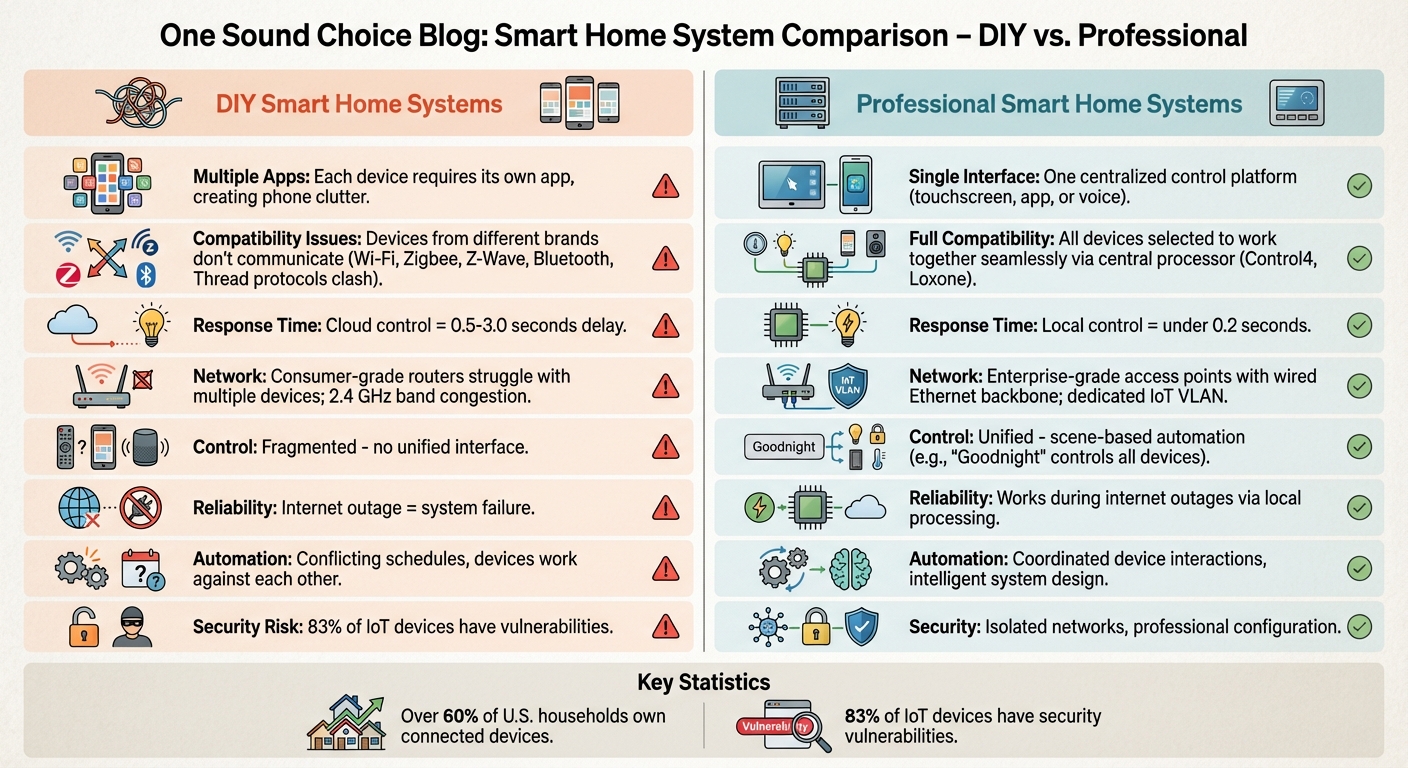
DIY vs Professional Smart Home Systems: Key Differences
Professional smart home installers share their tips
sbb-itb-c5b321b
The Problem: Too Many Devices, Too Many Apps
Smart homes are supposed to simplify life, but juggling multiple apps and incompatible systems often does the opposite. A typical setup might start with a smart thermostat, a video doorbell, or connected lighting. Each device comes with its own app, turning your phone into a cluttered control center. As WIRED Senior Writer Simon Hill aptly notes:
The more smart home gadgets you add, the more cluttered your phone becomes. Keeping track of which app controls which device is tricky enough[2].
Instead of making life easier, these disconnected systems create extra work. For example, preparing your home for vacation could mean cycling through apps for the thermostat, lighting, security, and locks. What should feel seamless becomes a tedious chore.
Managing Multiple Apps Creates Frustration
Each app comes with its own quirks, making even simple tasks complicated. One app might use a slider to adjust light brightness, while another asks you to input percentages. Some bury essential settings in hard-to-navigate menus, requiring multiple taps for basic actions.
This piecemeal approach misses the essence of home automation. As Heyo Smart experts put it:
This isn’t automation. It’s management[4].
The frustration grows when you try to link devices from different brands. For instance, getting your lights to activate when your security camera detects motion often isn’t possible. These devices operate as isolated systems, unable to communicate effectively. Your security camera doesn’t “know” your lights exist, and your lights are oblivious to the camera. This lack of integration highlights why many smart homes feel fragmented rather than unified.
Why Consumer-Grade Devices Don’t Work Together
The core issue lies in the design of consumer smart devices. Most are built to function within their own ecosystems, not as part of a larger, interconnected network. Manufacturers rely on different communication protocols – Wi-Fi, Zigbee, Z-Wave, Bluetooth, or Thread – that often need a hub to work together[3].
Even voice assistants, which aim to unify control, can fall short. Technology journalist Paul Lamkin expressed this frustration:
Every time I heard, ‘I found multiple devices with that name. Try renaming them, or putting them in a group,’ a small part of me died[1].
Voice assistants can create duplicate device entries when they detect the same gadget through multiple sources, such as a manufacturer’s cloud service and a direct hub connection. These duplicates disrupt voice commands and routines, leaving users to troubleshoot instead of enjoying the convenience they expected.
On the other hand, professionally integrated systems offer a better solution. These setups consolidate control into a single, cohesive interface. For example, in January 2026, AI professional Kalyan Basu collaborated with integrator Adam Bresson of SwitchOn Pro to streamline his Seattle home. Using the Brilliant Smart Home System, they unified security, garage door openers, and voice controls. The result? A centralized system managed through in-wall panels, eliminating the need to juggle multiple apps[5].
Device Compatibility and Communication Protocols
Understanding how devices communicate is essential to creating a smart home that actually works as a cohesive system. The technical protocols – like Wi‑Fi, Zigbee, Z‑Wave, Bluetooth, and Thread – determine whether your devices can "talk" to each other or remain isolated. For instance, a Zigbee light bulb cannot directly communicate with a Wi‑Fi thermostat without a bridge or a central hub to translate the signals between them[6].
This lack of compatibility can lead to noticeable performance issues. Wi‑Fi devices connect directly to your router, but they tend to consume more power and often rely on "Cloud Control." This means commands are sent to a remote server and back, which can take anywhere from 0.5 to 3.0 seconds, leading to delays[6]. On the other hand, Zigbee and Z‑Wave devices use low-energy mesh networks, passing information between devices within the network. These systems require a hub but operate on "Local Control", typically responding in under 0.2 seconds[6]. Mixing these technologies without proper planning often results in uneven performance, where devices fail to work in harmony or respond consistently.
What Happens When Devices Can’t Communicate
The effects of mismatched protocols are easy to spot. Imagine commanding all your lights to turn on at once. Wi‑Fi bulbs might lag by a few seconds, while Zigbee lights respond almost instantly. This delay creates a staggered effect that feels anything but seamless. Another issue arises when cloud-based devices fail to respond quickly, prompting you to send repeated commands. This can lead to conflicts – like lights flickering or blinds stopping halfway as the system struggles to catch up. Even worse, if your internet connection drops, cloud-dependent devices might stop working altogether, leaving you unable to control key functions in your home.
How Professional Installation Fixes Compatibility Problems
Professional integrators solve these issues by designing systems where all components are compatible from the outset. Instead of combining random devices, they carefully select hardware and platforms that can work together seamlessly, bridging multiple standards into a single, unified interface[4].
A professionally designed system eliminates the need for multiple hubs and processes automation logic locally within your home network. This local processing ensures response times of under 0.2 seconds, making your smart home feel smooth and efficient[6]. As Heyo Smart experts put it:
True smart living doesn’t come from stacking gadgets. It comes from intelligent system design – where devices are chosen to work together[4].
The end result is a home where lighting, climate control, and security systems operate as one integrated network rather than a patchwork of disconnected devices. By unifying protocols through professional design, your smart home evolves into a well-orchestrated ecosystem that works as a single, harmonious unit.
Network Infrastructure: Why Your Wi-Fi Matters
Your smart home’s performance hinges on its network infrastructure. No matter how advanced or costly your devices are, they’ll falter if your Wi-Fi can’t handle the load. With over 60% of U.S. households owning at least one connected device – and many homes juggling dozens – the strain on networks is real and growing [3]. A weak or poorly designed network can turn even the best devices into sources of frustration, undermining the seamless experience smart homes promise.
Common Network Problems That Break Smart Homes
One of the biggest culprits is 2.4 GHz band congestion. Many smart devices, especially budget-friendly ones, rely exclusively on this frequency. Unfortunately, this same band is shared by other household devices, from microwaves to baby monitors [3]. When too many devices compete for limited bandwidth, you’ll notice delays – like lights turning on one by one instead of all at once or thermostats responding sluggishly.
Physical barriers also weaken Wi-Fi signals. Walls, furniture, and distance from the router can interfere with connectivity. As My Custom Integrators explain:
A device too far from the router or blocked by walls will drop connection. Poor reliability causes constant headaches [3].
Battery-operated gadgets, such as smart locks, face additional challenges. Weak signals force these devices to work harder to stay connected, draining their batteries more quickly [3].
Then there’s the issue of consumer-grade routers. While convenient, these all-in-one devices often struggle to manage the constant traffic generated by a growing number of smart devices. Network congestion, unresponsive devices, and frequent router reboots become common. Cloud-dependent devices only add to the load, making the system even less reliable over time [1][4].
Building a Network That Supports Smart Home Devices
To avoid these pitfalls, a well-thought-out network design is essential. Professional setups focus on creating a robust, reliable infrastructure, treating the network as the backbone of your smart home. Instead of relying on a single consumer router, professionals deploy enterprise-grade access points throughout the home. These access points are strategically placed and connected via wired Ethernet backbones, ensuring strong, uninterrupted coverage without dead zones [4].
Network segmentation is another key strategy. By creating a dedicated network (VLAN) for smart devices, professionals isolate IoT traffic from personal devices like phones and laptops [3]. This not only boosts security – so a compromised device doesn’t expose sensitive information – but also improves efficiency. Devices no longer compete with bandwidth-heavy activities like video streaming or large downloads. Features like Quality of Service (QoS) settings can further prioritize essential smart home traffic, ensuring that critical devices like security cameras and door locks always get the bandwidth they need [3].
For critical components like control hubs, security cameras, and media systems, wired connections are the gold standard. Ethernet connections provide unmatched stability and free up wireless bandwidth for devices that truly need it [4]. This ensures that your smart home operates smoothly, even during internet outages. As My Custom Integrators put it:
Smart devices depend entirely on your network. When internet connectivity fails, your automated home becomes dumb fast [3].
Professional-grade networks are designed to maintain local control, ensuring your smart home remains functional and integrated regardless of external connectivity issues. This kind of infrastructure transforms a collection of devices into a cohesive, reliable system.
Centralized Control: One Interface Instead of Many
A truly seamless smart home experience requires more than just reliable connectivity – it hinges on having a unified control system. The appeal of smart home technology lies in its simplicity, yet many homeowners find themselves juggling multiple apps to manage their devices. One app might control your lighting, another handles the thermostat, and yet another is needed for security cameras or door locks. Instead of convenience, this fragmented setup often leads to frustration.
Professional control systems solve this problem by bringing everything together – lighting, shades, climate control, security, and entertainment – into one interface. Whether it’s a touchscreen, smartphone app, or voice command, a centralized system ensures easy, streamlined operation. While stable device communication and network reliability are important, the centralized interface is what ties all these elements together, making daily interactions effortless. As Heyo Smart puts it:
True smart living doesn’t come from stacking gadgets. It comes from intelligent system design – where devices are chosen to work together, scenes are built around your lifestyle, and everything runs from a central platform. [4]
Why Automations Fail Without Proper Planning
Many homeowners attempt to set up automations, only to encounter glitches or outright failures. The underlying issue is often poor planning and lack of coordination between devices. When each gadget operates independently through its own app, they can’t communicate or work together efficiently. For example, a security system might trigger an alarm, but if your lights are controlled by a separate app, they won’t turn on to alert you.
Conflicting automations can make things even worse. Imagine programming your thermostat to cool the house at 3:00 PM, only for your smart shades – operating on a separate schedule – to let in sunlight, raising the indoor temperature. Without a central system to manage these interactions, devices can end up working against each other. Additionally, cloud-based systems often introduce delays and duplicate device entries, further complicating things [1][3]. A unified system eliminates these issues by ensuring all devices are coordinated and responsive.
How Unified Control Systems Simplify Daily Use
Professional centralized systems replace the need for managing individual devices with scene-based control. With one command, such as "Goodnight", you can lock all doors, dim the lights, lower the shades, and set the thermostat to your ideal sleeping temperature [4]. Another command like "Movie Time" can simultaneously adjust the lighting, close the shades, and power on your entertainment system – all with a single tap.
Unlike consumer-grade setups that rely on cloud connections – sending commands to the internet and back – professional systems process commands locally within your home. This ensures faster response times, enhanced privacy, and uninterrupted functionality even during internet outages [4][1]. By integrating all components into one cohesive system, professional installations provide a smoother and more reliable experience compared to fragmented consumer setups.
These systems also cater to everyone in the household. While tech-savvy users might prefer smartphone apps, others can rely on touchscreens or physical smart switches that function like traditional light switches. Guests don’t need to download apps or learn complex controls – they can simply press a button. This inclusive design ensures that the smart home remains user-friendly for all ages and levels of comfort with technology, solving the common issue where only one person in the household knows how to operate everything [2][3].
Professional Integration: The Solution to Smart Home Complexity
How Professional Installers Create Systems That Work
Professional installers address the challenges of fragmented devices and unreliable networks by designing unified systems from the ground up. Unlike DIY setups, which often grow haphazardly as devices are added over time, professional integrators create a cohesive plan where every device is selected to work seamlessly with a central platform. This ensures smooth communication across the system [4][5].
Installers rely on centralized processors, such as the Loxone Miniserver or Control4 controllers, which act as the "brain" of the home. These processors bridge various communication protocols – like Zigbee, Z-Wave, Wi‑Fi, Bluetooth, and Thread – so all devices work together as a single, interconnected system rather than operating independently [3].
A practical example of this approach is the experience of tech professional Kalyan Basu, who collaborated with integrator Adam Bresson of SwitchOn Pro in January 2026. Basu’s previously fragmented Seattle smart home was transformed into a unified system. Bresson integrated security features, Genie garage door openers, and voice control into a Brilliant Smart Home System. This professional design eliminated the hassle of managing multiple apps. Now, Basu’s family can view camera feeds and control gate access directly from in-wall panels. The system was also designed for future enhancements, with planned integrations for Ecobee thermostats and Sonos audio. Reflecting on the project, Basu remarked:
He really architected the integration in his mind and implemented it seamlessly. I owe a great debt of gratitude to Adam [5].
Beyond functionality, professional installations also focus on security. By configuring secure networks with isolated IoT VLANs, they address the vulnerabilities that plague approximately 83% of IoT devices, significantly reducing the risk of cyberattacks [3][4].
Long-Term Benefits of Professional Systems
Professionally installed systems are designed to function reliably for years, providing a level of consistency that DIY setups often lack. Homeowners no longer need to act as their own tech support. Instead, many professional systems include ongoing maintenance and remote troubleshooting. With tools like OvrC, integrators can diagnose and fix issues remotely, often before homeowners even notice a problem [7].
As technology advances, professionally designed systems make it easy to add new features. Whether it’s upgrading to enhanced climate control or installing whole-home audio, these additions integrate smoothly because the infrastructure was built with scalability in mind [5]. As Control4 puts it:
A scattershot collection of smart devices won’t be able to scale the way a fully designed system can [7].
Another advantage is the focus on local processing. While many DIY devices rely on cloud services – sending commands to the internet and back, which can cause delays or failures during outages – professionally installed systems process commands locally. This ensures faster response times, improved privacy, and reliable operation even when the internet is down [1][4]. This robust and forward-thinking approach delivers the reliability and seamless experience that modern homeowners demand.
Conclusion
Smart homes often seem overwhelming because they are frequently built on fragmented systems. Many consumer-level setups rely on devices that use incompatible protocols and weak network infrastructures, turning what should be a seamless experience into a frustrating one. When every light, thermostat, and lock requires its own app, the result is a chaotic mix of gadgets rather than a cohesive solution.
The way to address this issue is by reimagining the design process from the very beginning. Professional integration tackles these challenges by creating systems designed to work together from the outset. Instead of simply adding devices to an existing network, professionals build wired or hybrid infrastructures that ensure stable and reliable communication. Centralized controllers, like those from Control4 or Loxone, unify various protocols under a single interface, providing true automation without the need for constant manual adjustments.
These professionally implemented systems also solve common DIY shortcomings by utilizing local processing. This approach offers faster response times, improved privacy, and continued functionality even during internet outages[1][4]. As Heyo Smart aptly states:
True smart living doesn’t come from stacking gadgets. It comes from intelligent system design – where devices are chosen to work together[4].
What One Sound Choice clients say
The 1 Sound Choice staff was very easy to work with. Ryan, you understood our wants right from the beginning. Simplicity of installation and operation were just some of the reasons we chose 1 Sound Choice. You exceeded my expectations!
– Mr. & Mrs. Matia (1 Sound Choice client testimonials)
I’d (tell others) that Ryan’s very professional and very easy to work with, in terms of budgeting and listening to what you want to have done. He never pushed us toward anything we couldn’t afford or didn’t want and he got the job done on time.
– Mr. & Mrs. DeSantis (1 Sound Choice client testimonials)
I have hired 1 Sound Choice on several occasions over the past 10 years for several projects (from minor implementations to a whole house system). Ryan and the team at 1 Sound Choice are consummate professionals – extremely knowledgeable and up to date with technology, focused on delivering the best solution to fit your need, and highly customer service oriented. This combination plus the quality of finished product (every time) have made me a loyal customer… I highly recommend 1 Sound Choice.
– Terry Maytin (Houzz review)
FAQs
How do I know if my smart home needs professional integration?
Your smart home might benefit from professional integration if you’re dealing with frequent compatibility problems among devices – such as conflicts with Wi-Fi, Zigbee, or Z-Wave – or if installation feels overly complicated. Additionally, unreliable automations can make daily use frustrating. A professional can address these issues by designing a well-thought-out system, ensuring all devices work together smoothly, and offering user training to make the setup easier to navigate and more efficient.
What should I upgrade first: devices, Wi-Fi, or a control system?
To get started, upgrade your Wi-Fi to establish a stable and dependable network. A strong connection is essential for your smart home devices to function smoothly. Once your network is in good shape, consider adding a centralized control system. This system helps you manage all your devices in one place, making integration and daily use much easier. Together, these steps set the stage for a more seamless and efficient smart home experience.
Will my smart home still work if the internet goes out?
Your smart home can keep running during an internet outage, but its capabilities might be limited. Many devices depend on cloud services, meaning features like voice assistants could go offline. On the other hand, devices designed for local control – such as specific switches or thermostats – can continue to operate without internet. To ensure consistent performance, it’s worth exploring systems that offer local control to maintain essential functions even when your connection is down.
Related Blog Posts
- Smart Home Questions Answered: 15 Common Concerns for Families
- Smart Home Personalization: What Families Need
- “Why Does My WiFi Still Not Work Properly Even Though I’ve Already Upgraded?”
- “How Do I Avoid Spending Money on Home Technology I’ll Regret in a Few Years?”
Juggling apps and remotes every night? See our too many remotes page.
More questions
Why does every device need its own app?
Each brand makes its own app. When nothing ties them together, you end up with a phone full of apps. One control system fixes that.
One Sound Choice, 8 Tilley Ave, Pompton Plains, NJ 07444. Call or text (973) 945-5275. We work in homes across Morris, Passaic, Bergen, Essex, Somerset, and Hunterdon counties. Written by Ryan Herd, founder of One Sound Choice.