
When your WiFi still struggles after upgrading your internet plan or router, the issue is rarely the speed of your connection. Instead, common problems like interference, poor router placement, physical barriers, and too many connected devices are likely to blame. These factors limit performance, even with advanced equipment or faster internet.
Key reasons your WiFi may still lag:
- Interference: Walls, mirrors, and devices like microwaves weaken signals.
- Coverage gaps: Larger homes or multi-floor layouts need more than one router.
- Device congestion: Too many connected devices, especially older ones, slow the network.
- Improper placement: Routers hidden in closets or placed too low reduce effectiveness.
Solutions include:
- Mesh systems: Use multiple nodes for better coverage and seamless connectivity.
- Enterprise-grade access points: Handle larger spaces and higher device counts with wired setups.
- Professional design: Optimize placement and network configuration to eliminate dead zones and interference.
Simply upgrading your hardware isn’t enough. A well-planned network setup ensures consistent, reliable WiFi for all your devices.
How to Fix and Upgrade a Weak WiFi Signal | Ask This Old House

sbb-itb-c5b321b
Why WiFi Problems Persist After Upgrades
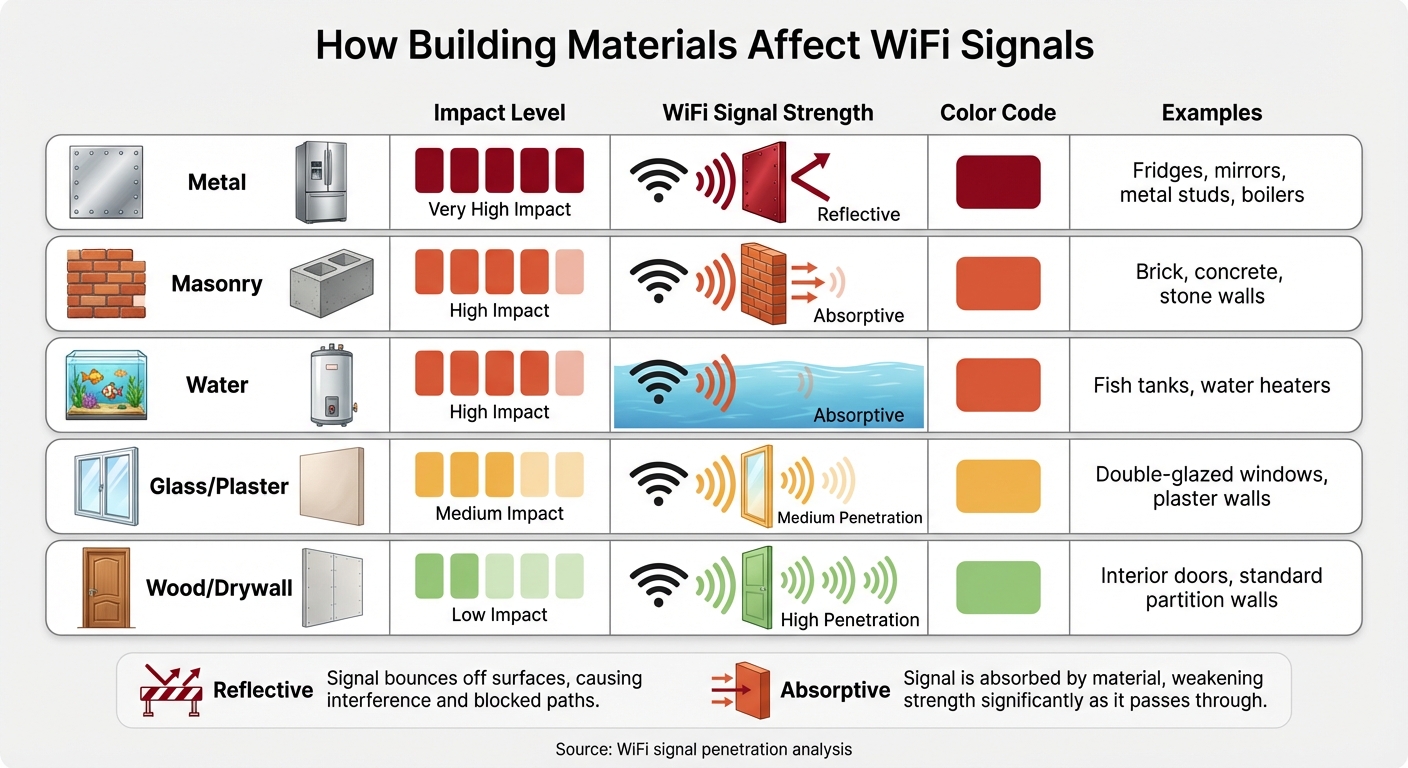
WiFi Signal Impact by Material Type: How Different Materials Affect Your Connection
Even with upgraded equipment, WiFi issues like interference, physical barriers, and network congestion can persist. Let’s explore these challenges and why they remain a problem.
Interference and Physical Barriers
WiFi signals struggle to pass through dense materials such as brick, concrete, and stone, while metal objects like refrigerators, mirrors, and radiators can reflect them [8] [9]. Even advanced routers using WiFi 6E or WiFi 7 face these limitations. Higher-frequency bands, while faster, are less effective at penetrating walls compared to the older 2.4 GHz signals [3] [8].
The 2.4 GHz band also suffers from electronic noise. Devices like microwaves, baby monitors, and Bluetooth gadgets operate within this frequency, creating congestion. With only three non-overlapping channels (1, 6, and 11), interference is common in densely populated areas [8].
Water can also absorb WiFi signals, so objects like fish tanks and water heaters can weaken your connection [3] [8]. A broadband survey revealed that 42% of respondents experienced unreliable home internet, often due to these internal WiFi issues rather than problems with their internet service provider [9]. These challenges highlight the need for tailored system designs, which professional integrators can provide.
Coverage Gaps in Larger Homes
Physical barriers aren’t the only issue – home layout and size also play a role. A single router typically covers up to 2,500 square feet. Larger homes, especially those over 3,000 square feet or with multiple floors, often require additional access points to maintain consistent coverage [4]. L-shaped layouts or homes with thick interior walls can further complicate signal distribution, as WiFi signals struggle to bend around corners or penetrate multiple barriers.
Higher-frequency bands like 5 GHz and 6 GHz, while faster, have a shorter range and are less effective at penetrating walls [3] [8]. Placement also matters – WiFi signals radiate outward and downward, so placing a router on the floor can lead to significant signal loss to the foundation [3]. In open spaces, WiFi can reach 150 to 300 feet, but obstructions significantly reduce that range [9].
| Material Type | Impact on WiFi Signal | Common Examples |
|---|---|---|
| Metal | Very High (Reflective) | Fridges, mirrors, metal studs, boilers |
| Masonry | High (Absorptive) | Brick, concrete, stone walls |
| Water | High (Absorptive) | Fish tanks, water heaters |
| Glass/Plaster | Medium | Double-glazed windows, plaster walls |
| Wood/Drywall | Low | Interior doors, standard partition walls |
To address these gaps, multiple access points must be strategically placed – a process best handled through professional site surveys and network planning.
Too Many Devices on the Network
WiFi operates as a half-duplex system, meaning only one device can transmit on a given frequency at a time. As Arol Wright from How-To Geek explains:
Wi-Fi is a half-duplex medium, meaning that on a given frequency, only one device can transmit at a time [3].
This setup forces devices to take turns, which can create delays even on high-speed networks.
The growing number of smart home devices adds to this congestion. Many smart bulbs, plugs, and thermostats rely exclusively on the 2.4 GHz band, further crowding the limited bandwidth [8]. These devices constantly send management frames and beacons to maintain their connections, consuming bandwidth that could otherwise be used for data [3].
Older devices can also slow down the network. Legacy smart home gadgets using outdated standards may force modern routers to reduce their speed to accommodate them, lowering overall efficiency [6]. Additionally, activities like security camera uploads and cloud backups can overwhelm your upload capacity, leading to higher latency [6]. As Daniel Reeves points out:
Every device you take off Wi-Fi frees up airtime for everything else [8].
Professional strategies, such as network segmentation and device management, can help optimize performance and reduce these bottlenecks.
Professional WiFi Solutions That Actually Work
Fixing persistent WiFi issues goes beyond upgrading your hardware; it requires a well-thought-out approach to network design. This means addressing the root causes of problems like interference, dead zones, and device congestion.
Mesh Network Systems
Mesh systems offer a modern alternative to traditional single-router setups by using multiple interconnected nodes to create a unified network. These nodes share the load and intelligently manage traffic, effectively eliminating dead zones. As eero puts it:
"Mesh wifi flips that model. Instead of one overworked router, you place a few compact nodes around your space. They talk to each other to route traffic intelligently, helping to eliminate dead zones." [10]
One of the standout features of mesh systems is the single network name (SSID). This allows your devices to connect seamlessly to the strongest signal as you move around your home, without needing to switch networks manually. Additionally, these systems have a built-in self-healing capability: if one node goes offline or becomes overloaded, the network automatically redirects traffic to maintain performance.
Professional-grade mesh systems often include dedicated backhaul channels, either through separate radio frequencies or wired Ethernet connections. This avoids the bandwidth drops commonly seen with traditional WiFi extenders. While a top-tier single router can cover up to 2,500 square feet, homes larger than 3,000 square feet typically gain better performance and coverage with a mesh setup [4].
| Feature | Wi-Fi Extender | Mesh Wi-Fi System |
|---|---|---|
| Network Name (SSID) | Often creates a second SSID (e.g., Home_EXT) | Single SSID for the entire home |
| Roaming | Manual or semi-automatic switching | Seamless automatic handoff |
| Range Performance | Often reduced due to shared bandwidth | Consistently fast, especially with tri-band or wired backhaul |
| Self-Healing | No; requires manual reset if connection drops | Yes; reroutes traffic if a node fails |
To get the best performance, place nodes 30–50 feet apart, ideally in central and elevated locations. Avoid hiding them inside cabinets or near large metal objects, as these can block signals. For maximum stability and speed, connect nodes with Ethernet cables whenever possible. Be cautious not to install too many nodes in a small area, as this can lead to signal interference and slow down your network.
Next, we’ll discuss solutions designed for even more demanding environments.
Enterprise-Grade Access Points
For larger properties or settings with numerous devices, enterprise-grade access points outperform consumer mesh systems. Products like Ubiquiti‘s UniFi systems are designed to handle high numbers of simultaneous connections without the slowdowns often experienced with standard consumer routers.
These enterprise-grade systems rely on wired Ethernet connections, ensuring full-speed performance across the network. This is particularly important for homes with multi-gigabit internet plans, where standard gigabit Ethernet (limited to 940 Mbps) can become a bottleneck [1].
Another advantage of enterprise systems is their ability to perform real-time radio frequency analysis. This feature automatically adjusts settings to reduce interference. They also support network segmentation, allowing you to isolate smart home devices on separate virtual networks (VLANs). This ensures that routine device activity doesn’t interfere with critical tasks like video conferencing or gaming [5].
| Feature | Consumer-Grade Router | Enterprise-Grade Access Point |
|---|---|---|
| Backhaul | Primarily wireless with shared bandwidth | Wired Ethernet with dedicated bandwidth |
| Analytics | Basic signal strength monitoring | Real-time RF spectrum analysis |
| Roaming | Can suffer from "sticky client" issues | Seamless automatic handoff between access points |
| Max Devices | Moderate (20–30 devices) | High (70+ devices without degradation) |
Enterprise systems also address the "sticky client" issue, where devices remain connected to a weaker, distant access point instead of switching to a closer, stronger one [3]. These systems actively guide devices to the optimal connection point, ensuring consistent performance throughout your space.
Strategic placement is crucial to get the most out of these advanced systems, as we’ll explore next.
Professional Site Surveys and Access Point Placement
The key to a high-performing network often lies in the placement of its components. Professional installers use heatmap analysis to identify weak signal areas and determine the best spots for access points.
This process considers various factors, such as signal-blocking materials like mirrors, concrete, and even fish tanks, as well as room layouts and potential interference sources. As Arol Wright notes:
"If you place three powerful mesh nodes in a 1,200-square-foot apartment, you are oversaturating the environment… you are essentially paying extra money to degrade your own network performance." [3]
Professionals calculate the minimum number of nodes required to provide full coverage without causing interference. Placing nodes too close together can lead to overlapping signals on the same frequency, which raises the noise level and makes it harder for devices to communicate effectively. A proper site survey ensures that nodes are spaced just right – close enough to maintain strong connections but far enough to extend coverage effectively.
Hardwiring stationary devices like smart TVs, gaming consoles, and media servers can further ease wireless congestion. Tailored planning ensures that the network is optimized for your home’s specific needs, addressing interference and coverage challenges in a way that generic setups cannot.
Why Professional Design and Installation Matter
Upgrading hardware is just one piece of the puzzle; proper placement and configuration are equally important. Professional design addresses the unique challenges of your home that generic, off-the-shelf solutions often overlook. This personalized approach ensures your network is optimized from the start.
Custom Systems Built for Your Home
Professional installers use tools like heatmap analysis to identify weak signal areas and interference zones, ensuring seamless coverage. They calculate the ideal number of access points needed to avoid common pitfalls, such as placing nodes too close together. When nodes are improperly spaced, they can increase the noise floor, leading to co-channel interference. This makes it harder for devices to distinguish between data packets and background noise, ultimately reducing performance [3].
A custom design also takes your household’s specific needs into account, including future plans. Professionals often recommend wired backhaul by running Ethernet cables between access points. This approach avoids the 50% throughput loss that wireless extenders typically suffer [12]. Additionally, they install hardware at optimal heights – 4 to 6 feet off the ground – to ensure signals disperse effectively across multiple floors [6]. To further enhance network performance, they segment the network by creating separate VLANs for smart home devices, ensuring routine IoT activity doesn’t interfere with bandwidth-heavy tasks like video streaming or gaming [11].
With modern smart homes connecting 30 to 70+ devices, all competing for bandwidth [2], a professionally designed system ensures your network can handle current demands while remaining scalable for future technology. Beyond the initial setup, maintaining peak performance over time is equally critical.
Continued Support and System Maintenance
Even the most advanced networks require regular firmware updates to stay secure and stable. Professional maintenance ensures your system remains reliable and protected against vulnerabilities, sparing you the frustration of troubleshooting issues on your own.
This ongoing support provides peace of mind. Whether you’re struggling to connect a new device, experiencing unexpected speed drops, or looking to expand coverage to a newly renovated space, having an expert to call can make all the difference. It’s the distinction between a network that remains dependable for years and one that quickly becomes a source of frustration.
Conclusion
Upgrading your router or internet plan won’t solve WiFi issues if interference, poor placement, or limited coverage are left unaddressed. As Rich Hein aptly puts it, "In most homes, the internet plan isn’t the problem. The bottleneck is." [1]
A professional WiFi design treats your network as a vital part of your home, not just an added convenience. This tailored approach ensures seamless connectivity for 30 to 70+ devices without interruptions [2][5]. By strategically placing access points and leveraging wired backhaul for maximum speeds, it delivers reliable performance throughout your home.
Unlike DIY solutions, professionally designed networks offer more than just better coverage. Managed systems include 24/7 remote monitoring, enabling technicians to identify and fix issues before they disrupt your experience [7]. This proactive support ensures your network stays secure, stable, and ready to adapt as your household’s technology demands grow. The result is a dependable network that forms the backbone of your digital lifestyle.
Your network is the foundation for all your connected devices. When that foundation is unstable, everything built upon it struggles. Investing in a well-designed WiFi infrastructure enhances your home’s functionality, security, and long-term tech readiness.
What One Sound Choice clients say
Ryan listened to us – he understood what we wanted to accomplish. (The 1 Sound Choice team’s) commitment to post-installation support and service has been unbelievable. They are professionals in every aspect and have gained our trust throughout the completion of our project.
– Mr. & Mrs. Maytin (1 Sound Choice client testimonials)
We were surprised with what (Ryan) took away from the conversation – even reading between the lines to put everything we wanted and needed right into his designs for us. At first, we really didn’t know who to go with; we hadn’t had any renovations to our home before. We set up a consultation and liked (Ryan) because he was personable, a good listener and knowledgeable. He asked about our wish list and gave us some ideas…which were great.
– Mr. & Mrs. Caywood (1 Sound Choice client testimonials)
Very efficient and professional. Knowledgeable of equipment and products suited for your space/home. Perfectionists at their job and get the task done in promised time.
– dmhajjar (Houzz review)
FAQs
How do I know if WiFi interference is my problem?
If you’re noticing unstable internet speeds or frequent disconnections, WiFi interference might be to blame. This is especially true if issues occur near devices like microwaves, cordless phones, or in areas with thick walls. Pay attention to whether the problem gets worse when specific appliances are running or if your router is operating on the same channel as other nearby networks. To tackle this, you can use tools to identify less crowded channels or consider professional fixes, such as setting up a mesh network, to minimize interference and improve connectivity.
Do I need mesh or wired access points for my home?
The decision to go with mesh networks or wired access points largely hinges on the size and layout of your home, as well as the specific Wi-Fi challenges you’re facing. Mesh systems work well for larger homes or those with multiple floors, as they use several nodes to create consistent coverage and minimize dead zones. On the other hand, wired access points, connected through Ethernet cables, deliver a more stable and faster connection. These are particularly effective for tricky layouts or areas with weak signals, especially when installed professionally to ensure the best performance.
How many devices are “too many” for one WiFi network?
The capacity of a WiFi network to manage devices largely hinges on its equipment and overall capability. Standard consumer routers often face challenges when handling 20-30 active devices, particularly if those devices are engaged in data-heavy activities like streaming or gaming. For households packed with numerous IoT gadgets, options such as mesh networks or enterprise-grade access points can provide better performance. Overloading a network can lead to slower speeds, connection drops, and interference – issues that are especially common on the already crowded 2.4 GHz frequency band.
Related Blog Posts
- Wi-Fi Coverage Estimator
- How to Set Up Whole Home WiFi: 7 Steps for Better Coverage
- Fixing Slow WiFi at Home: 6 Solutions That Actually Work
- How to Identify Wi-Fi Interference at Home
Rooms that still drop Wi-Fi? See our new home Wi-Fi page.
More questions
Will a faster internet plan fix my Wi-Fi?
Usually not. A faster plan brings more speed to the router. It does not push the signal through walls or to far rooms.
One Sound Choice, 8 Tilley Ave, Pompton Plains, NJ 07444. Call or text (973) 945-5275. We work in homes across Morris, Passaic, Bergen, Essex, Somerset, and Hunterdon counties. Written by Ryan Herd, founder of One Sound Choice.