
Smart home technology offers two main approaches: adding devices gradually or opting for professional integration upfront. Each has its pros and cons, and the best choice depends on your priorities, budget, and long-term goals.
- Gradual DIY Setup: Start small with devices like smart thermostats or video doorbells. While cheaper upfront ($1,000–$3,000), this approach can lead to issues like compatibility problems, network congestion, and higher long-term costs due to repeated upgrades or troubleshooting. Managing multiple apps and devices also increases complexity.
- Professional Integration: A single, cohesive system installed by experts ensures reliability, security, and ease of use. Though more expensive upfront ($10,000–$100,000+), it avoids the challenges of DIY setups, offers better scalability, and reduces maintenance efforts. Systems are designed to work together seamlessly, often enhancing property value.
Key Takeaway: If you prioritize ease, reliability, and security, professional integration is the better option. However, for those on a tight budget, starting small with DIY devices may be more practical, albeit with potential trade-offs in performance and scalability.
1. Adding Smart Home Technology Gradually
Starting small with smart home technology – like a thermostat – can be a manageable way to ease into automation. From there, you might add smart lighting or a video doorbell. The upfront costs are relatively modest, with basic systems typically ranging between $1,000 and $3,000 [9]. This approach allows you to learn and adapt over time.
However, as technology expert Tod Caflisch found over a seven-year period ending in May 2024, gradual adoption can come with headaches. He began with smart bulbs and slowly expanded, only to face "dead spots" and integration failures. Ultimately, he had to restructure his entire setup during a home renovation, opting for a centralized Wi‑Fi system with dedicated Ethernet networking to address these issues [3].
Cost Over Time
While spreading out purchases may seem easier on the wallet, it can lead to unexpected expenses. Mixing brands for different devices – choosing one for lighting, another for security, and yet another for climate control – can result in compatibility issues. This often necessitates buying new devices to unify the system, effectively doubling your investment [5].
Additionally, if you rely on professional installation at each step, labor costs can pile up. Spacing out installations over months or years means paying for setup multiple times rather than consolidating it into one project [9][3]. These incremental costs can quickly outpace the savings of a gradual approach.
Reliability
Gradual setups often struggle with reliability. Devices from different manufacturers may not integrate seamlessly, leading to automations that fail sporadically. This inconsistency can erode trust in the system.
"Consistency matters more than features. When automation fails even occasionally, you stop trusting it, and once that happens, it’s easier to turn everything off than to fix it." – Stefan Gheorghe, Founder/CEO, Homedit [5]
Another common issue is network congestion. Adding devices one at a time without upgrading your network can overload your Wi‑Fi, causing dropped connections and delayed voice commands [8]. Smart bulbs, for instance, can become unusable if someone turns off the wall switch, as their features depend on being powered on [5].
Scalability
If you’re planning to expand your system over time, sticking to a single ecosystem – whether it’s Apple HomeKit, Google Home, or Amazon Alexa – can save you from future headaches. Mixing platforms often leads to integration struggles, making it harder to add new devices smoothly [8][5].
Your home network also plays a critical role. As you add more devices, a basic Wi‑Fi setup may no longer suffice. Upgrading to a mesh network or wired system might become necessary to handle the increased demand [3][9]. Without this foundation, your original router or hub could become a bottleneck, forcing a complete system overhaul [8].
Security Risks
Gradual adoption can also expose your system to security vulnerabilities. Devices often retain their default credentials if passwords aren’t updated or two-factor authentication isn’t enabled, making them easy targets for hackers [8]. Cloud-dependent devices add another layer of risk – if your internet goes down, critical systems like locks or cameras could stop functioning [5]. Without local control options, you’re entirely reliant on the manufacturer’s cloud service, which could be discontinued or compromised.
Maintenance Effort
A piecemeal approach increases the effort required to maintain your system. Managing multiple apps and hubs can be a daily frustration, as each manufacturer uses its own interface and update schedule. Troubleshooting often involves juggling different apps, remembering which controls what, and keeping track of login credentials.
"A smart home is still a system you’ll forget about until something breaks. Label your hubs. Write down device names, codes, and which breaker feeds what." – Stefan Gheorghe, Founder, Homedit [5]
Battery-powered devices like smart locks add another layer of upkeep. These often experience high battery drain and may malfunction during seasonal door swelling [5]. Without proper documentation – such as labeling hubs and recording device codes – routine maintenance can quickly become a time-consuming ordeal [5][3]. This highlights why a professional home automation systems can sometimes offer better long-term value.
sbb-itb-c5b321b
2. Professional Integration from the Start
Opting for professional integration from the beginning can save both time and money, while ensuring a seamless and efficient system setup.
Unlike gradual installations that often lead to mounting costs and compatibility problems, professional integration offers a unified solution right from the start. By investing upfront in a system designed to work together, you avoid the need for repeated installations or replacing incompatible components. Professionally installed smart home systems typically cost between $1,000 and $15,000, depending on factors like the size of the home and wiring requirements [9]. While the initial cost might seem steep compared to piecemeal purchases, it eliminates the long-term expenses tied to fixing or replacing mismatched devices.
For example, in February 2026, Grounded Electric completed a high-end project for a 12,000 sq. ft. home in Alpine, NJ. The installation featured a Control4 custom system, Lutron HomeWorks for lighting and motorized shades, and a centralized equipment rack with redundant networking. The cost ranged from $250,000 to $400,000, delivering integrated automation for climate control, audio, and security [9]. This upfront investment provided the homeowner with a reliable, unified system built to last decades – free from compatibility headaches.
"The best approach is having as defined a concept of the smart home environment you want to build your plan around. This will save you a lot of time, frustration and money in the long run." – Tod Caflisch, Smart Home Thought Leader [3]
Cost Over Time
Professional installation consolidates labor and avoids recurring device replacement costs. By paying for setup once and sidestepping compatibility-related upgrades, you can prevent the gradual expense buildup associated with DIY systems [9]. For ongoing functionality, monthly fees for app connectivity or security monitoring usually range from $10 to $50 [9].
Additionally, a professionally installed smart home can enhance property resale value. Modern buyers often prioritize features like energy efficiency and security, making such systems an attractive selling point [8][9].
Reliability
Reliability is a cornerstone of professional systems, especially for critical functions like locks, cameras, and water shutoff valves. Unlike cloud-dependent devices that can fail during internet outages, these systems are designed to operate independently [5]. This ensures they remain functional when reliability is non-negotiable.
"A lock that works most of the time is worse than a regular key. Reliability matters more than features when it comes to anything security-related." – Stefan Gheorghe, Founder, Homedit [5]
Enterprise-grade networking solutions, such as Control4 or Lutron HomeWorks, manage hundreds of devices with ease [9]. Many professional setups also include remote monitoring tools like WattBox, allowing technicians to proactively address issues before they escalate [1]. This reduces the frustration of troubleshooting across multiple apps.
Scalability
Professional systems are designed with growth in mind. Using centralized hubs and standardized protocols, they can accommodate new devices without requiring a complete overhaul. Whether you’re adding automated shades, expanding audio zones, or installing additional security cameras, the system adapts smoothly [9].
Integrators also document wiring and system setups, protecting your investment and ensuring long-term performance as your home evolves [4][2].
Security Risks
Security is another area where professional integration excels. By implementing VLAN separation, integrators isolate smart devices from the primary network, preventing a compromised device – such as a hacked camera – from exposing sensitive data [1][4]. They also configure systems to counteract Wi-Fi jammers, which could otherwise disable wireless security components [1][4].
Additional measures include changing default credentials, disabling unused features like remote access, and performing regular firmware updates to address vulnerabilities [8]. These precautions go beyond what most DIY setups offer.
"A critical risk report… outlining 5 immediate fixes to defeat Wi-Fi jammers, protect high-value Bergen County residences, and reduce the chance of financial coercion through compromised home networks." – Ryan Herd, Owner, One Sound Choice [1]
This comprehensive approach ensures a secure and dependable system.
Maintenance Effort
Professional systems significantly reduce maintenance demands. With 24/7 remote monitoring and proactive issue resolution, integrators can address software glitches or connectivity problems before you even notice them [1][2]. This is a stark contrast to DIY setups, where you’re responsible for managing firmware updates, troubleshooting devices, and juggling multiple apps.
One-tap scenes simplify everyday use by coordinating lighting, audio, and shades, making the system intuitive for everyone in the household – even those with minimal technical experience [4].
Pros and Cons
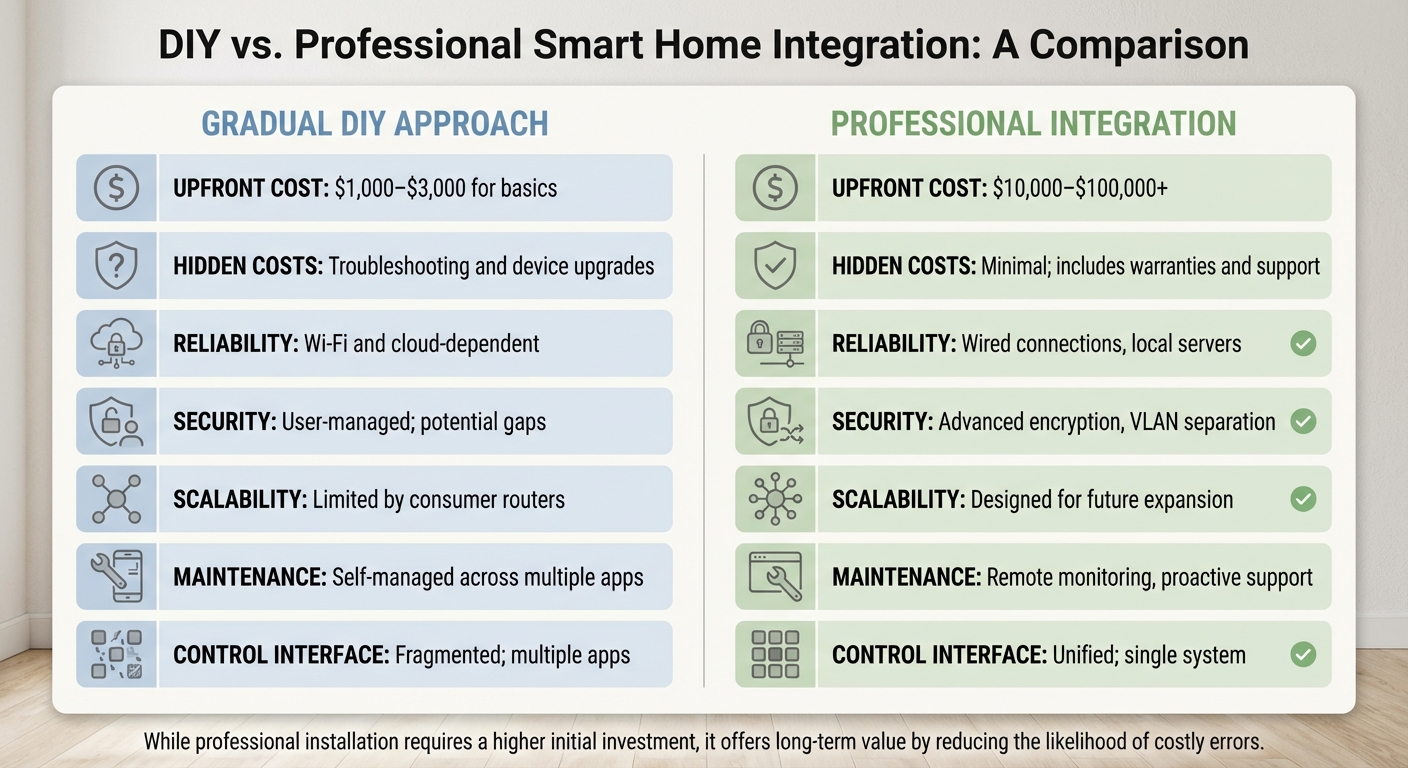
DIY vs Professional Smart Home Integration: Cost, Reliability and Scalability Comparison
Choosing between a DIY setup and professional integration for your smart home involves weighing factors like cost, performance, and long-term reliability. These decisions can shape your family’s daily experience and overall investment.
Cost is a key differentiator. DIY systems typically range from $1,000 to $3,000 for basic features like lighting, thermostats, and voice control [9]. In contrast, professional integration requires a much larger upfront investment, starting at $10,000 and climbing to over $100,000 depending on the size and complexity of your home [10]. While DIY may seem budget-friendly at first, hidden expenses – like fixing installation errors or troubleshooting issues – can add up over time [11]. Professional systems, on the other hand, bundle labor costs into a single phase and often include warranties, saving you from ongoing headaches and unexpected expenses [10][11].
Reliability and security are significant factors separating professional systems from DIY solutions. DIY setups often rely on Wi-Fi and cloud services, which can fail during internet outages. Professional systems, however, use wired connections and local servers, ensuring critical functions remain operational even when the internet is down [12][13]. Security is another area where DIY systems may fall short, as they often lack advanced encryption or rely on default credentials. Professional installations provide stronger protection through robust encryption and network segmentation [13][7].
"While professional installation requires a higher initial investment, it offers long‐term value by reducing the likelihood of costly errors." – Audio Tec Designs [11]
Scalability and maintenance also differ significantly. DIY systems can hit technical limits, such as when consumer-grade routers struggle to support additional devices. This can lead to costly infrastructure upgrades [8][7]. Professional systems, however, are designed for seamless expansion, allowing you to easily add features like motorized shades, additional audio zones, or extra cameras [6][7]. Maintenance is another consideration – DIY setups require you to manage multiple apps and handle firmware updates, while professional systems often include remote monitoring and proactive support [6][10].
| Feature | Gradual DIY Approach | Professional Integration |
|---|---|---|
| Upfront Cost | $1,000–$3,000 for basics [9] | $10,000–$100,000+ [10] |
| Hidden Costs | Troubleshooting and device upgrades [11] | Minimal; includes warranties and support [10][11] |
| Reliability | Wi-Fi and cloud-dependent [12] | Wired connections, local servers [13] |
| Security | User-managed; potential gaps [7] | Advanced encryption, VLAN separation [13][7] |
| Scalability | Limited by consumer routers [8] | Designed for future expansion [6] |
| Maintenance | Self-managed across apps [6] | Remote monitoring, proactive support [10] |
| Control Interface | Fragmented; multiple apps [12] | Unified; single system [7] |
This comparison highlights the advantages of professional integration for families seeking long-term reliability and simplicity. For those in Northern New Jersey who prioritize security and ease of use, professional systems offer a streamlined, durable solution that avoids the risks and challenges of piecemeal upgrades.
Conclusion
Deciding between a gradual DIY setup and professional integration often comes down to reliability, security, and long-term practicality. While DIY solutions might seem appealing due to their lower upfront costs, they can introduce challenges that professional systems are designed to avoid.
For homeowners in Northern New Jersey towns like Alpine, Saddle River, Franklin Lakes, and Mendham, integrating smart technology into your home’s design from the beginning can make a significant difference. This approach ensures that essential systems – such as locks and water shutoffs – remain functional even during internet outages, unlike many cloud-reliant DIY devices [5].
"Smart home tech isn’t about having more features. It’s about reducing the number of things you have to think about every day." – Stefan Gheorghe, Founder/CEO, Homedit [5]
This perspective highlights that integration isn’t just an upgrade; it’s a thoughtful strategy for managing your home more effectively over time.
If security and simplicity are priorities for your family, professional integration offers clear advantages. It provides a cohesive system tailored to your daily routines – like "Movie Night" or "Goodnight" – allowing you to adjust lighting, shades, and locks with a single tap [4].
For those seeking technology that enhances life without adding unnecessary complexity, starting with a professional plan is a smart investment. It supports your routines seamlessly, without the ongoing frustrations that often accompany piecemeal DIY solutions [4][8].
What One Sound Choice clients say
I’d (tell others) that Ryan’s very professional and very easy to work with, in terms of budgeting and listening to what you want to have done. He never pushed us toward anything we couldn’t afford or didn’t want and he got the job done on time.
– Mr. & Mrs. DeSantis (1 Sound Choice client testimonials)
(We received) friendly, highly competent, quick and clean installation by 1 Sound Choice. The team followed up a few weeks after completion to ask if we were satisfied with our Media Room and Home Audio System. 1 Sound Choice is truly “top shelf” – they surpassed our expectations every step of the way.
– Mr. & Mrs. Blake (1 Sound Choice client testimonials)
One Sound Choice was our second try at finding a contractor to repair our flood-damaged home after Irene blew through in August of 2011. Our Cape Cod house has a slab foundation and the entire first floor – living room, kitchen, dining room, two bedrooms, and a bathroom – got 5 feet of water. Ryan, the owner, was highly professional from start to finish. He worked closely with us to produce a contract that was within our insurance budget, and he came in on time and on budget. In some cases, he went over and above the call of duty; for example, surprising me with some crown molding in the bathroom and dining room that I had really wanted but just didn’t have the money for. We actually had enough left to hire him to do our home theater and bedroom media center! We were so pleased to have discovered the truly good people at One Sound Choice, and hope to work with them again when we are ready to remodel our upstairs rooms.
– bethbarnhill (Houzz review)
FAQs
How do I know when my home network needs an upgrade for smart devices?
Your home network might be due for an upgrade if you’re experiencing unreliable connections between devices, sluggish performance, or difficulty adding new gadgets. These problems are often caused by limited bandwidth, aging equipment, or potential security gaps. Resolving these issues can help your smart devices operate smoothly and safely.
What should I plan first if I want a professionally integrated smart home?
Start by identifying what you want from your smart home. Think about how your daily routines and goals align with systems like lighting, security, entertainment, and climate control. For instance, do you want lights that adjust automatically based on the time of day? Or perhaps a security system that lets you check cameras remotely? Planning ahead helps ensure everything works together smoothly and fits your needs.
Once you’ve outlined your priorities, focus on building a strong and secure network. This is the backbone of your smart home, supporting all your devices. A reliable network not only prevents connectivity hiccups but also makes it easier to expand your setup later without expensive upgrades. This approach sets the stage for a smart home that’s both efficient and future-ready.
Will my smart home still work if the internet goes out?
If your internet connection drops, many smart home systems can still operate basic automation and security features that work locally without needing online access. However, advanced functions, like remote control and full system management, usually depend on an internet connection. To ensure smooth operation during outages, it’s worth investing in a system specifically designed to manage such scenarios efficiently.
Related Blog Posts
- Smart Home Investment: Quality vs. Cost
- “How Do I Avoid Spending Money on Home Technology I’ll Regret in a Few Years?”
- “What’s the Difference Between a DIY Smart Home and a Professionally Designed One?”
- “How Do I Make Sure My Home Technology Is Simple Enough for Everyone to Use?”
Which way costs less?
Starting small costs less at first, often $1,000 to $3,000. A full system planned from the start can run $10,000 to $100,000 or more. Small add-ons can cost more over time when parts do not work together and need fixes. Pick what fits your budget now and your plans later.
Want a plan for your house? See our smart home page.
More questions
Can I start small and add more later?
Yes. Just plan the network and wiring first. Then each new device fits in, and you do not have to start over.
One Sound Choice, 8 Tilley Ave, Pompton Plains, NJ 07444. Call or text (973) 945-5275. We work in homes across Morris, Passaic, Bergen, Essex, Somerset, and Hunterdon counties. Written by Ryan Herd, founder of One Sound Choice.