
Making your home technology easy for everyone to use starts with simplicity and thoughtful design. A smart home isn’t about having the latest gadgets – it’s about creating a system that works for your entire household without frustration. Overly complicated setups with multiple apps, unreliable connections, and confusing controls often lead to frustration and wasted time. Here’s how to avoid common pitfalls and create a system that works for everyone:
- Keep controls intuitive: Systems should work with familiar tools like wall switches or labeled keypads so even guests or less tech-savvy family members can use them.
- Avoid app overload: Using too many apps for different devices makes the system harder to manage. A single, unified interface simplifies control.
- Ensure reliability: Invest in a strong network and local control to prevent devices from becoming unresponsive during outages or slow internet speeds.
- Consider professional integration: Experts can design a centralized system that brings all devices together, eliminates app fatigue, and ensures everything runs smoothly.
The goal is to create a system that works quietly in the background, making life easier for everyone without requiring constant troubleshooting or tech expertise.
Why DIY and Consumer Products Often Fail to Deliver Simplicity
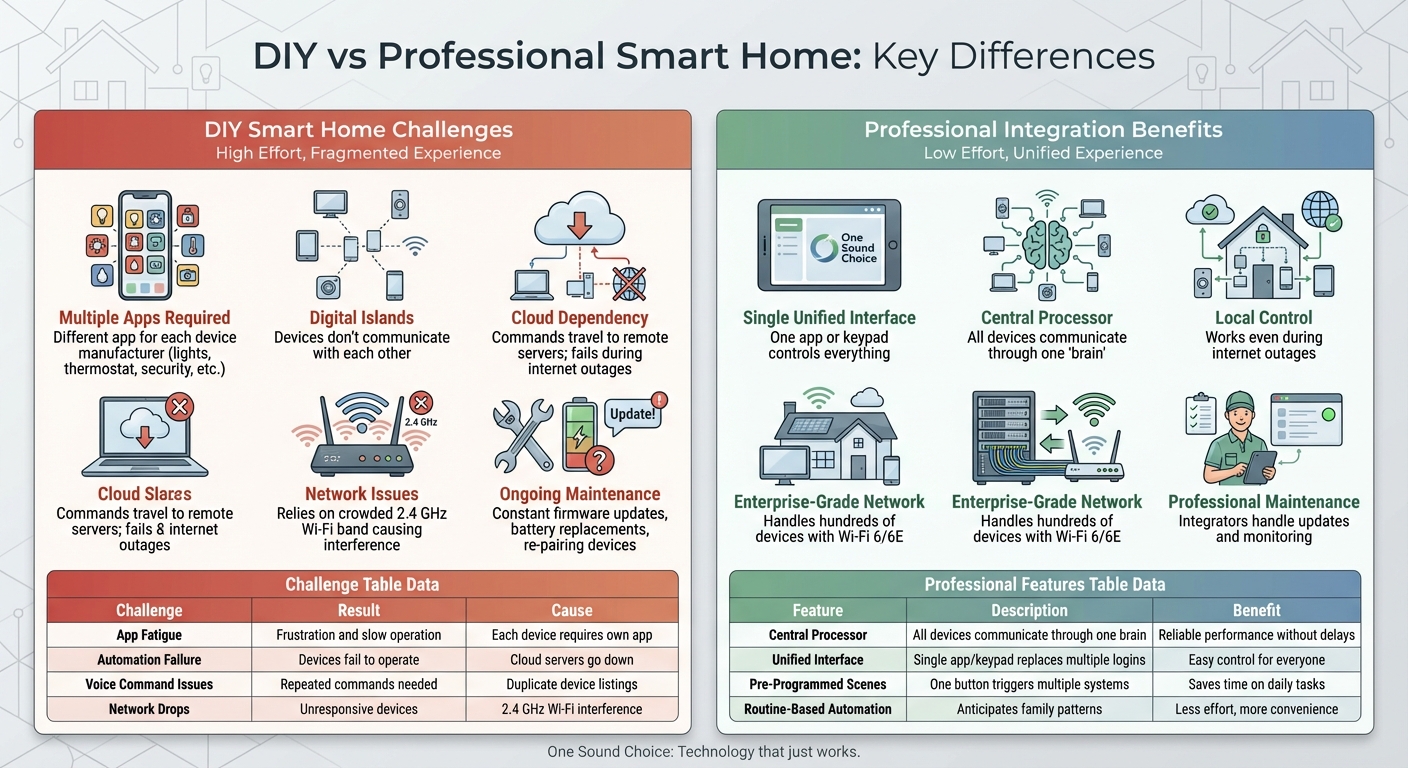
DIY vs Professional Smart Home Systems Comparison
DIY smart home setups sound convenient, but they often lead to fragmented, unreliable systems. Many families turn to consumer products expecting ease, only to encounter daily frustrations with multiple apps and inconsistent connections.
Too Many Apps, Too Much Confusion
Using multiple apps for different devices quickly becomes overwhelming. Each manufacturer typically requires its own app and account – one for your lights, another for your thermostat, and so on. As My Custom Integrators aptly puts it:
"Five apps to control one home isn’t smart. It’s chaos." [4]
This setup can leave households divided. One person might figure out which app controls what, while others give up and revert to manual switches. In the end, the smart home becomes functional only for the person who set it up, leaving everyone else frustrated or reliant on them for tech support.
No Unified Control
Consumer products from different brands often create "digital islands" – isolated systems that don’t communicate with each other [3]. Coordinating even simple tasks, like preparing your home for vacation, may require opening multiple apps and adjusting each device manually.
Even platforms that aim to unify devices can cause headaches. Technology journalist Paul Lamkin shared his struggles with voice control:
"Every time I heard, ‘I found multiple devices with that name. Try renaming them, or putting them in a group,’ a small part of me died." [2]
Connection Woes in DIY Systems
Reliability is one of the biggest issues with DIY setups. Many consumer devices rely on the crowded 2.4 GHz Wi-Fi band, which is already bogged down by signals from microwaves, baby monitors, and cordless phones [4]. When too many devices compete for bandwidth on a standard home router, connections drop, and devices become unresponsive.
Additionally, many DIY systems rely on cloud servers to process commands. For instance, turning on a light might require your phone’s signal to travel to a remote server and back before the light responds. If your internet connection is slow or goes down, your "smart" home essentially stops working [1][3]. Worse, these failures often happen without warning – you only discover the problem when a device refuses to respond.
| Challenge | Family Impact | Root Cause |
|---|---|---|
| App Fatigue | Frustration and slow operation | Each device requires its own app [4] |
| Automation Failure | Devices fail to operate as needed | Cloud servers go down or switches are flipped [1][2] |
| Voice Command Issues | Repeated commands are required | Duplicate device listings in voice apps [2] |
| Network Drops | Devices become unresponsive | Interference on the 2.4 GHz Wi-Fi band [4] |
On top of these issues, homeowners face ongoing maintenance like firmware updates, replacing batteries in wireless devices, and re-pairing gadgets after network resets. What starts as a fun project often turns into a time-consuming chore, taking away from family time instead of enhancing it.
These challenges highlight the advantage of professional integration, which can deliver a system that is both reliable and easy to use.
sbb-itb-c5b321b
How Professional Integration Makes Technology Easy to Use
Professional integration takes the hassle out of managing multiple devices and systems by bringing them together into a single, easy-to-use platform. Instead of wrestling with fragmented controls and juggling apps, families can simply enjoy the benefits of technology without worrying about how it all works behind the scenes.
One Control System for Everything
Professional integration simplifies home technology by merging everything into one streamlined system. With a professionally designed smart home, you’ll have a unified interface – whether it’s a wall-mounted keypad, a smartphone app, or voice commands. This consistency means you won’t need to switch between platforms or remember multiple logins to control your devices.
At the heart of this setup is a central processor that keeps all devices connected and responsive. Even if your internet goes down, this local control ensures that everything from adjusting the thermostat to checking security cameras works instantly and reliably [3]. It’s a system designed for convenience and dependability.
One-Touch Scenes for Daily Activities
Scenes take the complexity out of managing individual devices by grouping actions into a single command. For instance, a "Good Morning" scene can brighten the lights, set the thermostat to a comfortable temperature, and start your coffee maker – all at once. Similarly, a "Goodnight" scene might lock the doors, arm the security system, turn off the lights, and close the shades [3][5].
"True smart living doesn’t come from stacking gadgets. It comes from intelligent system design – where devices are chosen to work together, scenes are built around your lifestyle, and everything runs from a central platform that’s responsive, reliable, and easy to control." – Heyo Smart [3]
This kind of automation eliminates the need to open multiple apps or tweak settings manually. Instead, a single tap or voice command is all it takes, leaving the system to handle the rest.
Systems Designed Around Your Family’s Routines
Professional integration goes beyond convenience, tailoring automation to fit your family’s unique routines. Integrators start by learning about your daily habits – when you wake up, when you come home, or when the kids return from school. They then design a system that anticipates your needs, reducing the need for constant manual adjustments [7].
For example, if your family usually arrives home around 5:30 PM, the system can automatically adjust the lighting and temperature so the house feels welcoming. If you enjoy natural light in the mornings, motorized shades can open with the sunrise. These adjustments are triggered by factors like the time of day, occupancy sensors, or even geofencing, ensuring your home adapts seamlessly to your lifestyle [6][8][9].
The system is also designed with everyone in mind. For those less comfortable with technology, physical wall keypads can be installed in key areas, allowing anyone – guests, kids, or grandparents – to control lights and temperature without needing a smartphone [1]. This personalized approach ensures that every family member, no matter their comfort level with tech, can enjoy the benefits of an integrated system.
| Professional Feature | How It Simplifies Use | Family Benefit |
|---|---|---|
| Central Processor | All devices communicate through one "brain" | Reliable performance without delays |
| Unified Interface | Single app or keypad replaces multiple logins | Easy control for everyone |
| Pre-Programmed Scenes | One button triggers multiple systems | Saves time on daily tasks |
| Routine-Based Automation | Anticipates family patterns | Less effort, more convenience |
Why a Strong Network Is Critical for Reliability
The reliability of a smart home hinges on the strength of its network. When your household relies on devices like security cameras, smart locks, thermostats, and lighting, a weak network can lead to frustrating and even critical failures. The routers supplied by most internet service providers are designed for basic tasks like web browsing – not for the constant, high-bandwidth demands of a fully connected smart home [11].
A professional setup uses enterprise-grade hardware built to handle dozens, even hundreds, of devices without slowdowns or interruptions. These systems leverage advanced Wi-Fi standards such as Wi-Fi 6 or 6E to minimize congestion and prioritize wired Ethernet connections for stationary devices like smart TVs or gaming consoles. This approach frees up wireless bandwidth for mobile devices and sensors, ensuring smooth performance across your home [10][11].
Fixing Connection Problems Before They Start
Common issues like dead spots, buffering security camera feeds, or devices disconnecting unexpectedly often stem from reliance on basic consumer-grade routers. Professional network design tackles these problems head-on by mapping your home and placing mesh nodes strategically to ensure seamless, whole-home coverage [10][11].
Placement of equipment is key. Routers should be positioned away from obstructions and sources of interference. Activating QoS (Quality of Service) settings can further enhance reliability by prioritizing essential traffic, such as video calls or security feeds [10][11]. These measures create a network that supports the demands of a modern smart home without hiccups.
Protected and Organized Networks
Reliability also depends on a network that’s both secure and well-organized. Professional setups often divide devices into distinct zones, creating a dedicated network for smart home gadgets that’s separate from personal devices like laptops and phones. This separation not only safeguards sensitive data but also prevents compromised IoT devices from accessing private files [10][12].
"A strong network isn’t just about speed; it’s about stability, coverage, and security." – homenode [10]
Another advantage of professional systems is their reliance on local control. By shifting control logic to a central processor within your home, rather than depending on cloud servers, your smart home continues to function even if the internet goes down. This setup ensures faster response times for commands, as data doesn’t need to travel to a remote server and back [3][2]. Features like regular firmware updates and robust encryption protocols, such as WPA3, further enhance security and performance, keeping your network reliable as technology evolves [12].
Keeping Your System Working as Technology Changes
Smart homes are constantly evolving to meet the needs of families while keeping pace with technological advancements. Professional integration not only simplifies everyday use but also ensures your system remains flexible enough to accommodate future changes. In contrast, DIY setups often result in a clutter of outdated devices and broken automations [2]. Professional systems, on the other hand, are built with long-term reliability and flexibility in mind.
Regular Maintenance and Software Updates
Professional integrators take care of the technical aspects that keep your smart home running smoothly. They handle software updates, monitor system performance, and address compatibility issues before they can disrupt your daily life. This proactive approach ensures your system remains cohesive and functional over time.
Centralized logic engines, such as the Loxone Miniserver, offer a unified control point that maintains consistent operation across all devices – even as new ones are introduced [3]. This structure eliminates the confusion and malfunctions often associated with DIY systems, especially when cloud services change or individual devices unexpectedly go offline [2]. With this solid foundation, your smart home can adapt effortlessly as your family’s needs evolve.
Adding Features as Your Needs Change
Professional systems are designed with future growth in mind, incorporating structured cabling, expansion ports, and open protocols from the outset [3]. Whether you’re setting up a gaming room for your teenagers, installing solar panels, or expanding your living space, these systems can adapt without requiring a complete overhaul.
"A well-designed smart system anticipates these changes by laying the groundwork during installation: structured cabling, expansion ports, flexible inputs, and open protocols that welcome future upgrades." – Heyo Smart [3]
As your family’s lifestyle shifts – whether it’s kids growing older, changes in work schedules, or the addition of new spaces – your integrator can reconfigure smart lighting scenes, set up new zones, and fine-tune automation logic. This adaptability ensures your smart home evolves alongside you [3].
Conclusion: Professional Design Delivers True Simplicity
Creating simplicity in home technology isn’t just about buying the latest gadgets – it’s about thoughtful design and integration. As Tim Brookes, Senior Editor at How-To Geek, aptly states:
"A smart home should be as usable as a dumb home" [1].
To meet this standard, professional planning, strong infrastructure, and ongoing support are essential – elements that DIY setups often fall short of providing.
Professional integration ties together lighting, climate control, security, and entertainment into a single, cohesive system. This centralized approach eliminates the hassle of juggling multiple apps or devices, ensuring your home adapts smoothly to your family’s routines without constant manual adjustments.
At the heart of this simplicity lies intentional infrastructure. Structured cabling, reliable networking, and local control systems ensure your home remains functional even during internet outages [3]. Professional designs also plan for future growth by including expansion options and open protocols, so your system can evolve with your needs without requiring a complete overhaul.
When the foundation is solid, automation becomes seamless. It works quietly in the background, improving daily life without drawing attention. As Heyo Smart explains:
"Great automation is invisible. It anticipates your needs, reacts intelligently to changing conditions, and enhances your environment without getting in the way." [13]
Beyond installation, professional integrators provide ongoing support. They handle software updates, monitor system performance, and fine-tune automation as your lifestyle changes. This ensures your home technology remains easy to use, dependable, and perfectly aligned with your needs for years to come.
What One Sound Choice clients say
We were surprised with what (Ryan) took away from the conversation – even reading between the lines to put everything we wanted and needed right into his designs for us. At first, we really didn’t know who to go with; we hadn’t had any renovations to our home before. We set up a consultation and liked (Ryan) because he was personable, a good listener and knowledgeable. He asked about our wish list and gave us some ideas…which were great.
– Mr. & Mrs. Caywood (1 Sound Choice client testimonials)
The 1 Sound Choice staff was very easy to work with. Ryan, you understood our wants right from the beginning. Simplicity of installation and operation were just some of the reasons we chose 1 Sound Choice. You exceeded my expectations!
– Mr. & Mrs. Matia (1 Sound Choice client testimonials)
Had a Control 4 home automated system installed after we had a house fire. Every room in my house has been setup with phone/internet/cable. Created a central area that houses all my equipment. The only equipment in my home theatre and living rooms are the TV’s. This is great for little kids. No worries about them playing with your components. 1 Sound Choice installed all the equipment and provided me with a seamless entertainment experience. Very professional with a special attention to detail I have not seen in their industry. Customization is their specialty and they are willing to work with you to acheive your dreams. They have solutions for any budget or lifestyle. A true pleasure to work with. Have recommended their services to many and would look to them for any future upgrades or new installs should we decide to move.
– buoog14 (Houzz review)
FAQs
What’s the simplest way to control my whole smart home?
The simplest way to manage your smart home is by using a professionally integrated system that brings together essential functions – such as lighting, audio, security, and climate – into a single, user-friendly interface. Platforms like Control4 offer centralized control, while physical switches or panels provide quick and convenient access. A thoughtfully designed system tailored to your household’s needs ensures smooth operation and makes it easy for everyone to navigate.
How can my smart home still work if the internet goes out?
Your smart home can keep running smoothly even during internet outages by using local networks and devices that operate without needing an internet connection. This allows critical automation and security features to stay active, ensuring your home remains functional and secure. Opting for systems that prioritize local processing is essential for dependable performance in these scenarios.
What should I upgrade first to make everything more reliable?
To boost reliability, consider investing in a professional-grade, integrated system such as Control4. These systems are built to ensure smooth integration and consistent performance, allowing your devices to work together without hiccups. Unlike DIY setups or piecemeal solutions, professional systems come with the support of certified experts. This reduces compatibility problems and enhances the overall functionality of your home technology.
Related Blog Posts
- Smart Home Personalization: What Families Need
- “Why Does Our Smart Home Feel Complicated Instead of Convenient?”
- “Why Do Some Homes Have Reliable Technology and Others Constantly Have Issues?”
- “How Much Home Technology Do We Actually Need for Our Family?”
Too many apps and remotes in your house? See our too many remotes page.
More questions
Will my kids and parents be able to use it?
They should. A good setup has 1 remote or 1 button for each job, with clear names. If someone needs a manual, it is too hard.
One Sound Choice, 8 Tilley Ave, Pompton Plains, NJ 07444. Call or text (973) 945-5275. We work in homes across Morris, Passaic, Bergen, Essex, Somerset, and Hunterdon counties. Written by Ryan Herd, founder of One Sound Choice.