
Technology often feels magical when first installed – devices connect easily, automations work smoothly, and life becomes more convenient, and technology is not scary but an enhancement to your lifestyle. But over time, frustrations creep in. Devices disconnect, fail to respond, or stop working altogether. Why does this happen? The answer lies in three key areas:
- Wi-Fi and Network Issues: Adding more devices can overload your network, causing slowdowns and disconnections. Older devices often struggle in crowded 2.4 GHz bands.
- Software Updates: Updates meant to improve functionality can break integrations, introduce bugs, or render older devices incompatible.
- Aging Hardware: Older devices may lack the processing power or memory to handle newer software, and some manufacturers stop supporting legacy products altogether.
Professional integration offers solutions by designing structured networks, using local control to reduce cloud reliance, and ensuring systems can grow with your needs. While DIY setups may seem appealing, they often lead to ongoing headaches, making professional systems a smarter long-term choice.
Why Home Technology Breaks Down Over Time
Wi-Fi Problems and Network Overload
As more devices are added to your home network, its limitations become apparent. Initially, a few smart lights and a voice assistant work seamlessly, as these devices consume minimal bandwidth – around 1 Mbps each [5]. However, introducing security cameras, video doorbells, or streaming devices, which demand 25 Mbps or more, can overwhelm the system [5]. Picture it like a highway: light traffic flows smoothly, but during rush hour, congestion slows everything down.
The problem worsens because many smart devices rely on the 2.4 GHz frequency band, which is already crowded with signals from microwaves, cordless phones, and neighboring Wi-Fi networks [5][6]. QA Cafe highlights the complexity of this environment:
The number of combinations of Wi-Fi technologies, bandwidth channels, security modes, etc., make this an extremely complex environment for smart home devices [4].
Over time, some devices stop responding entirely after repeated connection failures [4].
Modern routers, designed with security in mind, use features like IP renumbering and MAC randomization. While these enhance security, they can disrupt devices that lack proper DNS failover, causing them to lose cloud connectivity [4]. On top of network challenges, software changes can further complicate device performance.
Software Updates That Break Things
Software updates, intended to improve devices, often have unintended consequences. Many devices "fail silently" after a background update alters their communication protocols [2][1]. While the device may appear functional, it stops responding to commands or automations.
Cloud-based systems are particularly susceptible. When manufacturers update their APIs to introduce new features or fix vulnerabilities, third-party integrations can fail if they aren’t updated simultaneously [1][3]. For example, a smart plug that worked flawlessly yesterday might stop functioning today because the manufacturer made server-side changes. Even major platforms like Apple HomeKit and Google Home sometimes modify how they handle voice commands, disrupting carefully set routines [7]. Beyond software misalignments, aging hardware also plays a role in these breakdowns.
Old Devices That Can’t Keep Up
Older smart devices often struggle to meet modern requirements. Processors and memory from a decade ago aren’t built for today’s streaming protocols or advanced encryption [11]. For instance, in January 2020, Sonos announced it would stop updating its oldest speakers because their aging processors could no longer handle current streaming technologies [11]. While the hardware itself remains operational, it becomes incompatible with evolving software demands.
An even greater challenge is when manufacturers abandon their products entirely. In April 2022, Insteon suddenly shut down its servers and dissolved its business, leaving users with non-functional hubs and cloud-dependent devices [10]. Similarly, Philips Hue ended support for its first-generation bridge in April 2020, requiring users to purchase a new $60 hub, even though the lightbulbs themselves were designed to last 25 years [11]. As Forrester analyst Frank Gillett explains:
It becomes more expensive and more complicated for a company to continue supporting old technology… frankly, part of the challenge is the customer last paid them 10 or 15 years ago [11].
sbb-itb-c5b321b
How Professional Integration Prevents These Problems
Enterprise-Grade Network Design
Professional integrators approach home networks with the precision of data center design, avoiding the pitfalls of piecemeal setups. Instead of relying on a single consumer-grade router, they create a structured network with detailed signal mapping, identifying potential problem areas before they arise [14].
The backbone of this setup is wired Ethernet connections for bandwidth-heavy devices like streaming boxes or gaming consoles. This ensures a stable foundation that avoids competing with wireless traffic. To address wireless needs, professionals strategically install Wi-Fi 6 access points and Gigabit switches throughout the home, eliminating dead zones caused by thick walls or multi-level layouts [13][15].
Additionally, network segmentation plays a critical role. By isolating smart home systems – such as lighting, security, and entertainment – from personal data networks, issues like a security camera firmware update won’t disrupt your video calls. Similarly, a compromised IoT device won’t have access to sensitive information like financial data [14][15].
For example, in January 2026, Nestology SmartHome engineers revamped the network of a Pennsylvania home plagued by daily outages across its 40+ connected devices. Instead of replacing hardware, they restructured the network and pinpointed failure points, achieving long-term stability without requiring new equipment. As their systems designer explained:
Smart homes fail not because of bad devices, but because no one engineered the system behind them [14].
This level of design ensures the network remains reliable and ready for proactive monitoring.
Regular Maintenance and System Monitoring
Once a solid network is in place, regular maintenance and monitoring ensure it stays that way. Professional systems come equipped with diagnostic tools that reveal hidden network issues, such as heavy traffic or unstable devices – data that’s often invisible to DIY setups [16].
This proactive monitoring allows technicians to identify and isolate failure points before they escalate into larger problems. For instance, if a manufacturer releases a problematic software update, only a specific segment of the network is affected, not the entire system [16]. Scheduled maintenance, including firmware updates and traffic analysis, ensures the network can handle additional devices as needed.
Professionals also prioritize local control architecture, reducing reliance on cloud-based services. This means your system won’t break when a third-party platform updates its API or experiences downtime. Even during internet outages, critical functions like lighting continue to operate. Highlighting this approach, a Nestology engineer stated:
Your lights should not depend on a distant server to turn on. Local control protects reliability, privacy, and long-term ownership [16].
By combining robust design with ongoing maintenance, professional integration avoids the common frustrations of DIY smart home systems.
Modular Systems That Grow With Your Family
Professional integration also ensures your system can evolve with your needs. Pre-installed conduits and wiring make future upgrades straightforward [18][19]. Whether it’s adding a gaming room for a teenager or installing new security cameras, the groundwork is already in place.
These systems use multi-protocol gateways that support current standards like Z-Wave, Zigbee, WiFi, and Matter. This allows new devices to integrate seamlessly into your ecosystem without requiring additional apps or controllers [17][18]. Professionals also plan for extra processing power and bandwidth, ensuring the system can accommodate new technologies as they emerge [17][18].
This approach treats your home as a cohesive digital ecosystem rather than a collection of disconnected gadgets. As the number of devices grows, the structured network design prevents the instability often seen in DIY setups [16]. Even if a manufacturer discontinues a product line or shuts down its servers – such as Insteon did in 2022 – your core functions remain operational because they aren’t tied to a single vendor’s cloud service [16]. This strategy safeguards your investment and ensures your system remains reliable as your needs and technology evolve.
This is your Smart Home nightmare, when smart devices become dumb!
Why Professional Integration Matters
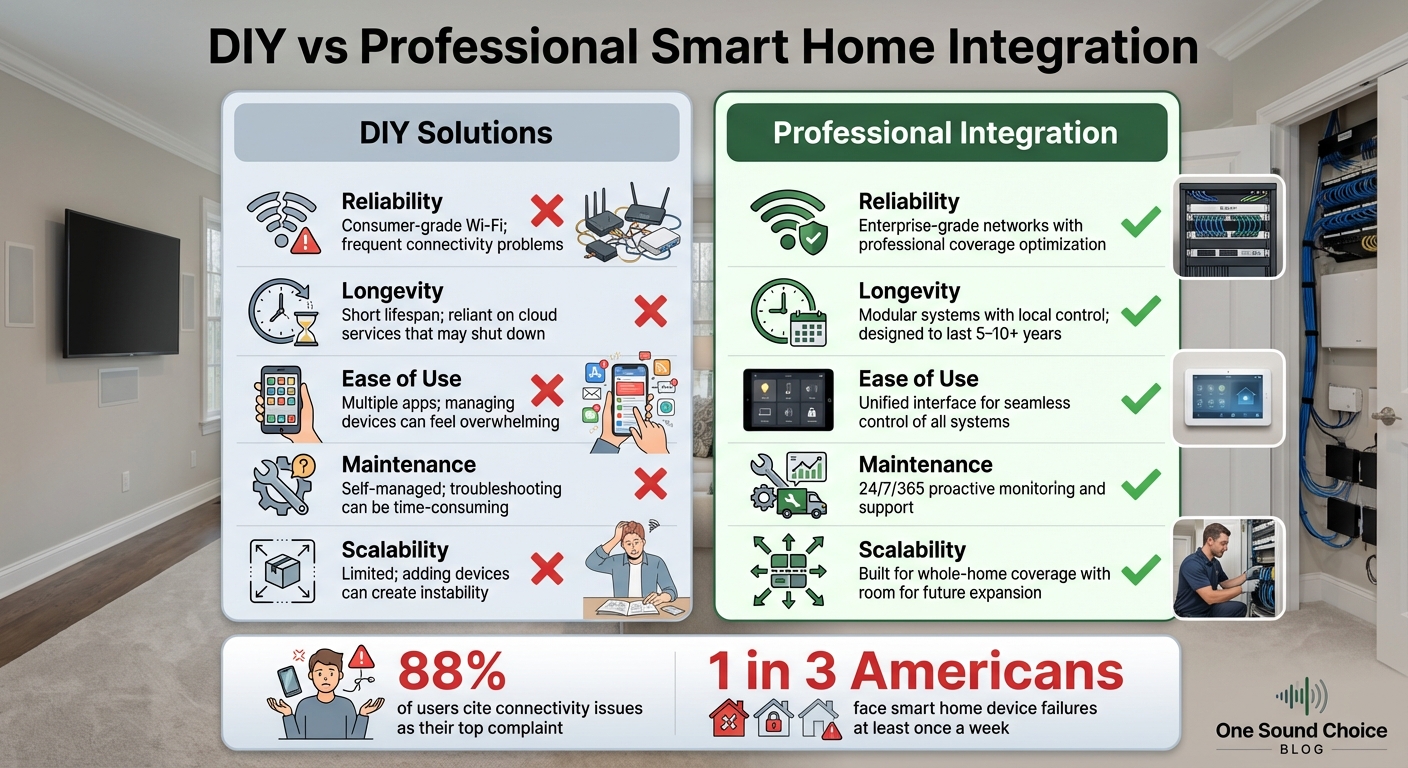
DIY vs Professional Smart Home Integration Comparison
DIY Systems vs. Professional Integration
As home technology becomes more complex, the gap between DIY setups and professional integration grows wider. DIY systems may seem appealing with their lower upfront costs and quick setup, but they often lead to ongoing headaches. Many users end up spending hours troubleshooting compatibility issues, fixing connectivity problems, and juggling multiple apps that don’t always work well together.
Statistics highlight these frustrations: 88% of users cite connectivity issues as their top complaint, and 1 in 3 Americans face smart home device failures at least once a week [26]. These problems are often tied to consumer-grade Wi-Fi networks, which can’t always handle the demands of modern households. Dead zones, bandwidth competition between devices, and frequent signal drops are all too common.
Here’s a closer comparison of DIY solutions versus professional integration:
| Feature | DIY Solutions | Professional Integration |
|---|---|---|
| Reliability | Consumer-grade Wi-Fi; frequent connectivity problems [8][26] | Enterprise-grade networks with professional coverage optimization [8][9] |
| Longevity | Short lifespan; reliant on cloud services that may shut down [8][20] | Modular systems with local control; designed to last 5–10+ years [12][9] |
| Ease of Use | Multiple apps; managing devices can feel overwhelming [27] | Unified interface for seamless control of all systems [21][22] |
| Maintenance | Self-managed; troubleshooting can be time-consuming [23][24] | 24/7/365 proactive monitoring and support [22][25] |
| Scalability | Limited; adding devices can create instability [22][25] | Built for whole-home coverage with room for future expansion [21][23] |
Professional integration eliminates these common obstacles by creating systems designed to handle the demands of modern homes. From stronger networks to streamlined interfaces, these solutions are built for reliability and ease of use.
How One Sound Choice Delivers Long-Term Results
One Sound Choice takes professional integration a step further by treating home technology as a permanent infrastructure rather than a collection of disconnected gadgets. Serving Morris, Bergen, and Essex counties in Northern New Jersey, the company focuses on designing systems that directly address the challenges faced by DIY users, including the connectivity issues reported by 88% of homeowners [26].
Their approach integrates lighting, security, climate control, and entertainment into a single, unified platform. This not only simplifies daily interactions but also reduces the frustration of managing multiple devices. With proactive maintenance and ongoing support, One Sound Choice ensures systems remain secure and functional. Considering that 1.51 billion IoT breaches were recorded in the first half of 2021, their professional monitoring and regular updates provide a critical layer of protection that DIY setups often lack [25].
By viewing the home as a cohesive digital ecosystem, One Sound Choice makes future upgrades and device additions seamless, sparing homeowners the need to troubleshoot or reconfigure their systems.
As Matt Walton, Founder of Homefile, insightfully explains:
Turning something on or off remotely doesn’t make a system intelligent. What’s needed is orchestration – driven by data – to optimize the home as a whole, not just manage one device at a time [9].
This philosophy ensures that professional integration not only resolves current frustrations but also prepares your home technology for whatever comes next.
Conclusion: Protecting Your Technology Investment
What Homeowners Need to Know
Home technology should deliver reliability every time. The difference between systems that perform seamlessly and those that become a source of frustration often lies in the infrastructure, not just the devices themselves. When systems fail, it’s usually because the underlying network and integration weren’t designed or implemented correctly.
To maintain your home’s functionality, it’s essential to treat it like the digital infrastructure it has become. This means investing in enterprise-grade network design, scheduling proactive maintenance to address potential issues before they escalate, and opting for modular systems that can adapt as your family’s needs evolve. Research indicates that many homeowners face frequent problems with smart devices, which can diminish the overall value of these systems [26]. Adding more devices without addressing the core infrastructure can often exacerbate these issues.
Homes that avoid these common frustrations share a few key features: a structured network architecture to prevent connectivity problems, local processing to ensure systems remain operational during internet outages, and professional monitoring to handle security vulnerabilities and software updates proactively [16][17]. These elements highlight why professional system integration is a necessity, not a luxury.
The Case for Professional Integration
Professional integration offers a clear solution to these challenges. For families in Morris, Bergen, and Essex counties who prioritize a seamless, hassle-free living experience, One Sound Choice approaches home technology with the same level of care and planning as other essential systems like electrical wiring or HVAC.
David Bell, a smart home expert at Vesternet, emphasizes this point:
The investment in professional installation pays dividends through improved system reliability, enhanced user experience, and reduced long-term maintenance costs [17].
This approach transforms your home into a unified system where lighting, security, climate control, and entertainment work harmoniously, rather than as a disjointed collection of apps and devices.
What One Sound Choice clients say
Ryan listened to us – he understood what we wanted to accomplish. (The 1 Sound Choice team’s) commitment to post-installation support and service has been unbelievable. They are professionals in every aspect and have gained our trust throughout the completion of our project.
– Mr. & Mrs. Maytin (1 Sound Choice client testimonials)
I’d (tell others) that Ryan’s very professional and very easy to work with, in terms of budgeting and listening to what you want to have done. He never pushed us toward anything we couldn’t afford or didn’t want and he got the job done on time.
– Mr. & Mrs. DeSantis (1 Sound Choice client testimonials)
I have hired 1 Sound Choice on several occasions over the past 10 years for several projects (from minor implementations to a whole house system). Ryan and the team at 1 Sound Choice are consummate professionals – extremely knowledgeable and up to date with technology, focused on delivering the best solution to fit your need, and highly customer service oriented. This combination plus the quality of finished product (every time) have made me a loyal customer… I highly recommend 1 Sound Choice.
– Terry Maytin (Houzz review)
FAQs
How do I know if my Wi‑Fi is the real problem?
If your smart devices seem unresponsive, operate slowly, or require multiple tries to function correctly, your Wi‑Fi could be the culprit. Look out for signs like frequent disconnections, noticeable lag, or a weak signal. To troubleshoot, test your network speed and make sure your router is placed in an optimal location. If these issues continue despite having a reliable internet plan, consider upgrading your router or adjusting your network setup to enhance your smart home’s functionality.
What should I do before installing a device update?
Before applying a device update, ensure you’ve backed up your system or have a method to roll back changes if necessary. Updates can occasionally lead to unexpected problems. Take a moment to review the update notes to understand the changes and verify that the update is compatible with your setup. Taking these steps can help you avoid potential headaches or system disruptions after the update.
How can I avoid getting stuck with cloud-dependent gear?
To ensure your smart home remains functional even during internet outages, opt for devices that support local control and use protocols such as Zigbee or Z-Wave. These systems are designed to operate independently of cloud services, offering greater reliability in case of disruptions. Steer clear of products that demand proprietary hubs or mandatory online registration, as they can tie your setup to external services. By building your smart home around local APIs and minimizing reliance on the cloud, you can enhance its long-term stability and reduce the likelihood of service interruptions.
Related Blog Posts
- “How Do I Avoid Spending Money on Home Technology I’ll Regret in a Few Years?”
- “Why Does Our Smart Home Feel Complicated Instead of Convenient?”
- “Why Do Some Homes Have Reliable Technology and Others Constantly Have Issues?”
- “How Much Home Technology Do We Actually Need for Our Family?”
Is Wi-Fi the weak spot in your house? See our new home Wi-Fi page.
More questions
Does adding more devices slow down my Wi-Fi?
It can. Every phone, TV, and camera shares the same network. Past a point, a home network that was fine at first starts to drop things.
One Sound Choice, 8 Tilley Ave, Pompton Plains, NJ 07444. Call or text (973) 945-5275. We work in homes across Morris, Passaic, Bergen, Essex, Somerset, and Hunterdon counties. Written by Ryan Herd, founder of One Sound Choice.