
When investing in a smart home system, the key to long-term reliability isn’t just picking the latest gadgets – it’s building a system with a strong foundation and professional-grade components. A system that lasts for years prioritizes:
- Reliable network infrastructure: Combine wired (e.g., Cat 6A cabling) and wireless solutions for stable performance.
- Future-ready design: Choose systems that support multiple communication protocols (e.g., Matter, Wi-Fi 7) and modular upgrades.
- Expert installation: Work with licensed professionals who follow structured wiring plans and conduct detailed site surveys.
- Maintenance and support: Ensure proactive service agreements, regular updates, and performance monitoring.
Are Your Smart Home Devices at Risk? | Shelly Palmer on Fox 5’s Good Day New York
sbb-itb-c5b321b
Check Your Network Infrastructure Quality
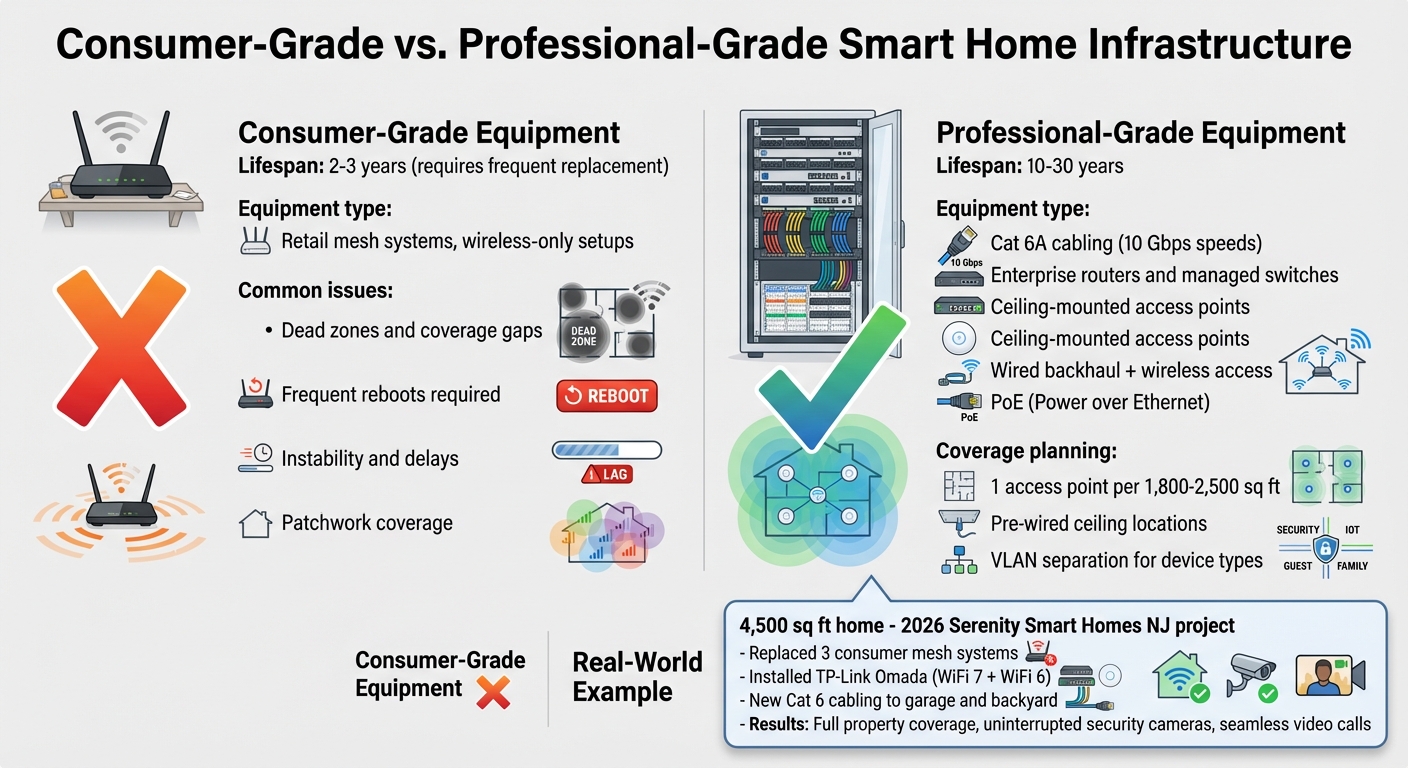
Consumer vs Professional-Grade Smart Home Equipment Lifespan and Features
Your home’s network is the backbone that supports everything from security cameras and lighting to entertainment systems and climate control [4][5]. If this foundation is unreliable, even the most advanced devices can struggle to perform as intended.
Review Wired and Wireless Network Foundations
A solid network infrastructure is the key to a professional-grade system. The best setups combine wired backhaul with wireless access. For example, Cat 6A cabling can handle speeds up to 10 Gbps, making it ideal for enterprise-level access points [6]. Wireless systems, on the other hand, depend heavily on a strong wired backbone. Mesh systems that rely solely on wireless connections often lead to instability and delays [4][6].
Enterprise-grade equipment, such as routers, managed switches, and ceiling-mounted access points, can last 10 to 30 years [5]. In contrast, consumer-grade devices typically need replacement every few years [7]. Take the case of a 2026 project by Serenity Smart Homes NJ: a homeowner with a 4,500 sq. ft. property replaced three consumer-grade mesh systems with a TP-Link Omada setup featuring WiFi 7 and WiFi 6 access points. The team installed new Cat 6 cabling to the garage and backyard and organized everything into a dedicated network rack. The result? Full coverage across the property, uninterrupted security camera operation, and seamless video calls with no dropped connections [4].
"Professional network infrastructure isn’t about having more equipment. It’s about having the RIGHT equipment, properly installed, working as one unified system." – Serenity Smart Homes NJ [4]
Eliminate Dead Zones and Maintain Reliability
Strategic planning is as important as robust hardware when it comes to eliminating dead zones. These weak spots often show up as frozen video calls, offline security cameras, or delays of several seconds for simple commands to execute [7]. Professional installers address this by conducting coverage mapping and bandwidth analysis before installation. This ensures they identify problem areas and plan for future needs [4].
Installers often pre-wire ceiling locations with Cat 6A cables and Power over Ethernet (PoE), placing one access point per floor for every 1,800 to 2,500 square feet [6]. This prevents the "patchwork" effect often seen in consumer-grade systems, which frequently require reboots and still leave coverage gaps.
A well-designed network also uses VLANs to separate high-bandwidth devices from IoT devices, reducing congestion that can mimic dead zones [8][2]. The key to success lies in wired infrastructure supporting wireless convenience, rather than relying on wireless systems to handle everything.
Confirm Compatibility and Integration for Future Upgrades
A system designed to evolve with advancing technology can save you from costly overhauls. By prioritizing compatibility and scalability, you ensure your setup stays relevant and functional for years to come. This section highlights key features, such as multi-protocol support and modular design, that help extend the lifespan of your investment.
Prioritize Multi-Protocol System Support
Modern systems that support multiple communication protocols – Matter, Thread, Z-Wave, Zigbee, and Wi‑Fi – offer flexibility and avoid being tied to a single vendor’s ecosystem [9]. This approach ensures seamless integration between devices, even as new technologies emerge. Multi-protocol systems also enable local processing, allowing your setup to operate even if your internet connection goes down. Commands are executed within your home, eliminating dependence on remote servers.
For example, the IEEE’s Wi‑Fi 7 standard, which accommodates channel widths up to 320 MHz, is particularly beneficial for homes with a growing number of connected devices [9].
"Designing around open standards (Matter/Thread), certified Wi‑Fi 7 infrastructure, and robust wiring/conduit pathways preserves flexibility as devices and apps evolve." – Kalen Development [9]
By combining open communication standards with advanced network capabilities, your system remains adaptable to future developments. For a longer look ahead, see Into the 22nd Century and Beyond.
Opt for Expandable and Modular System Architecture
A modular design ensures your system can grow with your needs. High-quality setups include reserved space in media panels and AV racks, simplifying future upgrades [9]. Additionally, strategically placed conduits allow for easy installation of features like solar panels, EV chargers, or battery storage without requiring major renovations [9].
For instance, the 2024 IECC mandates at least one EV-capable, EV-ready, or EVSE-installed space for all new single-family homes and duplexes [9]. A modular approach anticipates these needs. Smart electrical panels equipped with circuit-level monitoring and load-sharing capabilities make it easier to add EV chargers or energy storage systems over time without replacing the entire panel [9]. Similarly, heat pump water heaters – 2–3 times more energy-efficient than traditional models – are increasingly integrated into smart home energy programs, streamlining future upgrades [9].
Just as you plan for scalable network infrastructure, ensuring your hardware and system design can accommodate growth is essential. Taking steps now to prepare for expansion safeguards your investment and ensures your home is ready for future advancements.
Verify Professional Installation Standards
The longevity and reliability of a system often hinge on the quality of its installation. A professionally installed system by certified experts not only protects your investment but ensures it functions seamlessly and can adapt to your family’s evolving needs. Licensed low-voltage contractors bring a level of precision and safety to the process that DIY setups often lack. They follow strict safety protocols, use structured wiring plans, and perform detailed site surveys to optimize performance based on your home’s unique layout and your daily routines.
Hire Licensed Low-Voltage Contractors and Use Structured Wiring
Choosing a licensed low-voltage contractor safeguards against potential risks like electrical hazards, equipment damage, or even code violations that could void warranties or pose fire risks. Look for professionals with certifications from CEDIA (Custom Electronic Design and Installation Association). These credentials are brand-neutral and demonstrate expertise in areas such as infrastructure, system integration, and networking. Key certifications include:
- CIT (Cabling & Infrastructure Technician): Focused on basic wiring and infrastructure.
- IST (Integrated Systems Technician): Specializes in troubleshooting and verifying system functionality.
- RNS (Residential Networking Specialist): Designed for experts in building secure, high-performance residential networks.
These certifications are accredited by the ANSI National Accreditation Board under ISO/IEC 17024 standards, ensuring they meet rigorous professional benchmarks.
Structured wiring is another hallmark of professional installation. Using Cat6 or Cat6A cabling routed to a centralized, well-ventilated rack creates a robust foundation for high-definition video, lossless audio, and future upgrades. Professionals often install conduit – commonly referred to as "Smurf tubes" – during construction to simplify the process of adding new cables later without requiring invasive wall work.
"CEDIA certifications are brand-neutral and designed by fellow integrators to recognize smart home technicians with proven competence and a commitment to professionalism." – CEDIA [10]
Insist on Thorough Site Surveys and Detailed Planning
Before any installation begins, a professional installer should conduct an in-depth site survey. This includes reviewing floor plans, ceiling heights, shade pockets, and network requirements. Such surveys help identify potential vulnerabilities, like overlooked entry points or areas prone to Wi-Fi dead zones, which DIY approaches might fail to address. This step also ensures that wiring paths and equipment placements are coordinated with architects, interior designers, and builders, resulting in a seamless integration.
A professional installer will go beyond basic planning by creating detailed CAD drawings, riser diagrams, and labeled schedules. These documents serve as invaluable references for future upgrades or maintenance. Additionally, they plan for practical details like dedicated power outlets behind mounted TVs, backup power systems, and network segmentation (e.g., separating AV/IoT VLANs). These measures enhance both security and system performance, ensuring your setup is optimized for your lifestyle and ready to evolve with technological advancements.
"Early, disciplined coordination prevents surprises. We align drawings and responsibilities with your architect, interior designer, builder, and trades so wiring paths, equipment locations, and ventilation are correct the first time." – Interactive Spaces [11]
Plan for Long-Term Support and Maintenance
Once your system is installed and designed to handle future growth, the next step is ensuring it stays reliable over time. Long-term support plays a key role in keeping your system running smoothly. Regular maintenance, firmware updates, and proactive troubleshooting prevent small issues from turning into major problems. Without ongoing support, you might face outdated software, unresolved connectivity issues, or difficulties integrating new devices. Just as a solid installation sets the stage, consistent maintenance protects your investment.
Confirm Service Commitments and Troubleshooting Protocols
Before choosing a provider, make sure they offer a clear and detailed service agreement. This agreement should outline key details like response times, troubleshooting methods, and their plan for handling unexpected problems. Many professional integrators use remote monitoring tools, such as WattBox, to reboot devices and address problems before you even notice them [2][3]. This kind of proactive support can prevent disruptions, whether it’s right before a big family gathering or when you’re away and need access to your security cameras.
Priority service agreements often include 24/7 emergency support alongside scheduled on-site visits for routine maintenance [12][3]. Reliable providers also maintain detailed service records or offer a virtual account manager to track system updates and plan for future upgrades [16]. This ensures that any technician working on your system has full knowledge of its history, saving you from having to explain your setup repeatedly.
"Remote monitoring, proactive updates, and priority visits keep your system smooth and invisible in daily life." – One Sound Choice [3]
In addition to service agreements, ongoing network performance analysis is a critical part of long-term support.
Request Network Analysis and Performance Monitoring
Your home network is the foundation of every connected system, and its reliability impacts how well everything functions. Professional integrators often rely on enterprise-grade networking tools like Araknis to monitor network health and ensure consistent performance as more devices are added [2]. Regular audits can identify issues like dead zones, lag, or security risks before they disrupt your day-to-day activities.
For example, in January 2026, Nestology SmartHome engineers helped a homeowner whose system, with over 40 connected devices, was plagued by daily resets and outages. Instead of recommending expensive hardware replacements, the team redesigned the network, added diagnostic tools, and isolated weak points. This approach stabilized the system without requiring new equipment purchases [1]. This case demonstrates how regular performance monitoring can save money and extend the lifespan of your setup.
"Smart homes fail not because of bad devices, but because no one engineered the system behind them." – Nestology SmartHome Team [1]
Ask your provider if they offer automated updates and schedule periodic check-ins to help your family stay familiar with the system as technology evolves [13][14]. Combining technical monitoring with user support ensures your system remains secure and operates at its best.
Conclusion
Creating a home technology system that stands the test of time depends on four critical factors: a solid wired network, future-ready compatibility, expert installation, and ongoing support. Together, these components safeguard your investment and help your system remain dependable for 10 to 15 years or longer. Neglecting any of these aspects can result in outdated equipment, compatibility headaches, and expensive repairs.
The use of high-quality, professional-grade components further reinforces this longevity. The distinction between a system that quickly becomes obsolete and one that evolves with your family’s needs lies in the expertise and design behind it. Professional-grade solutions, such as Araknis networking and Control4 automation, are built to last rather than to be replaced frequently. Properly installed structured wiring, for instance, can support technological upgrades for 50 to 70 years, serving as a reliable backbone for decades of advancements [17]. This infrastructure ensures that as new devices and standards emerge, your system can adapt without requiring a complete overhaul. Unlike consumer-grade products designed for short-term use, professional systems are crafted by skilled integrators who focus on creating durable, long-term solutions.
For homeowners in Northern New Jersey, this commitment to excellence translates into dependable, localized support. Working with a local expert who understands your home’s unique requirements and your family’s needs can make all the difference. One Sound Choice has brought over 30 years of experience to more than 2,500 smart home projects across Morris, Bergen, Essex, Hudson, Somerset, Passaic, and Hunterdon Counties [15]. Their installations are designed to "just work", eliminating the need for constant troubleshooting or technical expertise, so you can focus on what truly matters – your family and daily life.
What One Sound Choice clients say
The 1 Sound Choice staff was very easy to work with. Ryan, you understood our wants right from the beginning. Simplicity of installation and operation were just some of the reasons we chose 1 Sound Choice. You exceeded my expectations!
– Mr. & Mrs. Matia (1 Sound Choice client testimonials)
We were surprised with what (Ryan) took away from the conversation – even reading between the lines to put everything we wanted and needed right into his designs for us. At first, we really didn’t know who to go with; we hadn’t had any renovations to our home before. We set up a consultation and liked (Ryan) because he was personable, a good listener and knowledgeable. He asked about our wish list and gave us some ideas…which were great.
– Mr. & Mrs. Caywood (1 Sound Choice client testimonials)
Truly One Sound Choice, you won’t find better. I called a couple of AV companies for quotes but on speaking with Ryan I had confidence that One Sound Choice would do the job right. Most companises had assured me that they would not have to cut holes in my walls to achieve my project goals. Ryan was up front, honest and realistic outlining all the possible challenges my install might face whilst reassuring me that One Sound Choice had the capabilitiy and expertise to meet my goals. Consulation was painless and Ryan and Kenny captured my requirements perfectly and offered advice based on their experience regarding optional additons to the project, which were practical and delivered exceptional enhancements. Ryan provided me with a view of what could be achieved given my requirements and then worked with me complete the project with consideration to my budget, but without compromising the final solution. Even completed the project without requiring any patch work which was a bonus. Ryan and Kenny were a pleasure to work with, respectful and courteous and I had confidence having them in our home. Highly recommend for any AV work you are considering. You will not be disappointed with the results.
– Leighton (Houzz review)
FAQs
What are the warning signs my home network is the weak link?
Slow or unreliable Wi-Fi, constant buffering while streaming, devices dropping their connections, or trouble managing several smart home gadgets at once are all warning signs of a struggling home network. These issues are often tied to outdated hardware, such as aging routers, or subpar wiring. To ensure smooth performance and prepare for growing demands, a well-designed and professionally set up network is crucial.
How can I tell if my smart home can be upgraded without starting over?
To keep your smart home ready for future upgrades, focus on systems built around open standards like Matter or Thread. Opt for strong wiring options, such as Cat6A or fiber, and include conduit to allow for easy expansion later. Selecting scalable solutions from trusted brands and ensuring professional installation with an emphasis on modularity and compatibility will also simplify upgrades. This approach helps you avoid costly overhauls when technology advances.
What should a real maintenance plan include after installation?
A well-thought-out maintenance plan for a home technology system should include several key tasks to keep everything running smoothly. These tasks typically involve reviewing device performance, recalibrating sensors to ensure accuracy, replacing batteries as needed, and updating firmware or software to access the latest features and fixes. Additionally, checking network security and connectivity is crucial to protect against potential threats and ensure seamless operation.
By staying on top of these steps, you can minimize the risk of malfunctions or security vulnerabilities. This approach ensures your system remains dependable, adaptable, and user-friendly as your needs evolve over time.
Related Blog Posts
- How to Coordinate Smart Home Installs with Builders
- “How Do I Avoid Spending Money on Home Technology I’ll Regret in a Few Years?”
- “Why Do Some Homes Have Reliable Technology and Others Constantly Have Issues?”
- “How Do I Make Sure My Home Technology Is Simple Enough for Everyone to Use?”
More questions
Is wired better than Wi-Fi for a smart home?
Use both. Wire the things that stay put, like TVs and access points. Then Wi-Fi works better for phones and things that move.
One Sound Choice, 8 Tilley Ave, Pompton Plains, NJ 07444. Call or text (973) 945-5275. We work in homes across Morris, Passaic, Bergen, Essex, Somerset, and Hunterdon counties. Written by Ryan Herd, founder of One Sound Choice.