
Automated shades combine convenience, energy savings, and smart home integration. These window coverings use built-in motors to adjust with remotes, apps, or voice commands. When connected to smart systems, they can follow schedules, respond to sensors, and enhance security by simulating occupancy. Power options include batteries, rechargeable motors, hardwired setups, or solar panels, making them suitable for various home layouts. Wireless protocols like Zigbee, Z-Wave, and Wi-Fi ensure seamless communication with hubs or smart speakers. While installation costs range from $300 to $800 per window, these shades can reduce cooling costs by up to 30% and cut solar heat gain by 80%. They’re ideal for hard-to-reach windows or enhancing home automation.
NEW Smart Shades! (Matter over Thread) Install, Setup, & Comparison
sbb-itb-c5b321b
How Motorized Shades Work
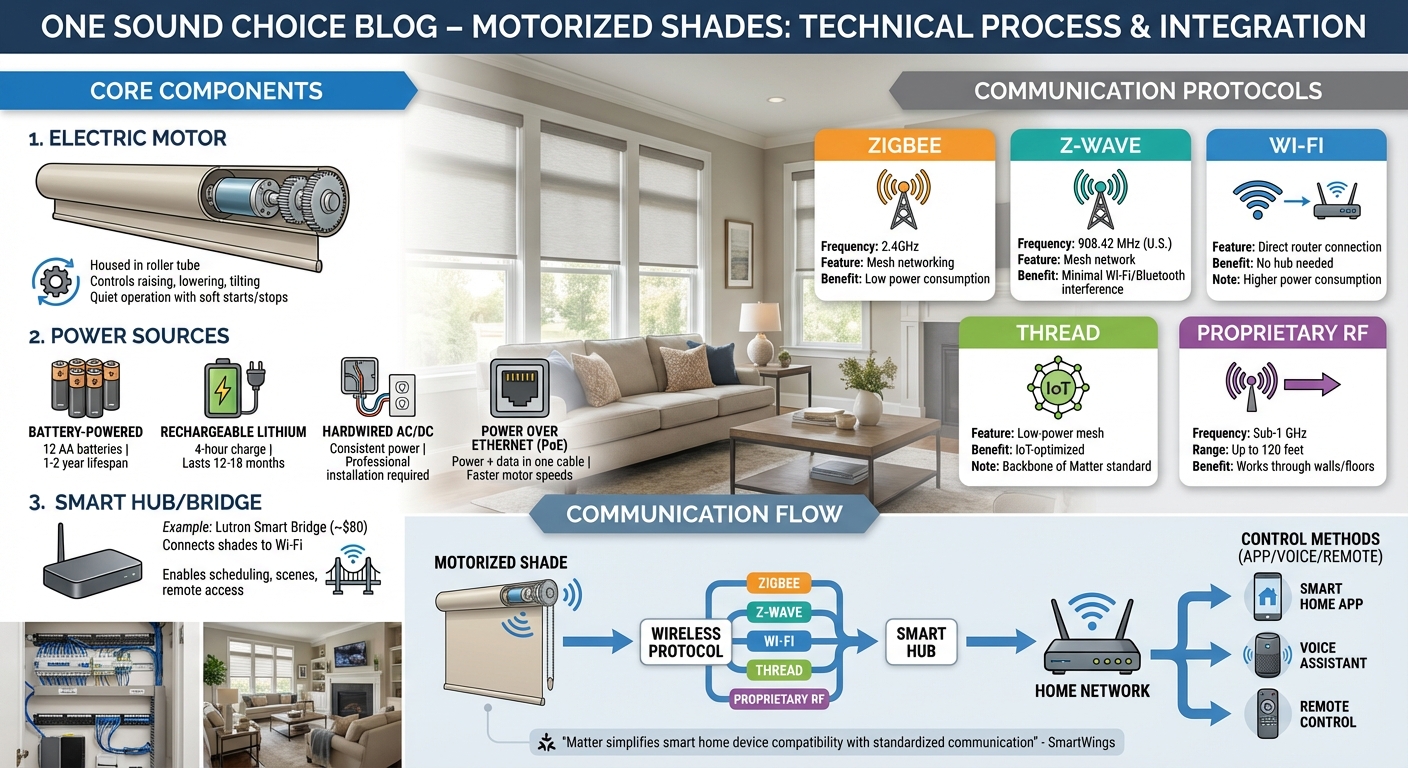
How Motorized Shades Work: Components and Communication Flow
Motorized shades combine precise motors, flexible power options, and reliable wireless communication to enhance home automation systems.
Main Components of Motorized Shades
At the core of motorized shades is the electric motor, housed within the roller tube. This motor controls the movement of the shade, whether it’s raising, lowering, or tilting to a specific angle. High-quality motors are often designed for quiet operation, featuring soft starts and stops to ensure smooth movement.
Power sources are tailored to different needs and setups. Battery-powered motors, which typically use 12 AA batteries, can last one to two years and are excellent for retrofitting windows without additional wiring. They integrate well with smart home hubs for automated control. Rechargeable lithium motors require a four-hour charge every 12 to 18 months, offering a low-maintenance option. For more permanent solutions, hardwired AC/DC systems provide consistent power but require professional installation. Another option, Power over Ethernet (PoE), combines power and data delivery through a single cable, enabling faster motor speeds compared to battery-operated models.
Smart hubs or bridges serve as the link between your motorized shades and your home network. For instance, the Lutron Smart Bridge (priced around $80) connects Serena shades to Wi-Fi, enabling control via smartphone apps or voice assistants. These hubs unlock advanced features like scheduling, scene creation, and remote access, making them a key part of the system.
In addition to hardware, effective communication protocols are vital for ensuring that all components work together seamlessly.
Wireless Communication Protocols
Motorized shades rely on various wireless technologies to integrate with smart home systems. Zigbee, operating on the 2.4GHz band, uses mesh networking to extend range and reliability. Its low power consumption makes it ideal for battery-powered shades. Z-Wave, which operates on 908.42 MHz in the U.S., minimizes interference from Wi-Fi and Bluetooth while maintaining a stable mesh network.
Wi-Fi allows shades to connect directly to your router without needing a hub, though it consumes more power and is better suited for hardwired motors. Thread, a newer low-power mesh protocol, is designed specifically for IoT devices and forms the backbone of the Matter standard. This standard promotes compatibility across major smart home ecosystems. Some manufacturers also use proprietary sub-1 GHz RF protocols for remote controls, offering reliable communication over distances of up to 120 feet, even through walls and floors.
"Matter… is designed to simplify the way smart home devices work by providing a standardized communication protocol, which enables these devices to work together seamlessly." – SmartWings [6]
When selecting a smart hub, check its supported protocols. Many modern smart speakers already include Zigbee, eliminating the need for additional hardware. For larger homes, mesh-capable protocols like Zigbee or Z-Wave ensure stable connections across multiple floors, making them a practical choice for expansive spaces.
Setting Up Motorized Shades with Smart Home Systems
The process to set up motorized shades is straightforward: pair the shades, set up automation, and enable voice control as part of your smart home solutions.
Connecting Shades to Smart Hubs
Begin by downloading the app specific to your shade’s brand, such as PowerView for Hunter Douglas, the Lutron app for Serena shades, or the Graber app for Z-Wave systems. These apps will guide you step-by-step, including how to put the shades into pairing mode – typically by holding a button on the motor or remote until an indicator light blinks.
If your shades require a hub or bridge (like the Lutron Smart Bridge, priced around $80), connect it to your router, then use the app to detect and link each shade. Wi-Fi-enabled shades skip the hub and connect directly to your Wi-Fi network. For larger spaces, signal repeaters may be necessary to ensure reliable communication, especially in homes with multiple floors or thick walls.
Once paired, test each shade to make sure they move correctly. Once everything is connected, you’re ready to configure automation to suit your daily routine.
Creating Schedules and Automation Rules
After connecting your shades, you can set up time-based schedules to operate them automatically. For instance, bedroom shades could open at 7:00 AM on weekdays and later on weekends. Many systems also offer event-based triggers tied to sunrise and sunset, adjusting automatically as daylight hours change throughout the year.
With scenes, you can control multiple shades at once. For example, a "Movie Night" scene might lower all the living room shades, while a "Morning" scene could open kitchen shades and partially open bedroom ones. These scenes can be activated manually, through voice commands, or as part of a broader routine that also adjusts lighting or temperature settings.
"Smart features integrate with other systems for optimal performance. The Hunter Douglas PowerView® automation system has been designed for compatibility with most other smart home systems and devices for simple integration."
– Skyline Window Coverings [4]
Security timers are another useful feature, allowing shades to move while you’re away to give the impression that someone is home.
Adding Voice Control
Voice control makes operating your shades even simpler. To enable this, link your shade manufacturer’s account to your voice assistant platform, such as Alexa, Google Assistant, or Apple HomeKit. For Apple HomeKit users, ensure compatibility and add the shades through the Home app, using a HomePod or Apple TV as the hub.
Assign clear, specific names like "Kitchen Left" or "Master Bedroom" to each shade to ensure accurate voice commands. You can then say things like, "Alexa, lower the living room shades." Some systems may require exact phrasing, such as, "Alexa, tell Powershades to open the living room" [5].
Voice-controlled shades can also be integrated into broader routines. A "Good Morning" routine, for example, might open the shades, turn on lights, and adjust the thermostat with a single command. It’s a good idea to keep a remote or wall switch as a backup for times when Wi-Fi is unavailable, and to regularly check for firmware updates to maintain compatibility with voice assistant features.
Troubleshooting and Maintenance
Fixing Connection Problems
When motorized shades stop responding, the issue often stems from one of three common causes: weak wireless signals, low battery power, or pairing failures. If the shades only fail to work in specific rooms, signal interference is likely the culprit. This can happen due to long distances or thick walls obstructing communication between the hub and the motor. Adding signal repeaters or other support accessories can help improve connectivity, especially in larger homes or across multiple floors [4].
A slow response from your shades usually points to low battery levels. As noted by Window Trends, "You’ll know when it’s time to charge your battery wands when they start responding to your voice-control commands and programmed automation at a slower pace than previously expected" [3]. Some systems, like Graber’s Z-Wave shades, even allow you to monitor battery levels through their app, providing advance notice before the shades completely lose power [3].
If the shades lose connection to their remotes or smart hub, a manual reset and re-pairing is often required. The process varies by manufacturer, but it typically involves holding a button on the motor or remote until an indicator light begins to blink. For ongoing issues, try powering down the system – removing batteries or unplugging it – for about 30 seconds before reconnecting. This can reset the motor’s logic. Additionally, keeping the firmware updated through the manufacturer’s app helps maintain compatibility with platforms like Alexa or Google Assistant [1].
Addressing these issues promptly and performing regular maintenance ensures your motorized shades operate smoothly over time.
Maintaining Your Motorized Shades
Routine maintenance is key to keeping motorized shades running reliably. Start by ensuring that the system’s firmware is always up to date using the manufacturer’s app, which also helps maintain compatibility with your smart home setup. For hardwired or Power over Ethernet (PoE) motors, check that all connections are secure. If a motor stops working entirely, it’s worth checking the circuit breaker in your home [2][4][5].
Battery-powered systems require a bit more attention. Some models, like Serena by Lutron shades, are designed for convenience with headrails that tip down for easy battery access. Others may have battery compartments mounted on the back of the headrail, making them harder to reach [5]. If frequent battery changes become a hassle, consider upgrading to rechargeable motors or switching to hardwired options during your next renovation [4].
Regular care not only keeps your shades functional but also ensures they remain seamlessly integrated with your smart home system. For added convenience, keep a remote or wall switch as a backup in case wireless connectivity becomes temporarily unavailable.
Conclusion
Motorized shades are changing the way families experience their homes by offering convenience, energy efficiency, and improved security through home automation systems. Features like voice commands, automated schedules, and smartphone controls eliminate the hassle of manually adjusting window treatments. Programmed scenes allow multiple shades to operate together, seamlessly fitting into daily routines. For hard-to-reach areas like skylights or large windows, motorization becomes more than a convenience – it’s practically indispensable[4].
The energy benefits are clear. Around 76% of sunlight hitting double-paned windows turns into heat inside the home. Motorized shades can cut unwanted solar heat gain by up to 80% in summer and reduce heat loss by as much as 40% in winter[5]. By automating shade schedules – closing them during peak sun hours or opening them to let in natural warmth – homeowners can lower HVAC expenses without lifting a finger.
Motorized systems also enhance home security. Automated "away" modes create the illusion of occupancy by opening and closing shades on randomized schedules, providing a deterrent to intruders while families are away[4]. Additionally, the cordless design eliminates risks for children and pets, making these systems a safer alternative to traditional window treatments[4].
"Motorized window treatments are no longer just an upgrade – they’re a key element of the connected home experience." – Juliette Victoria, Marketing Copywriter, Blinds.com[2]
Professional installation ensures the system’s longevity and performance. Skilled installers handle everything from motor calibration to setting limits and integrating the shades with smart home systems, guaranteeing smooth operation for years to come[4]. For families in Northern New Jersey looking to enhance their homes with smart automation, One Sound Choice offers over 30 years of expertise and a track record of more than 2,500 successful installations, including tailored lighting and shade solutions designed to improve everyday living.
What One Sound Choice clients say
We were surprised with what (Ryan) took away from the conversation – even reading between the lines to put everything we wanted and needed right into his designs for us. At first, we really didn’t know who to go with; we hadn’t had any renovations to our home before. We set up a consultation and liked (Ryan) because he was personable, a good listener and knowledgeable. He asked about our wish list and gave us some ideas…which were great.
– Mr. & Mrs. Caywood (1 Sound Choice client testimonials)
The 1 Sound Choice staff was very easy to work with. Ryan, you understood our wants right from the beginning. Simplicity of installation and operation were just some of the reasons we chose 1 Sound Choice. You exceeded my expectations!
– Mr. & Mrs. Matia (1 Sound Choice client testimonials)
Truly One Sound Choice, you won’t find better. I called a couple of AV companies for quotes but on speaking with Ryan I had confidence that One Sound Choice would do the job right. Most companises had assured me that they would not have to cut holes in my walls to achieve my project goals. Ryan was up front, honest and realistic outlining all the possible challenges my install might face whilst reassuring me that One Sound Choice had the capabilitiy and expertise to meet my goals. Consulation was painless and Ryan and Kenny captured my requirements perfectly and offered advice based on their experience regarding optional additons to the project, which were practical and delivered exceptional enhancements. Ryan provided me with a view of what could be achieved given my requirements and then worked with me complete the project with consideration to my budget, but without compromising the final solution. Even completed the project without requiring any patch work which was a bonus. Ryan and Kenny were a pleasure to work with, respectful and courteous and I had confidence having them in our home. Highly recommend for any AV work you are considering. You will not be disappointed with the results.
– Leighton (Houzz review)
FAQs
Do I need a hub for motorized shades?
Not always – whether a hub is necessary depends on the compatibility and integration needs of your motorized shades. Many modern shades can connect directly to smart home systems using Wi-Fi, Zigbee, or Z-Wave. However, certain setups might call for a hub to unlock advanced features or enable centralized control. Review your system’s specifications to decide if a hub is required for smooth integration with your smart home.
Which wireless protocol is best for my home?
The choice of the best wireless protocol hinges on factors such as reliability, range, compatibility, and security. For motorized shades, Wi-Fi stands out due to its strong, dependable connection and smooth integration with home networks. On the other hand, Zigbee and Z-Wave are excellent options for larger smart home setups, thanks to their low power consumption and secure mesh networking capabilities. To ensure consistent performance and prepare for future expansions, a stable Wi-Fi configuration or professional-grade system integration is key.
Are motorized shades worth it for energy savings?
Motorized shades are a smart way to save energy by controlling sunlight exposure. In the summer, they can block heat from entering your home, reducing the strain on air conditioning. During the winter, they help retain warmth, cutting down on heating costs. This efficient management of indoor temperatures could lower energy bills by 10–20%, making them a worthwhile addition to enhance your home’s energy efficiency.
Related Blog Posts
- Motorized Shades vs Manual Blinds: Cost and Convenience
- Cordless vs. Motorized Shades: Safety for Kids and Pets
- How to Automate Shades for Maximum Energy Savings
- I use motorized shades inside but What are outdoor shades?
Does late-day sun wash out your TV? See our motorized shades page.
More questions
How are motorized shades powered?
There are 4 ways: batteries, a rechargeable motor, a wire to house power, or a small solar panel. The best pick depends on the window.
One Sound Choice, 8 Tilley Ave, Pompton Plains, NJ 07444. Call or text (973) 945-5275. We work in homes across Morris, Passaic, Bergen, Essex, Somerset, and Hunterdon counties. Written by Ryan Herd, founder of One Sound Choice.