
When it comes to gaming and streaming, the choice between wired Ethernet and wireless WiFi depends on your priorities. Ethernet delivers unmatched reliability and low latency, making it the best option for competitive gaming and high-demand streaming. Meanwhile, WiFi offers flexibility and convenience, ideal for casual use and mobile devices. Here’s what you need to know:
- Ethernet: Provides consistent speeds, ultra-low latency (1–5 ms), and interference-free connections. Perfect for pro gamers, streamers, and stationary devices like smart TVs or PCs.
- WiFi: Offers mobility with speeds up to 9.6 Gbps (WiFi 6). Great for smartphones, tablets, and smart home devices, but prone to interference and higher latency (10–30 ms).
Quick Comparison
| Feature | Wired Ethernet | Wireless WiFi |
|---|---|---|
| Latency | 1–5 ms (very low) | 10–30 ms (variable) |
| Stability | Highly stable | Can fluctuate |
| Speed | Up to 10 Gbps (Cat6) | Up to 9.6 Gbps (WiFi 6) |
| Mobility | Stationary devices | Mobile-friendly |
| Setup | Requires cables | Easy, no cables |
| Interference | None | Prone to interference |
For the best performance, consider a hybrid setup: use Ethernet for high-priority devices like gaming consoles and WiFi for mobile devices. This ensures a balanced network that meets all your needs.
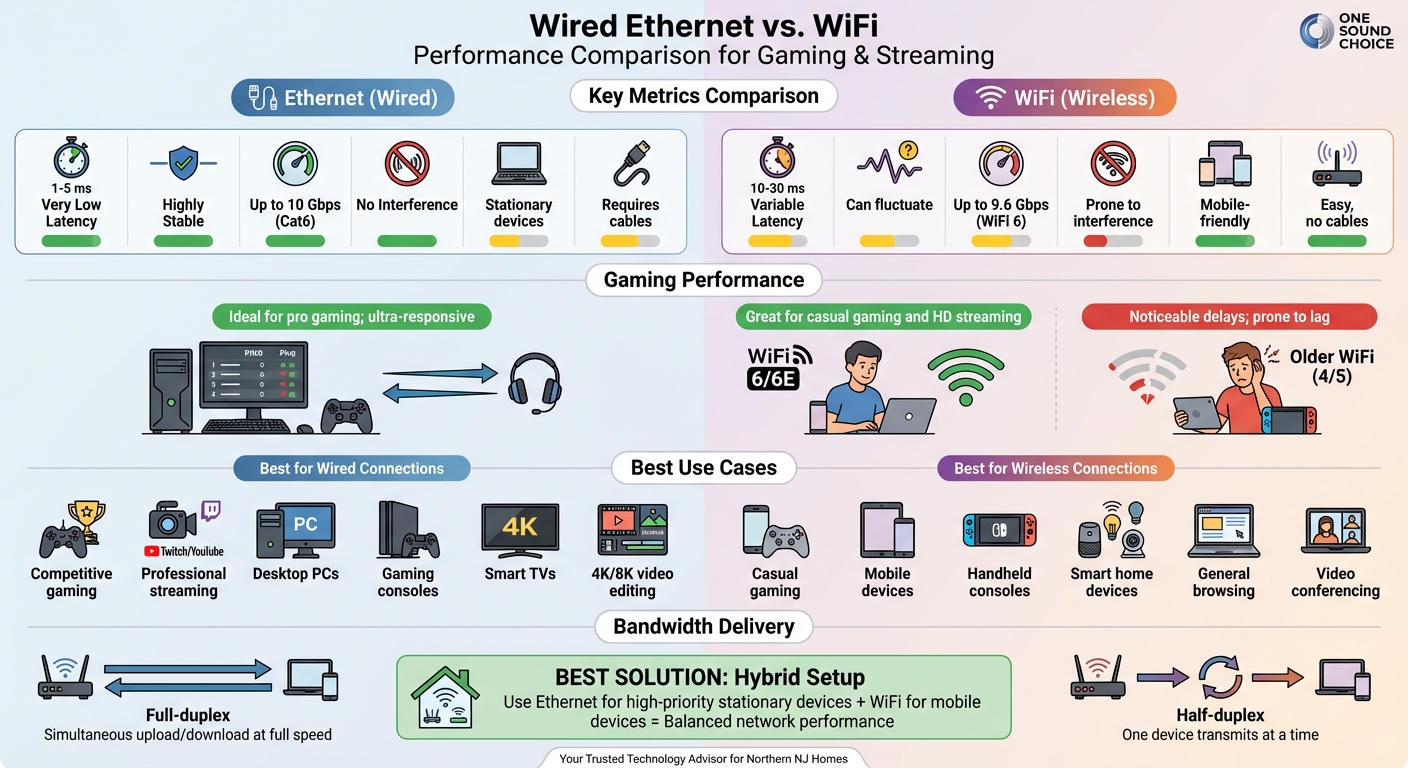
Wired Ethernet vs WiFi: Complete Performance Comparison for Gaming and Streaming
The Wired Vs Wireless Debate (Years Of Input Delay DATA!!!)
sbb-itb-c5b321b
Latency and Response Time: How Wired and Wireless Compare
Latency, often referred to as "ping", measures the time it takes for data to make a round trip between your device and a server, typically recorded in milliseconds. For competitive gaming, even a small delay can make a big difference. The gap between a 5 ms and a 50 ms connection could determine whether you hit your target or end up watching the killcam instead.
Latency Comparison Table
Here’s a breakdown of how latency varies between wired and wireless connections:
| Connection Type | Typical Latency (Ping) | Stability | Gaming Experience |
|---|---|---|---|
| Wired Ethernet | 1–5 ms | Highly Stable | Ideal for pro gaming; ultra-responsive |
| WiFi 6 / 6E | 10–30 ms | Improved | Great for casual gaming and HD streaming |
| Older WiFi (4/5) | 20–100 ms | Variable | Noticeable delays; prone to lag and disruptions |
For professional-level gaming, latency under 20 ms is essential. Once it exceeds 100 ms, gameplay can suffer from lag, rubberbanding (where your in-game character moves unpredictably), and synchronization problems, all of which can disrupt the experience[1]. These differences highlight why understanding latency is critical, especially when evaluating wireless performance.
What Affects Wireless Latency
Wireless connections face several challenges that wired Ethernet avoids. Physical barriers like walls, floors, and furniture can weaken or reflect the radio signals WiFi relies on. The farther you are from the router, the weaker and slower the connection becomes[5].
Interference from other devices is another issue. Everyday electronics such as microwaves, baby monitors, and Bluetooth gadgets often operate on similar frequencies, disrupting WiFi signals[6]. On top of that, network congestion can occur when multiple devices compete for bandwidth. For example, someone downloading a large file while you’re gaming or streaming can delay data packets[6].
Unlike Ethernet, which provides a direct and interference-free connection, WiFi must constantly adapt to these unpredictable factors, making it less consistent overall[3].
Bandwidth and Data Stability
When it comes to gaming and streaming, maintaining steady bandwidth is just as crucial as low latency. Bandwidth represents the amount of data your connection can handle, but consistency often matters more than raw speed. For example, a steady 100 Mbps connection will perform better than one that fluctuates between 200 Mbps and 50 Mbps. Streaming platforms set specific requirements – for instance, 4K HDR streaming demands a constant 25 Mbps, while UHD content on services like HBO Max may need up to 50 Mbps. Any drop below these levels can result in buffering or reduced resolution, disrupting the experience[1][2].
How Wired Connections Ensure Reliable Bandwidth
Ethernet connections provide what some experts call a "private highway" for data[3]. Each device connected via Ethernet gets its own dedicated pathway, operating in full-duplex mode. This means uploads and downloads can happen simultaneously at full speed without competing for bandwidth[1]. Using a Cat 5e cable, Ethernet can deliver consistent 1,000 Mbps (1 Gbps) speeds over distances up to 328 feet[4][2]. Unlike WiFi, it avoids interference from other devices, ensuring stable performance.
"The connection is a private highway for your data, resulting in a rock-solid, consistent stream that virtually eliminates the dreaded buffering icon." – wangfred, INAIRSPACE[3]
This setup minimizes packet loss and jitter, which are common culprits behind issues like rubberbanding in games or audio glitches during calls. For activities like streaming at 1080p and 60fps, which require a steady upload speed of 6 to 12 Mbps, Ethernet eliminates the unpredictable variables that often plague wireless connections[1]. Wireless networks, by comparison, must share their bandwidth among all connected devices.
The Challenges of Wireless Networks
WiFi operates differently, as it shares its spectrum among all devices on the network[1]. Unlike Ethernet’s full-duplex system, WiFi uses half-duplex communication, meaning only one device can transmit at a time[1]. This sharing becomes problematic when multiple devices are active. For instance, if one device is downloading a large file while another streams a movie, both will compete for bandwidth. This can lead to issues like bufferbloat, where sudden spikes in latency cause disruptions like ping spikes or resolution drops[1][6].
Distance adds another layer of complexity. While Ethernet maintains consistent performance across its full 328-foot range, WiFi speeds drop significantly as you move further from the router[1][2]. Even with advancements like WiFi 6, which offers real-world speeds of 300–1,200 Mbps, the technology often falls short of its theoretical 9.6 Gbps maximum due to interference and network congestion[1].
Wired Ethernet: Pros and Cons
Ethernet relies on direct electrical signaling through copper cables, achieving latency as low as 1–5 milliseconds, compared to WiFi’s 10–50 milliseconds delay [1][5]. This low latency is crucial for tasks like competitive gaming, where even a fraction of a second can determine success.
Benefits of Wired Ethernet
Ethernet’s performance edge lies in how it manages data transmission. Unlike WiFi, which uses a shared spectrum where devices transmit data sequentially, Ethernet provides full-duplex communication, allowing simultaneous uploading and downloading at full capacity [1]. A Cat5e cable can deliver a steady 1 Gbps speed over its entire 328-foot range, while Cat6A supports 10 Gbps over the same distance [1][4]. This dedicated connection eliminates interference from devices like microwaves, Bluetooth gadgets, or overlapping WiFi networks.
Security is another major advantage. Data transmitted through physical cables is inherently harder to intercept, making Ethernet a safer choice for sensitive information [3][7]. For content creators, such as Twitch or YouTube streamers, Ethernet’s stability is a game-changer, ensuring smooth high-bitrate uploads without frame drops or stream interruptions.
"When every millisecond counts, Ethernet is the tool of professionals. Whether you are climbing the esports ladder or broadcasting to thousands, it removes variables that wireless cannot control." – prodigitalweb [1]
While Ethernet offers these benefits, it also comes with some practical limitations.
Limitations of Wired Ethernet
Despite its performance and reliability, Ethernet’s physical setup can be restrictive. Devices must remain stationary, and installing a wired network often involves challenges like drilling holes and managing visible cables [1][3]. Many modern devices lack built-in Ethernet ports, requiring users to rely on USB adapters [1][2]. Additionally, most home routers only have four Ethernet ports, meaning extra devices often need additional hardware like switch boxes [2][5].
Renters face unique hurdles, as drilling or making permanent cable installations may violate lease agreements, leaving them with temporary solutions or relying on WiFi [1][2]. Even in homes where installation is possible, exposed cables can detract from the aesthetics of a room. Furthermore, while Cat6 cables can support 10 Gbps speeds, this performance holds only up to about 180 feet, after which speeds drop to 1 Gbps [1][2].
Understanding these trade-offs is key to deciding whether Ethernet suits your specific needs.
Wireless WiFi: Pros and Cons
WiFi has come a long way since its early days of unreliable connections. With modern advancements like Wi‑Fi 6 and 6E, wireless networks now deliver speeds ranging from 300 Mbps to 1.2 Gbps. These speeds are more than sufficient for activities like 4K HDR streaming, which only requires a steady 25 Mbps connection [1]. For most households, WiFi can now handle gaming, streaming, and other bandwidth-heavy tasks without the need for physical cables.
Benefits of Wireless WiFi
One of WiFi’s standout features is its mobility. You can stream a movie on your tablet in the living room, play games on a handheld console in your bedroom, or browse the web on your smartphone while relaxing in the backyard – all without being tied down by a cable. This flexibility is especially useful for devices that don’t come with Ethernet ports [5].
WiFi also simplifies setup. There’s no need to drill holes, run cables along walls, or deal with messy wires, making it a great option for renters or anyone who prefers avoiding permanent changes to their space [1]. Modern mesh systems take convenience a step further by extending coverage throughout the home with additional nodes, allowing dozens of devices to connect without complicated wiring [7].
"Wireless wins on ease of setup and aesthetics, hands down. It enables a clean entertainment center with no visible wires."
– wangfred, INAIRSPACE [3]
WiFi 6 introduces features like MU-MIMO and OFDMA, which let routers communicate with multiple devices at once, reducing congestion from smart TVs, gaming consoles, and security cameras all competing for bandwidth. Additionally, the 6 GHz band in Wi‑Fi 6E provides a less crowded spectrum, offering smoother performance with reduced interference from older devices [3].
While these benefits are impressive, WiFi does have performance limits, especially under heavy usage.
Performance Trade-Offs of Wireless WiFi
Despite its advancements, WiFi operates as a half-duplex system, meaning only one device can transmit data on a channel at any given time. In contrast, Ethernet supports full-duplex communication, which allows simultaneous data transmission. This limitation can lead to bandwidth contention when multiple devices are streaming or downloading simultaneously [1].
WiFi 6 typically delivers latency between 10–30 ms, but interference can cause spikes exceeding 100 ms [1]. These fluctuations can result in jitter – variations in latency that manifest as rubberbanding in games or buffering during live streams [1]. Competitive gamers, who rely on consistent performance, are likely to notice these issues even though gaming itself requires minimal bandwidth.
Physical barriers also impact performance. While the 5 GHz band offers faster speeds, it struggles to penetrate walls effectively. The 2.4 GHz band has better range but tends to suffer from congestion and interference [1]. In practice, wireless connections often achieve only 60–80% of their theoretical maximum speeds, with performance dropping significantly beyond 10 feet from the router [8][9].
"Wireless connections distribute bandwidth equally among connected devices, so the more devices there are on a given network, the more they compete for bandwidth, slowing overall connectivity."
– Chris Gallagher, Digital Trends [6]
For casual gaming and everyday streaming, modern WiFi delivers reliable performance. However, for competitive esports or tasks involving high-bitrate video editing, these limitations can become noticeable. To improve performance, consider optimizing router placement, using the appropriate frequency band (5 GHz or 6 GHz), and enabling Quality of Service (QoS) settings to prioritize critical devices [4].
How to Choose the Right Connection
Choosing between wired and wireless connections isn’t a one-size-fits-all decision. It depends on how you use your devices, where they’re located, and how much activity your network handles.
When Wired Ethernet Makes Sense
For tasks requiring top-tier reliability and minimal delay, Ethernet is the clear winner. Competitive gaming and professional streaming, for example, demand the ultra-low latency and consistent bandwidth Ethernet provides. Streamers broadcasting on platforms like Twitch or YouTube rely on this stability to avoid dropped frames, ensuring smooth streams even when others in the household are online [3]. Similarly, working with high-bitrate 4K or 8K video content benefits from Ethernet’s ability to reduce buffering and interruptions [1][2].
Ethernet also shines in households with heavy network traffic. When multiple people are gaming, streaming, or video conferencing at the same time, wired connections help avoid network slowdowns. This is particularly useful in multi-story homes, where walls and floors can weaken WiFi signals [1][3][10][11].
When Wireless WiFi Is Enough
WiFi works well for less demanding tasks like casual gaming and everyday streaming. Modern WiFi 6 technology typically offers latency between 10–30ms, which is sufficient for single-player games, cooperative multiplayer, and streaming 4K content [1].
Wireless connections also provide the flexibility needed for mobile devices and setups that change frequently. Devices like handheld consoles (e.g., Nintendo Switch, Steam Deck), smartphones, and tablets are designed to thrive on WiFi, giving you the freedom to move around your home [3]. For renters or anyone avoiding the hassle of running cables, WiFi’s ease of setup is a major plus. Additionally, most smart home devices – like thermostats, security cameras, and voice assistants – use minimal bandwidth and don’t require the ultra-low latency that wired connections offer [1][3].
Combining Wired and Wireless for Best Results
A hybrid approach often delivers the best results, combining the strengths of both wired and wireless connections. Use Ethernet for stationary, high-priority devices like gaming consoles, desktop PCs, and smart TVs, while reserving WiFi for mobile devices and everyday tasks [3].
"The wisest approach for most enthusiasts is not to choose one exclusively, but to strategically blend both technologies. This hybrid model leverages the strengths of each to create a superior overall network."
– wangfred, INAIRSPACE [3]
To enhance your wireless experience, connect devices to the 5 GHz or 6 GHz band whenever possible [11][12]. If running Ethernet cables isn’t feasible, consider using MoCA adapters to turn existing coaxial outlets into stable, wired-like connections [11].
This balanced approach ensures your network is well-equipped to handle high-demand tasks while maintaining the flexibility and convenience of wireless connectivity.
Professional Network Design for Reliable Performance
What Professional Network Design Delivers
A professionally designed network takes the strengths of both wired and wireless systems and combines them to deliver enterprise-level performance. In these setups, Ethernet is used for stationary, high-demand devices, while WiFi caters to mobile needs. This balance ensures optimal functionality for every device in the home. Additionally, expert designs incorporate Quality of Service (QoS) tools to prioritize activities like gaming and streaming, which are sensitive to latency, over less critical traffic. This ensures smooth performance even during periods of heavy network use [3][4][6].
Access points are strategically installed in high-usage areas, and wired backhaul connects mesh nodes using Ethernet cables. This eliminates the speed reductions that occur when nodes rely on wireless communication [2]. The result? No dead zones and consistent performance, even when multiple users are gaming, streaming, or video conferencing at the same time.
A professionally designed network also minimizes latency, achieving speeds as low as 1–5ms for wired devices and maintaining a stable 10–30ms for wireless connections. Such precision is well beyond the capabilities of standard consumer routers with default configurations [1][5].
One Sound Choice Network Solutions

For homeowners in Northern New Jersey seeking this level of network performance, One Sound Choice stands out as a trusted provider. Serving Morris, Bergen, and Essex counties, they specialize in creating enterprise-grade residential networks. With over 30 years of experience and more than 2,500 successful installations, their expertise ensures your gaming, streaming, and smart home devices operate without interruption or bandwidth competition.
Their philosophy treats home networking as a critical infrastructure investment rather than a collection of gadgets. They use Cat6 and Cat6A cabling, capable of supporting speeds up to 10 Gbps [1][4], and install professional-grade access points with advanced spectrum management. QoS settings are carefully configured to prioritize the activities most important to your household. This approach eliminates common frustrations like buffering, dropped connections, and lag – delivering a seamless experience today while preparing your network for future demands.
Conclusion
The decision between Ethernet and Wi-Fi isn’t about one being better than the other – it’s about leveraging their strengths to meet your specific needs. Ethernet offers unmatched stability and ultra-low latency (1–5ms), making it ideal for competitive gaming, professional streaming, and other high-demand tasks. On the other hand, Wi‑Fi 6/6E provides the flexibility and mobility that modern families need for smartphones, tablets, and smart home devices [1][5].
To make the most of both technologies, consider using wired connections for stationary, high-performance activities like 4K streaming, competitive gaming, or desktop work. For casual browsing, mobile gaming, or devices that move frequently, a strong wireless setup will do the job perfectly.
Adopting a hybrid approach – wired for high-demand, stationary devices and wireless for mobile ones – can help you achieve balanced performance. This setup ensures that bandwidth-heavy tasks don’t interfere with devices like your phone or smart thermostat, maintaining smooth and reliable performance throughout your home [3][7].
For households looking to prioritize performance and plan for the future, professional network design is a smart investment. With features like QoS (Quality of Service), well-placed access points, and wired backhaul, you can achieve enterprise-grade performance that goes beyond the limitations of standard consumer setups.
What One Sound Choice clients say
I’d (tell others) that Ryan’s very professional and very easy to work with, in terms of budgeting and listening to what you want to have done. He never pushed us toward anything we couldn’t afford or didn’t want and he got the job done on time.
– Mr. & Mrs. DeSantis (1 Sound Choice client testimonials)
The 1 Sound Choice staff was very easy to work with. Ryan, you understood our wants right from the beginning. Simplicity of installation and operation were just some of the reasons we chose 1 Sound Choice. You exceeded my expectations!
– Mr. & Mrs. Matia (1 Sound Choice client testimonials)
I have hired 1 Sound Choice on several occasions over the past 10 years for several projects (from minor implementations to a whole house system). Ryan and the team at 1 Sound Choice are consummate professionals – extremely knowledgeable and up to date with technology, focused on delivering the best solution to fit your need, and highly customer service oriented. This combination plus the quality of finished product (every time) have made me a loyal customer… I highly recommend 1 Sound Choice.
– Terry Maytin (Houzz review)
FAQs
Does using a wired or wireless connection impact gaming performance?
Yes, the type of internet connection you use can greatly influence your gaming experience. Wired Ethernet connections are often the go-to option for gamers because they deliver lower latency and more stable performance. This is especially important for fast-paced games where every millisecond counts. With Ethernet, you don’t have to worry about interruptions or inconsistent speeds caused by signal interference.
On the other hand, wireless connections offer convenience but can be less reliable for gaming. Factors like the distance from your router, physical barriers like walls, or interference from other devices can introduce latency or cause lag. These issues can disrupt gameplay and make competitive gaming frustrating.
For optimal performance, a wired connection is usually the best bet. However, if you need to use Wi-Fi, make sure your signal is strong and free from interference to reduce potential delays.
What are the advantages of using both wired and wireless connections for gaming and streaming?
A hybrid network setup blends the reliability and speed of wired connections with the convenience of wireless access, offering a balanced solution for modern connectivity needs. Wired connections are especially well-suited for activities like gaming and streaming, where low latency and steady performance are crucial. On the other hand, wireless access provides the freedom to connect mobile devices or cover areas where installing cables might be challenging.
This type of network setup works particularly well in households with multiple users or devices, ensuring smooth and dependable connectivity for everyone. For a more tailored solution, consulting professionals like One Sound Choice can help you create a custom network designed to support your specific needs – whether it’s for gaming, streaming, or powering a fully connected smart home.
What are the best ways to improve WiFi performance and reduce lag for gaming and streaming?
For smoother gaming and streaming, consider using a wired Ethernet connection whenever you can. Wired connections tend to be more reliable and offer lower latency compared to WiFi, making them ideal for activities that demand stable internet.
If WiFi is your only option, placement matters. Position your router in a central location, away from obstacles like thick walls, metal surfaces, or devices such as microwaves that can interfere with the signal. Upgrading to a newer WiFi standard, such as WiFi 6, and keeping your router’s firmware up to date can also improve performance.
You can optimize your connection further by reducing the number of devices connected to the network at the same time. Additionally, enabling Quality of Service (QoS) settings on your router allows you to prioritize traffic for gaming and streaming, helping to minimize lag and create a smoother experience. These adjustments can make a big difference in performance.
Related Blog Posts
- Fixing Slow WiFi at Home: 6 Solutions That Actually Work
- Future-Proofing Smart Homes with Low-Voltage Wiring
- Enterprise-Grade Networking for Smart Homes
- Why Wired Networks Matter for Smart Homes
Wi-Fi weak in the game room? See our new home Wi-Fi page.
More questions
Should my game console be wired?
Yes, if you can. A wired console has lower lag and fewer drops than Wi-Fi.
One Sound Choice, 8 Tilley Ave, Pompton Plains, NJ 07444. Call or text (973) 945-5275. We work in homes across Morris, Passaic, Bergen, Essex, Somerset, and Hunterdon counties. Written by Ryan Herd, founder of One Sound Choice.